# Any possibility of purely offline GUI installer ISO?
**URL:** https://discourse.nixos.org/t/any-possibility-of-purely-offline-gui-installer-iso/31254
**Category:** Help
**Created:** [August 3, 2023, 2:18pm UTC](https://discourse.nixos.org/t/any-possibility-of-purely-offline-gui-installer-iso/31254 "2023-08-03T14:18:14Z")
**Posts on this page:** 16
**Page:** 1
### Author:  [@PoneyClairDeLune](https://discourse.nixos.org/u/PoneyClairDeLune)
#### Post date: [August 3, 2023, 2:18pm UTC](https://discourse.nixos.org/t/any-possibility-of-purely-offline-gui-installer-iso/31254/1 "2023-08-03T14:18:14Z")
Is there a possibility to support fully-offline GUI installer images? Not all target machines have network access, and proxy support on all current NixOS GUI installers is non-existent at best.
When behind a proxy, NixOS behaves as if there is no network access at all. Environment variables or system proxy settings? Disregarded. Proxychains? DNS resolution failure when “copying channels”.
It’d be appreciated if the installer images can actually install the system without a network connection to benefit all. Unless NixOS doesn’t want to support machines disconnected from the Internet?
---
### Author:  [@Carrot](https://discourse.nixos.org/u/Carrot)
#### Post date: [August 3, 2023, 3:16pm UTC](https://discourse.nixos.org/t/any-possibility-of-purely-offline-gui-installer-iso/31254/2 "2023-08-03T15:16:19Z")
Hello, Welcome to nix
The installer doesn’t know which system you’ll be installing. If you add a few packages to you configuration.nix, then those should available in the iso. It will be TB’s of data.
---
### Author:  [@nrdxp](https://discourse.nixos.org/u/nrdxp)
#### Post date: [August 3, 2023, 3:21pm UTC](https://discourse.nixos.org/t/any-possibility-of-purely-offline-gui-installer-iso/31254/3 "2023-08-03T15:21:34Z")
You can build your own ISO fairly trivially, and put whatever configuration and packages you want in it beforehand so that you do not need a network connection at install time. Essentially you import the same modules the official iso uses to enable a special build target which builds the iso in a Nix derivation. Don’t remember the specifics off hand but I’m sure there is a guide somewhere.
---
### Author:  [@PoneyClairDeLune](https://discourse.nixos.org/u/PoneyClairDeLune)
#### Post date: [August 3, 2023, 3:49pm UTC](https://discourse.nixos.org/t/any-possibility-of-purely-offline-gui-installer-iso/31254/5 "2023-08-03T15:49:55Z")
Then… Why do almost all other distros offer offline installer images with minimal set of packages to get started, and don’t cost terabytes of data?
---
### Author:  [@PoneyClairDeLune](https://discourse.nixos.org/u/PoneyClairDeLune)
#### Post date: [August 3, 2023, 3:50pm UTC](https://discourse.nixos.org/t/any-possibility-of-purely-offline-gui-installer-iso/31254/6 "2023-08-03T15:50:26Z")
Is it possible to use the graphical installer (Calamares) for the install process of the custom-built NixOS image? And since the GUI installer image already has several apps installed, it simply doesn’t make sense not to offer offline installation with the apps already on-board.
---
### Author:  [@nrdxp](https://discourse.nixos.org/u/nrdxp)
#### Post date: [August 3, 2023, 3:54pm UTC](https://discourse.nixos.org/t/any-possibility-of-purely-offline-gui-installer-iso/31254/7 "2023-08-03T15:54:37Z")
You can basically pick your flavor by importing the corresponding module from here:
>
>
> //github.com/NixOS/nixpkgs/tree/master/nixos/modules/installer/cd-dvd
---
### Author:  [@jonringer](https://discourse.nixos.org/u/jonringer)
#### Post date: [August 3, 2023, 4:07pm UTC](https://discourse.nixos.org/t/any-possibility-of-purely-offline-gui-installer-iso/31254/8 "2023-08-03T16:07:35Z")
> [@PoneyClairDeLune](#):
>
> Is there a possibility to support fully-offline GUI installer images? Not all target machines have network access, and proxy support on all current NixOS GUI installers is non-existent at best.
The GUI installer is for the 90%+ of users we who have a normal desktop (internet, physical access) happy path. For more advanced cases, you’ll want to look into what the others are suggesting such as [building your own iso](https://nixos.wiki/wiki/Creating_a_NixOS_live_CD) or [creating a NixOS Netboot image](https://nixos.wiki/wiki/Netboot).
If you’re not on NixOS you may follow [setting proxy variables during installation](https://nixos.org/manual/nix/stable/installation/env-variables.html?highlight=proxy#proxy-environment-variables).
The proper way to set proxy settings in NixOS is [to use the related NixOS options](https://search.nixos.org/options?channel=unstable&from=0&size=50&sort=relevance&type=packages&query=networking.proxy).
It might be possible to bootstrap the system with the GUI installer by doing a minimal install (no extra packages or services, and only add a user). After the initial install, then try to configure the proxy with the NixOS options mentioned above. If there’s no additional sources/packages needed, it should be able to build the new generation without internet access [as the module is only writing to files and environment variables](https://github.com/NixOS/nixpkgs/blob/66aedfd010204949cb225cf749be08cb13ce1813/nixos/modules/config/networking.nix). Once rebuilt, the proxy settings should be applied.
---
### Author:  [@PoneyClairDeLune](https://discourse.nixos.org/u/PoneyClairDeLune)
#### Post date: [August 4, 2023, 12:42pm UTC](https://discourse.nixos.org/t/any-possibility-of-purely-offline-gui-installer-iso/31254/9 "2023-08-04T12:42:23Z")
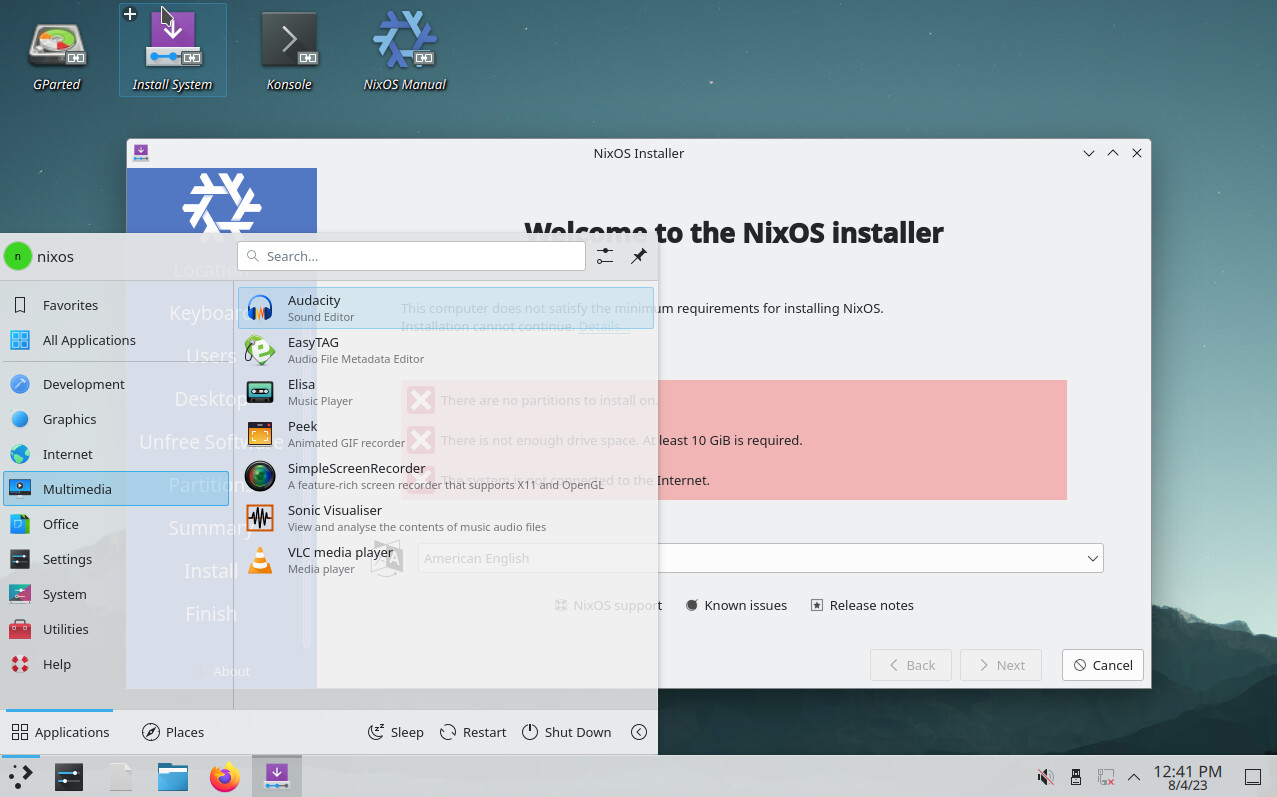
Now that I’ve built a custom GUI installer image, how am I gonna install it to the hard disk without a network connection?
---
### Author:  [@Carrot](https://discourse.nixos.org/u/Carrot)
#### Post date: [August 4, 2023, 1:46pm UTC](https://discourse.nixos.org/t/any-possibility-of-purely-offline-gui-installer-iso/31254/10 "2023-08-04T13:46:26Z")
I haven’t used the gui installer.
I use the cli and use a 2nd computer which already runs NixOS.
I connect the 2 using a switch or router.
- make a custom live iso and put it on a thumbdrive
– enable ssh
– add you keys
– avahi
Note: I left parts in here you won’t need:
```nix
{ lib
, pkgs
, ...
}:
{
imports = [
../modules/services/numlock-on-tty
];
isoImage.volumeID = lib.mkForce "my-nixos-live";
isoImage.isoName = lib.mkForce "my-nixos-live.iso";
# Use zstd instead of xz for compressing the liveUSB image, it's 6x faster and 15% bigger.
isoImage.squashfsCompression = "zstd -Xcompression-level 6";
networking = {
useDHCP = false;
hostName = "my-nixos-live"; # default: "nixos"
usePredictableInterfaceNames = false;
interfaces.eth0.useDHCP = true;
# interfaces.eth0.ipv4.addresses = [
# {
# address = "192.168.1.150";
# prefixLength = 24;
# }
# ];
# defaultGateway = "192.168.1.1";
# nameservers = ["192.168.1.1" "1.1.1.1" "8.8.8.8"];
};
boot.supportedFilesystems = ["zfs" "f2fs"];
boot.zfs.requestEncryptionCredentials = true;
# serial connection for apu
boot.kernelParams = ["console=ttyS0,115200n8"];
users.mutableUsers = false;
users.users.root.openssh.authorizedKeys.keys = [
"ssh-ed25519 xxxxxxxxxxxxxxxxxxxxxxxxxxxxxxxxxxxxxx"
];
users.users = {
"nixos" = {
isNormalUser = true;
home = "/home/nixos";
password = "";
uid = 1000;
extraGroups = ["systemd-journal" "wheel"];
openssh.authorizedKeys.keys = [
"ssh-ed25519 AAAAC3NzaC1lZDI1NTE5AAAAIOLiUIkiHcw53KVob6Y8aVp3hAUieo+GWDECJyiEcb2K sl@sl-think"
];
};
};
# sshd
services.openssh = {
enable = true;
settings.PasswordAuthentication = false;
settings.PermitRootLogin = lib.mkDefault "prohibit-password";
hostKeys = [
{ type = "rsa"; bits = 4096; path = "/etc/ssh/ssh_host_rsa_key"; }
{ type = "ed25519"; path = "/etc/ssh/ssh_host_ed25519_key"; }
];
};
services.avahi = {
enable = true;
nssmdns = true;
publish.addresses = true;
publish.domain = true;
publish.enable = true;
publish.userServices = true;
publish.workstation = true;
};
# Turn on flakes.
nix.package = pkgs.nixVersions.stable;
nix.extraOptions = ''
experimental-features = nix-command flakes
'';
# includes this flake in the live iso : "/etc/nixcfg"
environment.etc.nixcfg.source =
builtins.filterSource
(path: type:
baseNameOf path
!= ".git"
&& type != "symlink"
&& !(pkgs.lib.hasSuffix ".qcow2" path)
&& baseNameOf path != "secrets")
../.;
environment.systemPackages = with pkgs; [
git
htop
tmux
tree
nano
ripgrep
cryptsetup
];
## FIX for running out of space / tmp, which is used for building
fileSystems."/nix/.rw-store" = {
fsType = "tmpfs";
options = ["mode=0755" "nosuid" "nodev" "relatime" "size=14G"];
neededForBoot = true;
};
}
```
Now from you laptop to the live machine.
You can install is remotely using commands or use nixos-anywhere.
> **[GitHub - nix-community/nixos-anywhere: install nixos everywhere via ssh...](https://github.com/nix-community/nixos-anywhere)**
>
> install nixos everywhere via ssh \[maintainer=@numtide\] - GitHub - nix-community/nixos-anywhere: install nixos everywhere via ssh \[maintainer=@numtide\]
note: I’m currently using my own scripts, I’m looking into replacing some parts with nixos-anywhere.
Your laptop’s nix-store will be used to install the machine.
---
### Author:  [@pete3n](https://discourse.nixos.org/u/pete3n)
#### Post date: [January 24, 2024, 1:55pm UTC](https://discourse.nixos.org/t/any-possibility-of-purely-offline-gui-installer-iso/31254/11 "2024-01-24T13:55:09Z")
@PoneyClairDeLune I also wanted this capability, so I [created this repo](https://github.com/pete3n/nix-offline-iso) which allows you to build an ISO with the graphical Calamares Gnome installer that can install your configuration completely offline.
Hope you find it useful.
---
### Author:  [@adminy](https://discourse.nixos.org/u/adminy)
#### Post date: [August 3, 2024, 8:11pm UTC](https://discourse.nixos.org/t/any-possibility-of-purely-offline-gui-installer-iso/31254/12 "2024-08-03T20:11:46Z")
> [@pete3n](#):
>
> created this repo
thank you sir. Its mind bending that NixOS installer, hearing lots of praises for it and when you need it to work the most in situations where physically its impossible to connect to the internet because the wireless card is missing some sort of driver and there is no cabled, you really have not much of a choice there. Its not okay to encourage that this is the way it is, and suck it up, even as an advanced Nix user this was a lot of time wasted, that I could have productively put elsewhere.
---
### Author:  [@pete3n](https://discourse.nixos.org/u/pete3n)
#### Post date: [August 6, 2024, 11:20am UTC](https://discourse.nixos.org/t/any-possibility-of-purely-offline-gui-installer-iso/31254/13 "2024-08-06T11:20:33Z")
Thanks. I agree that this should be basic functionality, however I do recognize that this is a community supported project and apparently this isn’t as big an issue for most folks as it is for us.
I am still very much interested in getting flake-based configurations working offline (I.E. able to rebuild a system configured by flakes completely offline, barring any dependency changes). Unfortunately I’ve been too busy with other work-related projects to put more time into it.
---
### Author:  [@misuzu](https://discourse.nixos.org/u/misuzu)
#### Post date: [August 6, 2024, 12:24pm UTC](https://discourse.nixos.org/t/any-possibility-of-purely-offline-gui-installer-iso/31254/14 "2024-08-06T12:24:09Z")
> [@adminy](#):
>
> Its mind bending that NixOS installer, hearing lots of praises
afaik Calamares installer is not even tested by NixOS tests like manual installation. I’d recommend using manual installation instead because of its flexibility, also you can at least figure out what went wrong in case of any issues
---
### Author:  [@waffle8946](https://discourse.nixos.org/u/waffle8946)
#### Post date: [August 6, 2024, 2:24pm UTC](https://discourse.nixos.org/t/any-possibility-of-purely-offline-gui-installer-iso/31254/15 "2024-08-06T14:24:31Z")
There’s also not much point in using calamares? If you need to configure your system, you need to edit your config manually anyway, so just do that from the start. There’s little point in hiding from the complexity that you _must_ face when using NixOS.
(I’ve also never seen anyone “praise” the NixOS Calamares installer, FWIW, just people who prefer it due to their habits on other distros.)
The manual equivalent has been discussed before, e.g. [NixOS automatic unattended offline installer USB stick](https://discourse.nixos.org/t/nixos-automatic-unattended-offline-installer-usb-stick/6114), [More airgap questions - #13 by kotatsuyaki](https://discourse.nixos.org/t/more-airgap-questions/38748/13), [Using NixOS in an isolated environment - #23 by ejpcmac](https://discourse.nixos.org/t/using-nixos-in-an-isolated-environment/3369/23), etc.
---
### Author:  [@pete3n](https://discourse.nixos.org/u/pete3n)
#### Post date: [August 6, 2024, 7:04pm UTC](https://discourse.nixos.org/t/any-possibility-of-purely-offline-gui-installer-iso/31254/16 "2024-08-06T19:04:45Z")
There is some nice functionality provided with the Calamares installer aside from just having a graphical interface; for example, interactive partitioning and setting the LUKS encryption password.
The best solution depends on your use case. If you are provisioning a bunch of identical offline systems, then creating an automated system would make more sense. If you are installing to a bunch of different offline systems, then having something interactive makes more sense.
---
### Author:  [@pete3n](https://discourse.nixos.org/u/pete3n)
#### Post date: [July 28, 2026, 8:03pm UTC](https://discourse.nixos.org/t/any-possibility-of-purely-offline-gui-installer-iso/31254/17 "2026-07-28T20:03:14Z")
For anyone still interested in this. I have **finally** updated [this repo](https://github.com/pete3n/nix-offline-iso) to support the current Calamares extensions installer used by Nixos 26.05. I have also updated it to include support for both channel and flake system configurations as well as a minimal CLI installer with some helpful instructions and options baked-in.