# How to install a flake onto a Raspberry Pi?
**URL:** https://discourse.nixos.org/t/how-to-install-a-flake-onto-a-raspberry-pi/18200
**Category:** Help
**Created:** [March 15, 2022, 9:29pm UTC](https://discourse.nixos.org/t/how-to-install-a-flake-onto-a-raspberry-pi/18200 "2022-03-15T21:29:40Z")
**Posts on this page:** 8
**Page:** 1
### Author:  [@Nebucatnetzer](https://discourse.nixos.org/u/Nebucatnetzer)
#### Post date: [March 15, 2022, 9:29pm UTC](https://discourse.nixos.org/t/how-to-install-a-flake-onto-a-raspberry-pi/18200/1 "2022-03-15T21:29:40Z")
I’m some problems with install my flakes on a raspi.
Usually I boot from the live image, execute my nix-shell to enable flakes then install the config with `nixos-install —flake .#hostname —impure`.
This however gives me an error that the `flake.nix` escapes from the store path (whatever that means).
Since the OS is already on the SD I thought that I might have to enable Flakes in the `configuration.nix` but this file doesn’t exist and when I symlink my flake to `/etc/nixos/flake.nix` and do a rebuild it complains about the experimental flag being unknown.
I added now a basic `configuration.nix` and enabled flakes in that but this doesn’t feel like it is the proper way to do it.
In the future I plan to create a custom image but I would like to know this way as well.
---
### Author:  [@Nebucatnetzer](https://discourse.nixos.org/u/Nebucatnetzer)
#### Post date: [March 21, 2022, 8:22am UTC](https://discourse.nixos.org/t/how-to-install-a-flake-onto-a-raspberry-pi/18200/2 "2022-03-21T08:22:41Z")
Nobody tried Flakes on a Raspi?
---
### Author:  [@NobbZ](https://discourse.nixos.org/u/NobbZ)
#### Post date: [March 21, 2022, 8:26am UTC](https://discourse.nixos.org/t/how-to-install-a-flake-onto-a-raspberry-pi/18200/3 "2022-03-21T08:26:36Z")
Despite being PI or not, installing a base configuration with activated flakes using “legacy” configuration and then switching to an actual flake based config _after_ the first boot has been the most reliable way to install from flake.
`nixos-install --flake` always has its problems with this or that…
---
### Author:  [@reckenrode](https://discourse.nixos.org/u/reckenrode)
#### Post date: [March 21, 2022, 5:44pm UTC](https://discourse.nixos.org/t/how-to-install-a-flake-onto-a-raspberry-pi/18200/4 "2022-03-21T17:44:21Z")
I use flakes on a Raspberry Pi 4B+. I install with a GitHub URL rather than a local flake (using `nixos-install`). I also use the aarch64 ISO instead of the SD image. You can see my config [here](https://github.com/reckenrode/nixos-configs). The Raspberry Pi host is khloe.
---
### Author:  [@Nebucatnetzer](https://discourse.nixos.org/u/Nebucatnetzer)
#### Post date: [March 22, 2022, 5:59am UTC](https://discourse.nixos.org/t/how-to-install-a-flake-onto-a-raspberry-pi/18200/5 "2022-03-22T05:59:53Z")
I hadn’t any problems with the normal ISOs and a nix-shell on x86 systems that’s why I was wondering.
Since the Pi doesn’t come with a base `configuration.nix` you have to create that as well instead of just enabling Flakes.
Granted not a huge task if you’ve done once but still a bit unnecessary.
---
### Author:  [@Nebucatnetzer](https://discourse.nixos.org/u/Nebucatnetzer)
#### Post date: [March 22, 2022, 6:10am UTC](https://discourse.nixos.org/t/how-to-install-a-flake-onto-a-raspberry-pi/18200/6 "2022-03-22T06:10:23Z")
Very interesting, can you describe your steps to install it in a bit more detail?
I tried the aarch64 ISO in combination with tow-boot and the PTF firmware but wasn’t able to get it to boot.
I always got this error after the generations screen:
```auto
mmc0: error -5 whilst initialising sd card
```
Why do you have the imports the way they are and don’t use the config from `nixos-hardware`?
What does `reset_raspberrypi` do and why do you mount `/boot/efi` and not just `/boot`?
Edit: I’ve since found out that you specifically point to `/boot/efi` can you explain why though?
---
### Author:  [@reckenrode](https://discourse.nixos.org/u/reckenrode)
#### Post date: [March 22, 2022, 12:18pm UTC](https://discourse.nixos.org/t/how-to-install-a-flake-onto-a-raspberry-pi/18200/7 "2022-03-22T12:18:18Z")
> [@Nebucatnetzer](#):
>
> Very interesting, can you describe your steps to install it in a bit more detail?
Sure. I’m using the [PFT firmware](https://github.com/pftf/RPi4) firmware and running my Pi off an SSD. Before I did the installation, I went into the firmware and disabled the 3GB limit and set it to devicetree (for CPU governor support). I put the aarch64 ISO image on a USB stick and the firmware on a FAT-formatted SD card.
For the installation itself, I booted off the USB stick and created the partitions on the SSD. The EEPROM is new enough to support USB booting, so I created the partitions using `sgdisk` (the funky order is just because I didn’t want the EPS as partition 1 for some reason at the time):
```
DISK=
sgdisk -Z $DISK -n 3:2048:+384M -n 2:0:+2048M -n 1:0:0 -t 3:ef00 -t 2:8200 -t 1:8300
mkfs -t vfat -F 32 -n ESP $DISK-part3
mkfs -t xfs -L NixOS $DISK-part1
mkswap -L Swap $DISK-part2 && swapon $DISK-part2
```
I mounted `$DISK-part1` at `/mnt` and `$DISK-part3` at `/boot/efi` then ran `nixos-generate-config --root /mnt` to get a `hardware-configuration.nix` for the installation.
I can’t remember why exactly I mounted the ESP at `/boot/efi` instead of at `/boot`. I think I was trying to avoid having the kernels copied to it, but that failed, and I just never bothered to change it. I don’t think it’s necessary.
Anyway, once I had a `hardware-configuration.nix`, I updated my flake, deleted `/mnt/etc`, and ran `nixos-install --impure --no-root-passwd --flake github:reckenrode:NixOS/nixos-configs/#khloe`. The `--impure` is due to [this issue](https://github.com/nix-community/home-manager/issues/2074) in Home Manager. Once it finished, I `systemctl reboot` into my new installation.
It took a few iterations to arrive at a working configuration. I learned the hard way that `systemd-boot` doesn’t work for some reason, and disabling ACPI also resulted in a lot of unnecessary pain. Now that it’s working though, I can just reuse the config if I need to reinstall or set up a new one.
> [@Nebucatnetzer](#):
>
> Why do you have the imports the way they are and don’t use the config from `nixos-hardware` ?
At the time, `nixos-generate-config` wasn’t including all the modules I needed to boot with devicetree and no ACPI. I tried to figure out which ones, but I eventually gave up and just included all of them. I manually included `reset_raspberrypi` because it wasn’t part of `all-hardware.nix` at the time. It’s needed to boot the Pi successfully.
> [@Nebucatnetzer](#):
>
> I always got this error after the generations screen:
>
> ```auto
> mmc0: error -5 whilst initialising sd card
>
> ```
I ran into something similar with my SSD. The config that was generated didn’t include all the modules I needed. That’s why (as noted above) I added `all-hardware.nix` to my imports in `hardware-configuration.nix` (because it was easier than trying to find the specific ones I needed).
---
### Author:  [@Nebucatnetzer](https://discourse.nixos.org/u/Nebucatnetzer)
#### Post date: [March 23, 2022, 7:44am UTC](https://discourse.nixos.org/t/how-to-install-a-flake-onto-a-raspberry-pi/18200/8 "2022-03-23T07:44:13Z")
Pew got it working yesterday but took a lot of trial and error.
Turned out that the nixos-hardware import wasn’t compatible with the UEFI installation.
However I still had massive problems and every rebuild after the initial generation resulted in a broken boot.
I tried as well to figure out which kernel modules are really required but as mentioned the boot always failed regardless of the change.
In addition booting took ages compared to the normal image, it just hanged for a long time at the GRUB screen after selecting the generation.
This was with a SD card only setup.
Tow-boot and PFT both gave me the same result.
This message came up as well:
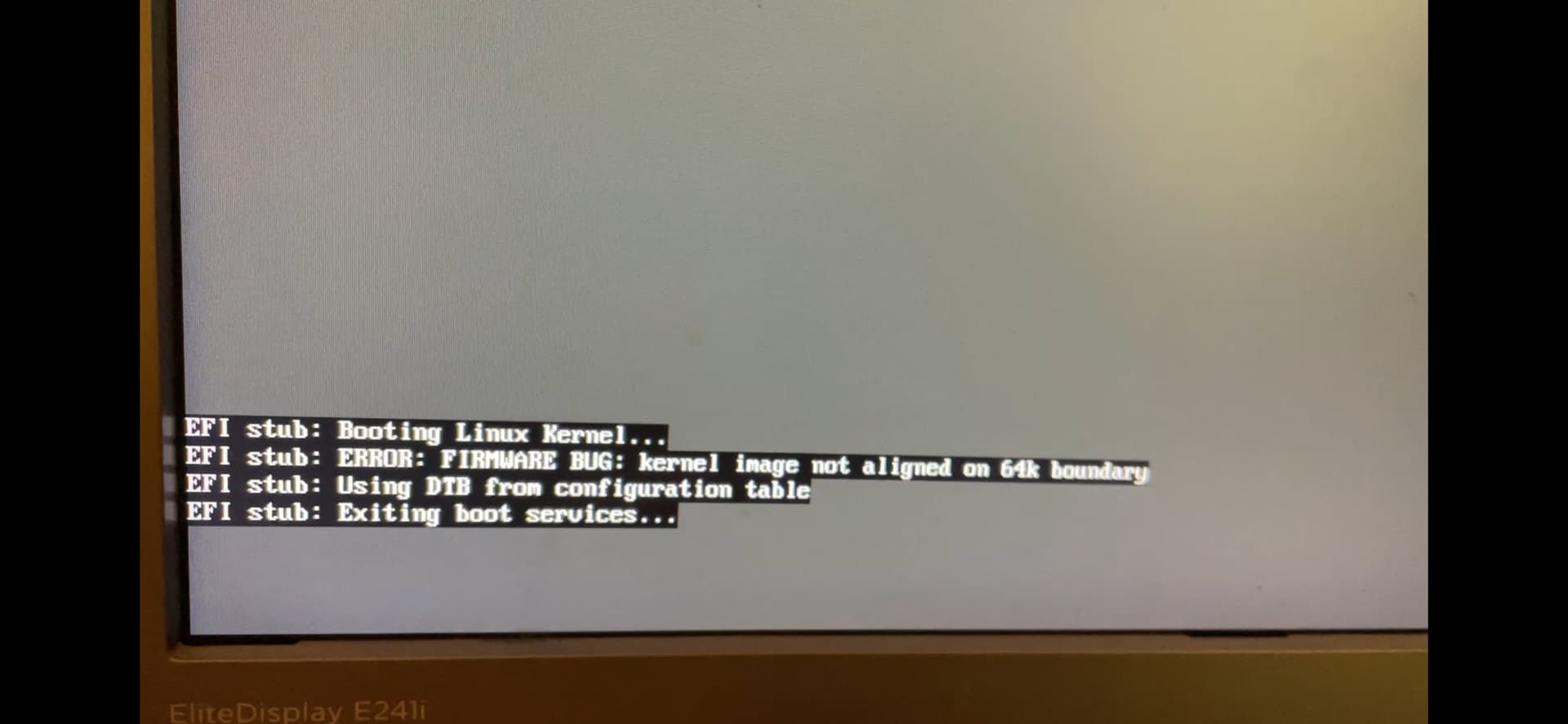
I’m going to stick with the normal image for he moment since that works without a problem so far.