Hi!
I recently started to want to learn Nim language. Right now, I’m writing my very first project which is a TUI application with illwill but I have issues compiling.
~/dev/foursquare: nim c hello.nim
Hint: used config file '/nix/store/s1vi41r5yjry4afnxqnh0mhkslvmlsyd-x86_64-unknown-linux-gnu-nim-wrapper-2.2.10/etc/nim/nim.cfg' [Conf]
Hint: used config file '/nix/store/s1vi41r5yjry4afnxqnh0mhkslvmlsyd-x86_64-unknown-linux-gnu-nim-wrapper-2.2.10/etc/nim/config.nims' [Conf]
..............................................................................................................................
/home/wavesinaroom/dev/foursquare/hello.nim(9, 3) Error: undeclared identifier: 'illwill'
candidates (edit distance, scope distance); see '--spellSuggest':
 (0, 2): 'illwill'
I thought that illwill wasn’t installed in $PATH but that was not the case.
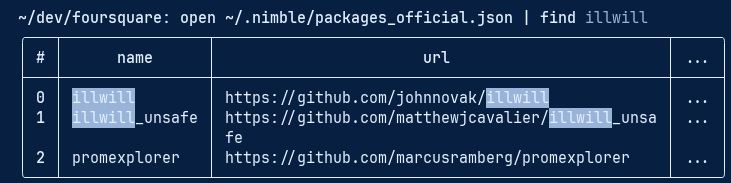
Sorry about the screenshot, nushell output is terribly hard to format. Anyways, I’m following one of the official illwill tutorials and my import are alright so there shouldn’t be any reason to get an error.
import illwill

proc exitProc {.noconv} =
  illwillDeinit()
  showCursor()
  quit(0)

proc main() =
  illwill(fullscreen=true)
  setControlCHook(exitProc)
  hideCursor()
  while true:
    var tb = newTerminalBuffer(terminalWidth(), terminalHeight())
    var key = getKey()
    case key
    of Key.Escape, Key.Q: exitProc()
    else: discard

    tb.write(0, 0, "Press Q, Esc or Ctrl-C to quit")
My import looks fine so, what am I missing/doing wrong here?
Oh almost forgot my devshell:
{pkgs ? import <nixpkgs> {}}:
pkgs.mkShell {
    packages = with pkgs; [nim nimble];
}
Pretty straight foward beginner shell nothing suspiciously fancy but it might be missing a path setting or something, I’m truly not sure
Can anybody point out what’s wrong here please?
Is it installed inside of the *.nimble file and what does the .nimble file look like?
Hi! Thanks for replying
This is my ls output of .nimble folder.
Nimble never created a file inside my project if that’s the file we’re talking about. Should it be one? I’m utterly new to the language and I don’t know how it works specifically on Nix
By what you have mentioned so far I assume you have some project directory (without a .nimble file) and ran nimble install <pkg>. This would install the package in the global package directory but the compiler doesn’t necessarily pick it up (although historically I think it did) but the more reliable ways to ensure it does I try to describe below.
nimble uses a file named <pkg>.nimble.
You can get the bones setup by running nimble init.
And then dependencies are declared using this syntax requires "illwill".
The official nimble guide for starting a package might be helpful.
To install or use dependencies with nimble you can do some of the following:
- use
nimble build: nimble will check deps and install as necessary then run nim c path/to/bin.nim --path:<dep1>/src --path:<dep2>/src
- use
nimble setup: this will check the deps and install them and write to a file called nimble.paths a newline seperated list of the same flags as the command above you generate at runtime.
The main advantage of 2 over 1 is that the dependency resolution is performed once and then you can can just call nim c hello.nim as you originally did.
In term of using nim with nix we have a seperate derivation builder that does not rely on nimble but instead a custom lock file format. But that isn’t necessary to use to play around with the language only if you want to get a binary added to nixpkgs.
Personally, I exclusively use nimble setup --l which both performs step 2 as described and also uses a local directory nimbledeps rather than the global package directory.
For packages that I build for my system I use a flake based on nimble that doesn’t require the same custom lock file I described above but instead uses the nimble generated lock file nimble.lock
Thanks a lot! It worked. Coming from Golang I can see some similarities between nimble init and go mod init. However I liked the nimble step by step process more.
To make it work I used nimble setup --l which in my opinion is better cause it keeps the dependencies inside my devshell instead of polluting global some might like to install dependencies in globals.
I’ll be working without nix for the moment to get Nim fundamentals first.
Why did you guys choose Nim?