### Author:  [@yasu](https://discourse.nixos.org/u/yasu)
#### Post date: [May 28, 2020, 3:36pm UTC](https://discourse.nixos.org/t/please-post-working-xrdp-setting-in-configuration-nix/7404/1 "2020-05-28T15:36:20Z")
Hi,
I use NixOS 20.03.
XRDP doesnt work as advertised
[https://nixos.wiki/wiki/Remote\_Desktop](https://nixos.wiki/wiki/Remote_Desktop)
Would somone please post a working configuration.nix?
When I specify the ICEW as in the link and log in via RDP, the system just asks for username and password and after that I just get a teal background screen with no buton
I am puzzled that there aren’t many posting about XRDP in NixOS. Do people just use SSH or X window manager and not many people use XRDP? Or do people just use something like the VNCServer?
---
### Author:  [@dalto](https://discourse.nixos.org/u/dalto)
#### Post date: [May 28, 2020, 4:19pm UTC](https://discourse.nixos.org/t/please-post-working-xrdp-setting-in-configuration-nix/7404/2 "2020-05-28T16:19:04Z")
I just tested it. It works fine here. I am using xorg.
I copy/pasted it straight from the wiki:
```auto
services.xrdp.enable = true;
services.xrdp.defaultWindowManager = "${pkgs.icewm}/bin/icewm";
networking.firewall.allowedTCPPorts = [3389];
```
Here is the full configuration.nix from the VM I use for testing random nixos stuff. It isn’t very clean 🤠
> **configuration.nix**
>
> ```auto
> # The vm used for testing
>
> { config, pkgs, ... }:
>
> let
> unstable = import { config = { allowUnfree = true; }; };
> in {
> imports =
> [
> ./modules/common.nix
> ./modules/zsh.nix
> ./modules/sddm-theme.nix
> ./modules/vmware.nix
> ];
>
> # Use the systemd-boot EFI boot loader.
> boot.loader.systemd-boot.enable = true;
> boot.loader.efi.canTouchEfiVariables = true;
>
> # Enable the KDE Desktop Environment.
> services.xserver.desktopManager.plasma5.enable = true;
> services.xserver.displayManager.sddm = {enable = true; extraConfig = ''
> [General]
> InputMethod=
> '';};
> services.sddmTheme = {enable = true; backgroundFile = /wallpapers/slimepink.png;};
>
> networking.interfaces.ens33.useDHCP = true;
> networking.hostName = "nixos";
>
> environment.systemPackages = with pkgs; [
> unzip
> ffmpeg
> kate
> firefox
> flameshot
> gwenview
> okular
> gimp
> falkon
> (vivaldi.override { proprietaryCodecs = true; enableWidevine = true; })
> smplayer
> vlc
> sayonara
> latte-dock
> appimage-run
> unstable.vscodium
> inxi
> lm_sensors
> glxinfo
> mpv
> ];
>
> # Open ports in the firewall.
> networking.firewall.enable = true;
> networking.firewall.allowedTCPPorts = [3389];
> # networking.firewall.allowedUDPPorts = [...];
>
> services.printing.enable = true;
>
> # Enable sound.
> sound.enable = true;
> hardware.pulseaudio.enable = true;
>
> # Enable the X11 windowing system.
> services.xserver.enable = true;
> services.xserver.layout = "us";
> # services.xserver.xkbOptions = "eurosign:e";
>
> users.users.dalto = {
> isNormalUser = true;
> extraGroups = ["wheel"]; # Enable ‘sudo’ for the user.
> };
>
> system.stateVersion = "20.03"; # Did you read the comment?
>
> nixpkgs.config.allowUnfree = true;
>
> # zfs
> boot.initrd.supportedFilesystems = ["zfs"];
> boot.zfs.devNodes = "/dev/disk/by-partuuid";
> services.zfs.autoScrub.enable = true;
> networking.hostId = "6b4fb61d";
>
> # automatic upgrades
> system.autoUpgrade = {enable = true; allowReboot = true;};
>
> services.xrdp.enable = true;
> services.xrdp.defaultWindowManager = "${pkgs.icewm}/bin/icewm";
> }
>
> ```
> [@yasu](#):
>
> Do people just use SSH or X window manager and not many people use XRDP? Or do people just use something like the VNCServer?
Speaking only for myself, I use ssh 90% of the time. When I need a graphical session I usually use my virtualization platform to get access to the console.
---
### Author:  [@yasu](https://discourse.nixos.org/u/yasu)
#### Post date: [May 28, 2020, 8:21pm UTC](https://discourse.nixos.org/t/please-post-working-xrdp-setting-in-configuration-nix/7404/3 "2020-05-28T20:21:09Z")
Thank you so much! Let me try soon! Is it the case that I need to turn off the native X session running with the video caed before I can use the XRDP version, maybe? Anyway, let me try!
---
### Author:  [@dalto](https://discourse.nixos.org/u/dalto)
#### Post date: [May 28, 2020, 8:40pm UTC](https://discourse.nixos.org/t/please-post-working-xrdp-setting-in-configuration-nix/7404/4 "2020-05-28T20:40:16Z")
> [@yasu](#):
>
> Is it the case that I need to turn off the native X session running with the video caed before I can use the XRDP version, maybe?
I don’t think so. I was able to log into the plasma session via the console and rdp concurrently.
That being said, I didn’t test extensively.
---
### Author:  [@breakds](https://discourse.nixos.org/u/breakds)
#### Post date: [May 29, 2020, 5:43am UTC](https://discourse.nixos.org/t/please-post-working-xrdp-setting-in-configuration-nix/7404/5 "2020-05-29T05:43:51Z")
@yasu I am using XRDP + remmina (the RDP client) for work extensively. This [module](https://github.com/breakds/nixvital/blob/07c738507e2b5b63b0f4b6fbd386ec7bb25e9134/modules/desktop/remote-desktop.nix) should work for 20.03. Hope it helps. Btw, I am using xfce on remote server, haven’t tested the others yet.
---
### Author:  [@yasu](https://discourse.nixos.org/u/yasu)
#### Post date: [July 14, 2020, 2:51pm UTC](https://discourse.nixos.org/t/please-post-working-xrdp-setting-in-configuration-nix/7404/6 "2020-07-14T14:51:29Z")
I have just tried again - using the same configuration, I still get the same old problem - just a teal background screen
---
### Author:  [@yasu](https://discourse.nixos.org/u/yasu)
#### Post date: [July 14, 2020, 3:10pm UTC](https://discourse.nixos.org/t/please-post-working-xrdp-setting-in-configuration-nix/7404/7 "2020-07-14T15:10:14Z")
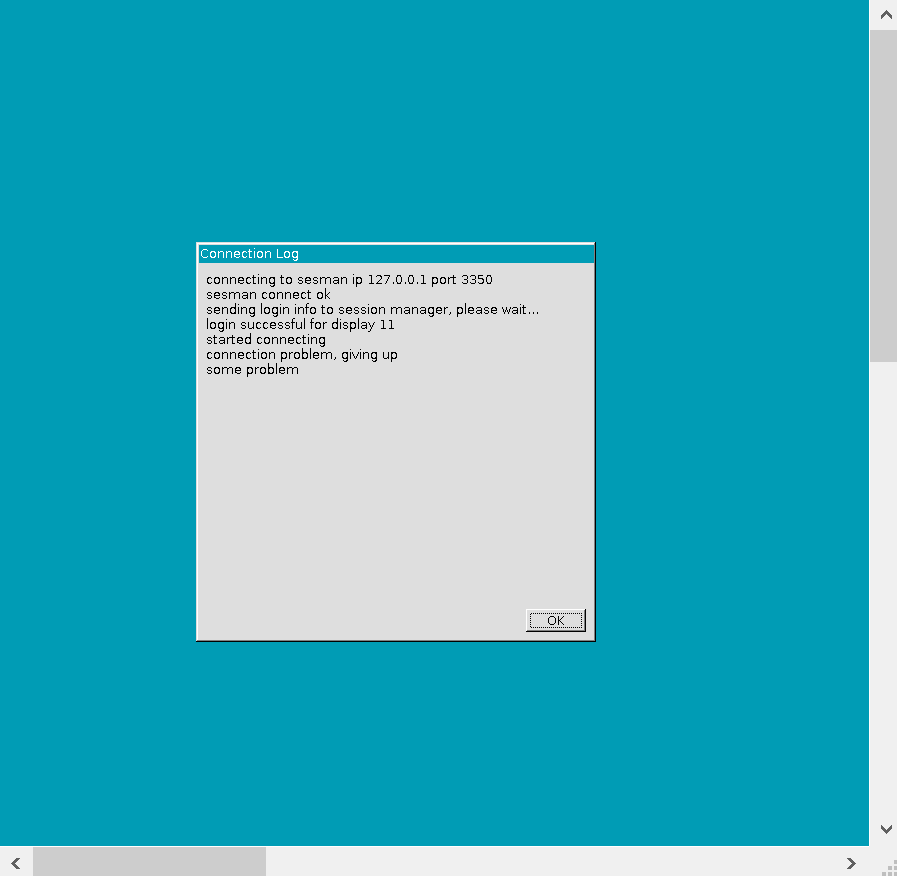
This XRDP setting is so frustrating. I have no idea what I am doing wrong.
These are the relevant lines from my /etc/nixos/configuration.nix
``
services.xrdp.enable = true;
services.xrdp.defaultWindowManager = “${pkgs.xterm}/bin/xterm”;
networking.firewall.allowedTCPPorts = [3389];
``
Would some please post a complete configuration that does work? (Please make it as “declarative” as possible - no missing dependencies or anything)
I don’t care what kind of Window Manger - just please post something that does work (meaning, I can launch programs)
I am so curious why this takes such an effort. Doesn’t almost everybody who runs graphical applications from a remote terminal use XRDP? Or do people use other methods like VNC?
---
### Author:  [@tbenst](https://discourse.nixos.org/u/tbenst)
#### Post date: [July 14, 2020, 3:36pm UTC](https://discourse.nixos.org/t/please-post-working-xrdp-setting-in-configuration-nix/7404/8 "2020-07-14T15:36:42Z")
I’ve been using x11vnc which does work but crashes frequently for unknown reasons. x11 forwarding on ssh works with good stability however
---
### Author:  [@yasu](https://discourse.nixos.org/u/yasu)
#### Post date: [July 15, 2020, 11:29pm UTC](https://discourse.nixos.org/t/please-post-working-xrdp-setting-in-configuration-nix/7404/9 "2020-07-15T23:29:10Z")
It appears that the following is necessary to make it work.
1. There can only be a **single** desktopManager. Add multiple lines and XRDP won’t work
```auto
services.xserver.desktopManager.gnome3.enable = true;
```
1. Even if only a single desktopManager is specified as above, only **ICEWM** would work. No other desktopManager will work (other than the default xterm).
```auto
services.xrdp.defaultWindowManager = "${pkgs.icewm}/bin/icewm";
```
In the github link below, anything that includes:
```auto
config.services.xserver.displayManager.session.script
```
will fail, because the daisy chaining by “.” (dot) will fail in the middle of the expression.
The expression fails because one of the elements joined by “.” is a list of 2 elements, instead of a single set.
[https://github.com/NixOS/nixpkgs/issues/57717](https://github.com/NixOS/nixpkgs/issues/57717)
---
### Author:  [@tbenst](https://discourse.nixos.org/u/tbenst)
#### Post date: [November 25, 2020, 6:57am UTC](https://discourse.nixos.org/t/please-post-working-xrdp-setting-in-configuration-nix/7404/10 "2020-11-25T06:57:31Z")
A working solution for KDE has been found ([xrdp server missing KDE option · Issue #57717 · NixOS/nixpkgs · GitHub](https://github.com/NixOS/nixpkgs/issues/57717#issuecomment-698297970)):
```auto
services.xserver.enable = true;
services.xserver.displayManager.sddm.enable = true;
services.xserver.desktopManager.plasma5.enable = true;
services.xrdp.enable = true;
services.xrdp.defaultWindowManager = "startplasma-x11";
networking.firewall.allowedTCPPorts = [3389];
```
Make sure to reboot after rebuilding.
---
### Author:  [@yasu](https://discourse.nixos.org/u/yasu)
#### Post date: [November 25, 2020, 12:22pm UTC](https://discourse.nixos.org/t/please-post-working-xrdp-setting-in-configuration-nix/7404/11 "2020-11-25T12:22:02Z")
Thank you:smile: - I have recently switched to GNU Guix but I still use NixOS o my wife’s machine. This is good to know! 😄
---
### Author:  [@hyper\_ch](https://discourse.nixos.org/u/hyper_ch)
#### Post date: [July 16, 2021, 1:38am UTC](https://discourse.nixos.org/t/please-post-working-xrdp-setting-in-configuration-nix/7404/12 "2021-07-16T01:38:40Z")
I tried that solution. I got the x11 login windows, I saw plasma starting/loading but then I just got a black screen. I’m using Nixos Unstable.
Any idea why it’s not working anymore?
Figured it out: I first needed to log out on the remove machine before connecting with RDP.
---
### Author:  [@nixoslife](https://discourse.nixos.org/u/nixoslife)
#### Post date: [September 13, 2022, 8:31pm UTC](https://discourse.nixos.org/t/please-post-working-xrdp-setting-in-configuration-nix/7404/13 "2022-09-13T20:31:37Z")
I’m trying to use gnome, can you give me the link to the wiki where these lines of code are.
```auto
services.xrdp.enable = true;
services.xrdp.defaultWindowManager = "${pkgs.icewm}/bin/icewm";
networking.firewall.allowedTCPPorts = [3389];
```
---
### Author:  [@dalto](https://discourse.nixos.org/u/dalto)
#### Post date: [September 13, 2022, 9:45pm UTC](https://discourse.nixos.org/t/please-post-working-xrdp-setting-in-configuration-nix/7404/14 "2022-09-13T21:45:14Z")
That was over two years ago. It has probably changed quite a bit since then. This is probably the section you want:
[https://nixos.wiki/wiki/Remote\_Desktop](https://nixos.wiki/wiki/Remote_Desktop)
---
### Author:  [@nixoslife](https://discourse.nixos.org/u/nixoslife)
#### Post date: [September 14, 2022, 5:47pm UTC](https://discourse.nixos.org/t/please-post-working-xrdp-setting-in-configuration-nix/7404/15 "2022-09-14T17:47:33Z")
Thanks for responding. We got it working. 😀