# Struggling to configure GTk/QT theme on laptop
**URL:** https://discourse.nixos.org/t/struggling-to-configure-gtk-qt-theme-on-laptop/42268
**Category:** Help
**Created:** [March 27, 2024, 12:57pm UTC](https://discourse.nixos.org/t/struggling-to-configure-gtk-qt-theme-on-laptop/42268 "2024-03-27T12:57:42Z")
**Posts on this page:** 20
**Page:** 1
### Author:  [@heitorpb](https://discourse.nixos.org/u/heitorpb)
#### Post date: [March 27, 2024, 12:57pm UTC](https://discourse.nixos.org/t/struggling-to-configure-gtk-qt-theme-on-laptop/42268/1 "2024-03-27T12:57:43Z")
Hello!
I’m Nixifying my laptop and I’m struggling to get the themes to my liking.
Here’s what I want:
- Breeze-dark theme everywhere
- mocha-light cursor theme, from [Catppuccin icon theme](https://github.com/catppuccin/cursors)
- mocha-lavender icon theme, from [Catppuccin folders theme](https://github.com/catppuccin/papirus-folders)
I’m using Sway and home-manager to configure my user.
Here’s what I have in my `configuration.nix`:
```nix
environment.systemPackages = with pkgs; [
# Themes
kdePackages.breeze-gtk
kdePackages.breeze-icons
kdePackages.breeze.qt5
kdePackages.breeze
catppuccin-cursors # Mouse cursor theme
catppuccin-papirus-folders # Icon theme, e.g. for pcmanfm-qt
papirus-folders # For the catppucing stuff work
];
qt = {
enable = true;
platformTheme = "kde";
};
```
And in my `home.nix`:
```nix
let
theme = "Breeze-Dark";
iconTheme = "cat-mocha-lavender"; # For icons, e.g. in pcmanfm-qt
cursorTheme = "mochaLight";
cursorSize = 16;
in
# Cursor setup
home.pointerCursor = {
name = machine.seat.cursorTheme;
package = pkgs.catppuccin-cursors;
gtk.enable = true;
size = machine.seat.cursorSize;
};
# GTK Setup
gtk = {
enable = true;
theme.name = theme;
iconTheme.name = iconTheme;
cursorTheme = {
size = cursorSize;
name = cursorTheme;
};
gtk3 = {
bookmarks = [
"file:///tmp"
];
extraConfig.gtk-application-prefer-dark-theme = true;
};
};
dconf.settings."org/gtk/settings/file-chooser" = {
sort-directories-first = true;
};
# GTK4 Setup
dconf.settings."org/gnome/desktop/interface" = {
gtk-theme = lib.mkForce "Breeze";
color-scheme = "prefer-dark";
};
```
But that is not complete yet, or I got something wrong.
My cursor is not changed, it is still the default one.
On Qt applications, like `pcmanfm-qt`, I still get a white theme, and no catppuccin icons. Firefox Open File dialog shows in dark. But `pcmanfm` uses dark theme but some weird icons.
So, what am I missing?
---
### Author:  [@anon54679641](https://discourse.nixos.org/u/anon54679641)
#### Post date: [March 27, 2024, 6:56pm UTC](https://discourse.nixos.org/t/struggling-to-configure-gtk-qt-theme-on-laptop/42268/2 "2024-03-27T18:56:42Z")
```auto
home.pointerCursor = {
gtk.enable = true;
name = "Catppuccin-Mocha-Light-Cursors";
package = pkgs.catppuccin-cursors.mochaLight;
size = 16;
};
```
[Here](https://github.com/catppuccin/cursors/tree/main/cursors) you can find some names. For [Nix](https://github.com/catppuccin/cursors?tab=readme-ov-file#for-nix-users) users.
---
### Author:  [@heitorpb](https://discourse.nixos.org/u/heitorpb)
#### Post date: [March 28, 2024, 11:59am UTC](https://discourse.nixos.org/t/struggling-to-configure-gtk-qt-theme-on-laptop/42268/3 "2024-03-28T11:59:38Z")
Oh, that was spot on. Thank you!
Now my cursor is how I want 🙂
But stuff is still missing. The QT apps are not in the breeze dark variant and the icon theme is not used anywhere. Any tips?
---
### Author:  [@eljamm](https://discourse.nixos.org/u/eljamm)
#### Post date: [March 28, 2024, 4:19pm UTC](https://discourse.nixos.org/t/struggling-to-configure-gtk-qt-theme-on-laptop/42268/4 "2024-03-28T16:19:35Z")
This was literally me a few days ago, except I went full catppuccin 🐈
I’m running Gnome under Wayland, so I’m not sure how well this applies to Sway, but I hope this helps you in the right direction. Also, if there is a better way to do this then I hope someone corrects me.
**PS:** This is all done using home-manager, so you only need to edit your `home.nix`.
## With Breeze 🍃
First add the required packages, the rest will be specified later within options:
```nix
home.packages = with pkgs; [
papirus-folders
];
```
### GTK
This sets the GTK interface, icon and cursor. I was using just `gtk.cursorTheme` for mine, but I noticed that some apps (like steam) didn’t respect it. Thankfully, the solution posted by @anon54679641 solved that for me 😃 Now I have them both set just up in case.
```nix
gtk = {
enable = true;
theme = {
name = "Breeze-Dark";
package = pkgs.libsForQt5.breeze-gtk;
};
iconTheme = {
name = "Papirus-Dark";
package = pkgs.catppuccin-papirus-folders.override {
flavor = "mocha";
accent = "lavender";
};
};
cursorTheme = {
name = "Catppuccin-Mocha-Light-Cursors";
package = pkgs.catppuccin-cursors.mochaLight;
};
gtk3 = {
extraConfig.gtk-application-prefer-dark-theme = true;
};
};
home.pointerCursor = {
gtk.enable = true;
name = "Catppuccin-Mocha-Light-Cursors";
package = pkgs.catppuccin-cursors.mochaLight;
size = 16;
};
dconf.settings = {
"org/gnome/desktop/interface" = {
gtk-theme = "Breeze-Dark";
color-scheme = "prefer-dark";
};
};
```
By the way, I’m noticing that you’re setting `Breeze-Dark` in `gtk.theme`, but you’re enabling `Breeze` in `dconf.settings`. Shouldn’t that also be the `Breeze-Dark` ?
### QT
There is no problem with the `Breeze` light theme, but I spent a lot of time searching and experimenting and the only way I found to set `Breeze-Dark` for QT is to make it follow the gtk theme:
```nix
qt = {
enable = true;
platformTheme = "gtk";
style = {
name = "gtk2";
package = pkgs.libsForQt5.breeze-qt5;
};
};
```
The icon theme for QT apps should also automatically be set to the one from `gtk.iconTheme`.
## Full Catppuccin 🐈
**Edit:** Check out [catppuccin-nix](https://github.com/catppuccin/nix). You can already use it to set catppuccin for gtk (and other apps) and I’m sure it’s gonna grow more in the future.
* * *
I just want to share my current catppuccin config in case you or anyone else wants to try it.
First add the required packages, the rest will be specified later within options:
```nix
home.packages = with pkgs; [
(catppuccin-kvantum.override {
accent = "Blue";
variant = "Macchiato";
})
libsForQt5.qtstyleplugin-kvantum
libsForQt5.qt5ct
papirus-folders
];
```
### GTK
```nix
gtk = {
enable = true;
theme = {
name = "Catppuccin-Macchiato-Standard-Blue-Dark";
package = pkgs.catppuccin-gtk.override {
accents = ["blue"];
size = "standard";
variant = "macchiato";
};
};
iconTheme = {
name = "Papirus-Dark";
package = pkgs.catppuccin-papirus-folders.override {
flavor = "macchiato";
accent = "blue";
};
};
cursorTheme = {
name = "Catppuccin-Macchiato-Dark-Cursors";
package = pkgs.catppuccin-cursors.macchiatoDark;
};
gtk3 = {
extraConfig.gtk-application-prefer-dark-theme = true;
};
};
home.pointerCursor = {
gtk.enable = true;
name = "Catppuccin-Macchiato-Dark-Cursors";
package = pkgs.catppuccin-cursors.macchiatoDark;
size = 16;
};
dconf.settings = {
"org/gnome/desktop/interface" = {
gtk-theme = "Catppuccin-Macchiato-Standard-Blue-Dark";
color-scheme = "prefer-dark";
};
# For Gnome shell
"org/gnome/shell/extensions/user-theme" = {
name = "Catppuccin-Macchiato-Standard-Blue-Dark";
};
};
```
### QT
```nix
qt = {
enable = true;
platformTheme = "qtct";
style.name = "kvantum";
};
xdg.configFile."Kvantum/kvantum.kvconfig".source = (pkgs.formats.ini { }).generate "kvantum.kvconfig" {
General.theme = "Catppuccin-Macchiato-Blue";
};
```
Finally, you need to choose the icon theme for QT apps. Open qt5ct, then click `Icon Theme > Papirus-Dark > Apply`. If you use QT6 apps then you need to the the same in qt6ct (make sure the theme is `kvantum` there).
Hopefully this has been helpful. Happy nixing ❄
---
### Author:  [@anon54679641](https://discourse.nixos.org/u/anon54679641)
#### Post date: [March 28, 2024, 4:42pm UTC](https://discourse.nixos.org/t/struggling-to-configure-gtk-qt-theme-on-laptop/42268/5 "2024-03-28T16:42:53Z")
> [@eljamm](#):
>
> Setting the theme with `qt = {...}` worked for me, but some applications didn’t pick up the icon theme.
We probably need to enforce theme by setting variables in sway configuration or somewhere else.
Snippet from hyprland.conf:
```auto
# Some default env vars.
env = XCURSOR_SIZE,16
#env = QT_QPA_PLATFORMTHEME,qt5ct # change to qt6ct if you have that
#env = GTK2_RC_FILES,/home/USER/.config/gtk-2.0/gtkrc
env = QT_QPA_PLATFORMTHEME,gtk2
env = QT_STYLE_OVERRIDE,gtk2
```
Icons are working in pcmanfm-qt with some variables.
---
### Author:  [@eljamm](https://discourse.nixos.org/u/eljamm)
#### Post date: [March 28, 2024, 5:16pm UTC](https://discourse.nixos.org/t/struggling-to-configure-gtk-qt-theme-on-laptop/42268/6 "2024-03-28T17:16:30Z")
After posting my reply the icons disappeared from my `pcmanfm-qt` 😅
Thankfully the issue was easily fixed from the settings, just go to `Edit > Preferences > User Interface` and choose `Papirus-Dark` as your icon theme.
Don’t know why this happened now, but I remember this happening to me before in other distros.
> [@anon54679641](#):
>
> We probably need to enforce theme by setting variables in sway configuration or somewhere else.
`systemd.user.sessionVariables` was the only way for qt5ct to read `QT_QPA_PLATFORMTHEME` for me. I tried:
- `environment.sessionVariables`
- `environment.variables`
- `home.sessionVariables`
But those didn’t work.
Also, this was only necessary when using `nixpkgs.config.qt` as I didn’t have to manually set any variable when just using `qt`. This is on Gnome, though, so it might be necessary for other DE or WM.
---
### Author:  [@heitorpb](https://discourse.nixos.org/u/heitorpb)
#### Post date: [March 28, 2024, 6:39pm UTC](https://discourse.nixos.org/t/struggling-to-configure-gtk-qt-theme-on-laptop/42268/7 "2024-03-28T18:39:08Z")
Oh, that’s super helpful!
Only reason I was using Breeze+catppuccin is history xD I’m now on [almost] full catppuccin thanks to you 😃
I got no icons on `pcmanfm-qt` and `pavucontrol-qt`. Everything else looks fine.
Here’s my `home.nix`:
```nix
# Theme for graphical apps
{ machine, lib, pkgs, ... }:
{
home.packages = with pkgs; [
(catppuccin-kvantum.override {
accent = "Blue";
variant = "Mocha";
})
libsForQt5.qtstyleplugin-kvantum
papirus-folders
];
# Cursor setup
home.pointerCursor = {
name = "Catppuccin-Mocha-Lavender-Cursors";
package = pkgs.catppuccin-cursors.mochaLavender;
gtk.enable = true;
size = machine.seat.cursorSize;
};
# GTK Setup
gtk = {
enable = true;
theme = {
name = "Catppuccin-Mocha-Standard-Blue-Dark";
package = pkgs.catppuccin-gtk.override {
accents = ["blue"];
size = "standard";
variant = "mocha";
};
};
iconTheme = {
#name = "Catppuccin-Mocha-Blue";
name = "cat-mocha-blue";
package = pkgs.catppuccin-papirus-folders.override {
flavor = "mocha";
accent = "blue";
};
};
cursorTheme = {
name = "Catppuccin-Mocha-Lavender-Cursors";
package = pkgs.catppuccin-cursors.mochaLavender;
};
gtk3 = {
extraConfig.gtk-application-prefer-dark-theme = true;
};
};
dconf.settings = {
"org/gtk/settings/file-chooser" = {
sort-directories-first = true;
};
# GTK4 Setup
"org/gnome/desktop/interface" = {
gtk-theme = "Catppuccin-Mocha-Standard-Blue-Dark";
color-scheme = "prefer-dark";
};
};
xdg.configFile."Kvantum/kvantum.kvconfig".source = (pkgs.formats.ini { }).generate "kvantum.kvconfig" {
General.theme = "Catppuccin-Mocha-Blue";
};
}
```
And I have this in my `configuration.nix`:
```nix
environment.systemPackages = with pkgs; [
libsForQt5.qt5ct
];
qt = {
enable = true;
platformTheme = "qt5ct";
style= "kvantum";
};
```
I think is some small little knob in the corner to turn…
I can get the icons to show in `pcmanfm-qt` if I set Edit → Preferences → Display → Icon Theme to `Papirus-Dark`. But that does not propagate to `pavucontrol-qt` for example.
---
### Author:  [@eljamm](https://discourse.nixos.org/u/eljamm)
#### Post date: [March 28, 2024, 9:24pm UTC](https://discourse.nixos.org/t/struggling-to-configure-gtk-qt-theme-on-laptop/42268/8 "2024-03-28T21:24:37Z")
I figured out the icon problem. I think this is also the reason why `pcmanfm-qt` had no icons.
The issues is that QT apps don’t have their icon theme set by default, so you can configure each one individually like we did with `pcmanfm-qt`. However, a better solution is to do it for all of them using qt5ct, as the [Arch wiki](https://wiki.archlinux.org/title/Qt#Configuration_of_Qt_5_applications_under_environments_other_than_KDE_Plasma) suggests.
Just open `qt5ct > Icon Theme > Papirus-Dark` then click Apply.
This isn’t exactly the Nix way of doing things, but it’s something that works for now. We could probably also do this by modifying `$HOME/.config/qt5ct/qt5ct.conf` using home-manager, but I don’t know how exactly.
---
### Author:  [@eljamm](https://discourse.nixos.org/u/eljamm)
#### Post date: [March 28, 2024, 11:13pm UTC](https://discourse.nixos.org/t/struggling-to-configure-gtk-qt-theme-on-laptop/42268/9 "2024-03-28T23:13:24Z")
> [@eljamm](#):
>
> Setting the theme with `qt = {...}` worked for me, but some applications didn’t pick up the icon theme.
I was wrong here. Using `nixpkgs.config.qt` was pretty much a workaround as ot turns out the applications that didn’t show the icons were using QT6, and setting `QT_QPA_PLATFORMTHEME = "qt5ct"` made them use that instead of `qt6ct` (I’ll fix this in my original answer).
This is the same issue that we faced with `pcmanfm-qt`, but with QT6 apps. Fixing that is pretty much just setting the interface theme as `kvantum` and icon theme as `Papirus-Dark` in `qt6ct`.
* * *
**Note:** if any `pcmanfm-qt` user is wondering why the Application Menu is empty when right clicking a file `Open With > Other Applications`, that’s because you need to add the following packages:
```nix
environment.systemPackages = with pkgs; [
lxqt.lxqt-menu-data
shared-mime-info # optional, but nice to have
];
```
---
### Author:  [@heitorpb](https://discourse.nixos.org/u/heitorpb)
#### Post date: [April 1, 2024, 12:23pm UTC](https://discourse.nixos.org/t/struggling-to-configure-gtk-qt-theme-on-laptop/42268/10 "2024-04-01T12:23:10Z")
AHA!
Got it working! I manually wrote the configuration files for `qt5ct` and `qt6ct` this way:
```nix
xdg.configFile = lib.mkIf hasSeat {
kvantum = {
target = "Kvantum/kvantum.kvconfig";
text = lib.generators.toINI { } {
General.theme = "Catppuccin-Mocha-Blue";
};
};
qt5ct = {
target = "qt5ct/qt5ct.conf";
text = lib.generators.toINI { } {
Appearance = {
icon_theme = "Papirus-Dark";
};
};
};
qt6ct = {
target = "qt6ct/qt6ct.conf";
text = lib.generators.toINI { } {
Appearance = {
icon_theme = "Papirus-Dark";
};
};
};
```
My `hasSeat` is a boolean that only writes this file if I have a systemd-seat (graphical interface), I use the same configuration files for my headless server. I need this because I use impermanence ([Erase your darlings: immutable infrastructure for mutable systems - Graham Christensen](https://grahamc.com/blog/erase-your-darlings/)). Also, I don’t want to have to manually setup my icons in the other laptop.
My complete configuration file is now this: [wm-theme](https://github.com/heitorPB/dotfiles-supimpas/blob/9deab8c297d8a681e975cf48941ffed7d4e9194b/home-manager/wm-theme.nix) with these extra packages system-wide:
```nix
libsForQt5.qtstyleplugin-kvantum.
libsForQt5.qt5ct # Magic for some Qt apps keep functionality.
```
But it seems those two could be moved to my user.
Thank you @eljamm @anon54679641!
---
### Author:  [@heitorpb](https://discourse.nixos.org/u/heitorpb)
#### Post date: [July 9, 2024, 2:42pm UTC](https://discourse.nixos.org/t/struggling-to-configure-gtk-qt-theme-on-laptop/42268/11 "2024-07-09T14:42:26Z")
@eljamm do you still have your catpuccins working everywhere? I updated my system and lost the icons, cursors and themes. Have no Idea how to setup anymore.
---
### Author:  [@eljamm](https://discourse.nixos.org/u/eljamm)
#### Post date: [July 9, 2024, 3:22pm UTC](https://discourse.nixos.org/t/struggling-to-configure-gtk-qt-theme-on-laptop/42268/12 "2024-07-09T15:22:48Z")
Some things have changed since then, but I’m using [catppuccin/nix](https://github.com/catppuccin/nix) and it’s working for me (you can check this out [in my config](https://github.com/eljamm/nixos/blob/c8fcda75d8eeffa56d5045e7ab850ad5b597c69b/hosts/default/gnome/theme.nix)). Can you share your current configuration?
**Edit:** More likely related to [GTK settings suddenly not applying](https://discourse.nixos.org/t/gtk-settings-suddenly-not-applying/47381)
---
### Author:  [@heitorpb](https://discourse.nixos.org/u/heitorpb)
#### Post date: [July 29, 2024, 7:16pm UTC](https://discourse.nixos.org/t/struggling-to-configure-gtk-qt-theme-on-laptop/42268/13 "2024-07-29T19:16:24Z")
Thanks for the hint on catppuccin.nix, that’s awesome!
I managed to get GTK working with Catppuccin theme, but not Qt. Here’s what I currently have:
```nix
{ machine, lib, pkgs, ... }:
let
hasSeat = machine.seat != null;
catppuccinFlavor = "macchiato";
catppuccinAccent = "blue";
in
{
home.packages = with pkgs; lib.mkIf hasSeat [
papirus-folders
];
# Mouse cursor
catppuccin.pointerCursor = {
enable = true;
accent = catppuccinAccent;
flavor = catppuccinFlavor;
};
# GTK Setup
gtk = lib.mkIf hasSeat {
enable = true;
catppuccin = {
#enable = true; # No need to set this anymore
accent = catppuccinAccent;
flavor = catppuccinFlavor;
icon = {
enable = true;
accent = catppuccinAccent;
flavor = catppuccinFlavor;
};
};
gtk3.extraConfig.gtk-application-prefer-dark-theme = true;
};
# Qt setup - not working properly
qt = lib.mkIf hasSeat {
enable = true;
platformTheme.name = "kvantum";
style = {
name = "kvantum";
catppuccin = {
enable = true;
apply = true;
accent = catppuccinAccent;
flavor = catppuccinFlavor;
};
};
};
}
```
I have no icons in Qt apps (e.g. pavucontrol-qt) and they are just plain white.
How to configure Qt?
---
### Author:  [@eljamm](https://discourse.nixos.org/u/eljamm)
#### Post date: [July 29, 2024, 7:32pm UTC](https://discourse.nixos.org/t/struggling-to-configure-gtk-qt-theme-on-laptop/42268/14 "2024-07-29T19:32:21Z")
This is how I have it set up right now:
>
Didn’t know a module for QT was added for catppuccin-nix 🤔
It’s worth noting that my method isn’t fully reproducible as I’m using `qtct` to set `kvantum` as the theme. Although that can be done automatically as you’ve done before with the icon theme:
> [@heitorpb](#):
>
> ```auto
> qt5ct = {
> target = "qt5ct/qt5ct.conf";
> text = lib.generators.toINI { } {
> Appearance = {
> icon_theme = "Papirus-Dark";
> };
> };
> };
>
> ```
---
### Author:  [@heitorpb](https://discourse.nixos.org/u/heitorpb)
#### Post date: [July 29, 2024, 7:48pm UTC](https://discourse.nixos.org/t/struggling-to-configure-gtk-qt-theme-on-laptop/42268/15 "2024-07-29T19:48:13Z")
> [@eljamm](#):
>
> Although that can be done automatically as you’ve done before with the icon theme:
It worked back then, but the icons are not showing up anymore ☹
---
### Author:  [@eljamm](https://discourse.nixos.org/u/eljamm)
#### Post date: [July 29, 2024, 8:08pm UTC](https://discourse.nixos.org/t/struggling-to-configure-gtk-qt-theme-on-laptop/42268/16 "2024-07-29T20:08:02Z")
Do theme files exist under `$XDG_CONFIG_HOME/Kvantum`?
Do you see anything odd in the generated config files?
---
### Author:  [@heitorpb](https://discourse.nixos.org/u/heitorpb)
#### Post date: [July 30, 2024, 11:10am UTC](https://discourse.nixos.org/t/struggling-to-configure-gtk-qt-theme-on-laptop/42268/17 "2024-07-30T11:10:04Z")
> [@eljamm](#):
>
> Do theme files exist under `$XDG_CONFIG_HOME/Kvantum`?
I see the files in there, with a SVG and a kvconfig files. The svg seems a bit odd to me:
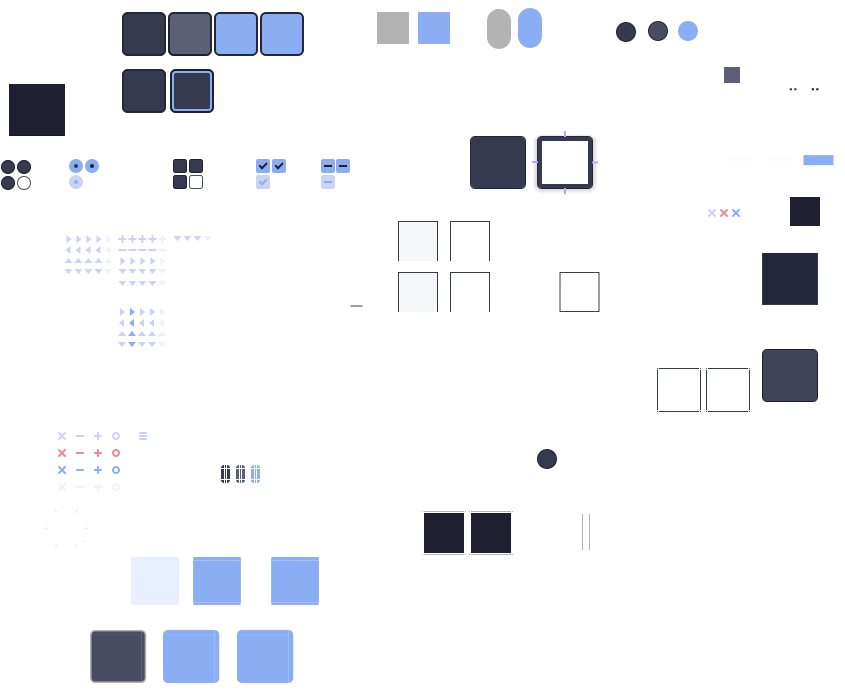
Seems to be missing many icons, like folders for example? In the case of `pavucontrol`, the symbols for audio, mic, enabled, etc are not in this SVG. Should they be there?
What do you see in there?
---
### Author:  [@eljamm](https://discourse.nixos.org/u/eljamm)
#### Post date: [July 30, 2024, 11:41am UTC](https://discourse.nixos.org/t/struggling-to-configure-gtk-qt-theme-on-laptop/42268/18 "2024-07-30T11:41:03Z")
> [@heitorpb](#):
>
> Should they be there?
Ah, right. That’s for the theme and not the icons. That’s perfectly normal.
Can you manually change the icon theme in `qt5ct` and `qt6ct`? You can change it to something else and see if it works, then back to `Papirus-Dark` and see if that works as well.
---
### Author:  [@heitorpb](https://discourse.nixos.org/u/heitorpb)
#### Post date: [July 30, 2024, 1:20pm UTC](https://discourse.nixos.org/t/struggling-to-configure-gtk-qt-theme-on-laptop/42268/19 "2024-07-30T13:20:20Z")
> [@eljamm](#):
>
> Ah, right. That’s for the theme and not the icons. That’s perfectly normal.
Oh, that makes sense.
> [@eljamm](#):
>
> Can you manually change the icon theme in `qt5ct` and `qt6ct`?
Found something: I get a warning when I open `qt6ct`:
```auto
Please remove the QT_STYLE_OVERRIDE environment variable (current value: kvantum).
The QT_QPA_PLATFORMTHEME environment variable is not set correctly (current value: kvantum, required values: qt6ct or qt5ct).
```
I don’t set any of those environment variables manually. Do you have them in your `env`?
---
### Author:  [@eljamm](https://discourse.nixos.org/u/eljamm)
#### Post date: [July 30, 2024, 1:26pm UTC](https://discourse.nixos.org/t/struggling-to-configure-gtk-qt-theme-on-laptop/42268/20 "2024-07-30T13:26:57Z")
> [@heitorpb](#):
>
> I don’t set any of those environment variables manually.
Those are set by the catppuccin QT module (see [here](https://github.com/catppuccin/nix/blob/8bdb55cc1c13f572b6e4307a3c0d64f1ae286a4f/modules/home-manager/kvantum.nix#L40)).
> [@heitorpb](#):
>
> I don’t set any of those environment variables manually. Do you have them in your `env`?
I only have the `QT_STYLE_OVERRIDE` message since my platform theme is `qt5ct`.
I think that those are just warnings, though, right? or does this mean you can’t change the icon theme if you’re not using `qt5ct` as a platform theme?
[Next page](https://discourse.nixos.org/t/struggling-to-configure-gtk-qt-theme-on-laptop/42268.md?page=2)