# Using git to handle and manage \`configuration.nix\`
**URL:** https://discourse.nixos.org/t/using-git-to-handle-and-manage-configuration-nix/38337
**Category:** Help
**Created:** [January 16, 2024, 11:11am UTC](https://discourse.nixos.org/t/using-git-to-handle-and-manage-configuration-nix/38337 "2024-01-16T11:11:00Z")
**Posts on this page:** 6
**Page:** 1
### Author:  [@enoren5](https://discourse.nixos.org/u/enoren5)
#### Post date: [January 16, 2024, 11:11am UTC](https://discourse.nixos.org/t/using-git-to-handle-and-manage-configuration-nix/38337/1 "2024-01-16T11:11:00Z")
In my brief experience so far playing with NixOS as a Virtual Box guest o/s (the demo appliance provided), I quickly learned how fragile the `configuration.nix` file is and how hard it can be to identify which line or curly brace is the source of a problem. For example, I tried installing Xfce. When I ran `$ sudo nixos-rebuild switch`, it was broken. So I tried commenting out the lines but that didn’t resolve the issue. I tried commenting out and uncommenting in other lines which produced a similar but not quite the same error when running `$ sudo nixos-rebuild switch`. I was caught in an hours-long cycle of commenting out certain lines, saving, rebuilding, uncommenting other lines, saving, rebuilding (repeat).
Eventually I resolved to reloading a vanilla VirtualBox demo appliance and being more careful with the changes I make.
Having said all of that, I came up with a potential solition: git. I could commit each state of the `/etc/nixos/configuration.nix` file before each rebuild and then if I wreck the configration with a recent change, I could just roll back or revert to a prior git commit.
I’ve seen other NixOS users use services such as codeberg / gitlab / github for storing their NixOS configurations. So it’s possible. I am just left wondering - - how do they do it? I ask because `/etc/nixos/` (or any config inside `/etc/`) is sudo’er territory meaning that it is write protected. I would think that it would be a very bad idea and non-secure technique to initilize a git repo inside `/etc/nixos/`.
So what would you people recommend NixOS admins use to track their `configuration.nix` version history to enable them to roll back to a last known good state using git?
---
### Author:  [@Damage](https://discourse.nixos.org/u/Damage)
#### Post date: [January 16, 2024, 11:37am UTC](https://discourse.nixos.org/t/using-git-to-handle-and-manage-configuration-nix/38337/2 "2024-01-16T11:37:44Z")
There are many different approaches.I simply sudo then manipulate the files using git. Backup the result periodically rather than use something like github (mainly because I am using a single config for multiple machines and haven’t worked out an effective approach yet).
I think Nix and NixOS are definitely “do what you want” rather than “do what others do” way of working.
---
### Author:  [@teto](https://discourse.nixos.org/u/teto)
#### Post date: [January 16, 2024, 6:42pm UTC](https://discourse.nixos.org/t/using-git-to-handle-and-manage-configuration-nix/38337/3 "2024-01-16T18:42:05Z")
my whole config is in $HOME. You just have to tell nixos-rebuild to look into $HOME instead of /etc/nix. As I use flakes, it looks like :
`nixos-rebuild --flake ~/home --override-input nixpkgs ~/nixpkgs --use-remote-sudo switch`.
`--use-remote-sudo` allows to differ the need for credentials right before switching, which I believe is more secure.
---
### Author:  [@enoren5](https://discourse.nixos.org/u/enoren5)
#### Post date: [January 23, 2024, 2:19am UTC](https://discourse.nixos.org/t/using-git-to-handle-and-manage-configuration-nix/38337/4 "2024-01-23T02:19:20Z")
> [@Damage](#):
>
> I think Nix and NixOS are definitely “do what you want” rather than “do what others do” way of working.
If all NixOS admins handle `/etc/nixos/configuration.nix` differently - - and no two approaches are the same as you say - - where each individual user approaches administering their configurations like a unique (snow) ‘flake’ - - then I want to learn from as many as possible because the problematic default way that I outlined in my OP above is clearly broken. If everyone is different then that is even a better reason to solicit best practices from others. I don’t intend to copy exactly what someone else does. I just want to explore what options are out there.
I got a symlink arrangement to work with [my new GitHub repo](https://github.com/enoren5/nixos-configs).
Here are the steps I used (for my future reference and to help any else out there who may be as curious as I was when I started this thread):
1. Move `/etc/nixos/configuration.nix` to the locally cloned GitHub repo in the user’s home directory.
2. To resolve this, change ownership. In my case in my VBox demo appliance, the user is `demo` and the group is `users`. Here is the required command: `$ sudo chown demo:users configuration.nix`. In prod when I make the leap-of-faith and commit to migrating from my native Manjaro installation to NixOS, the user name will not be ‘demo’. So change accordingly.
3. In `/etc/nixos/`, run:
```auto
$ sudo ln -s ~//configuration.nix .
```
- **To emphasize: take note of the trailing “`.`” at the end.**
- Additional point of clarification: The recommended command #3 here will only work inside `/etc/nixos/` as working directory. If you try to complete the symbolic link by invoking the `ln -s` command from within the repo directory, it won’t work. So be careful with this too.
The end product should look like this:
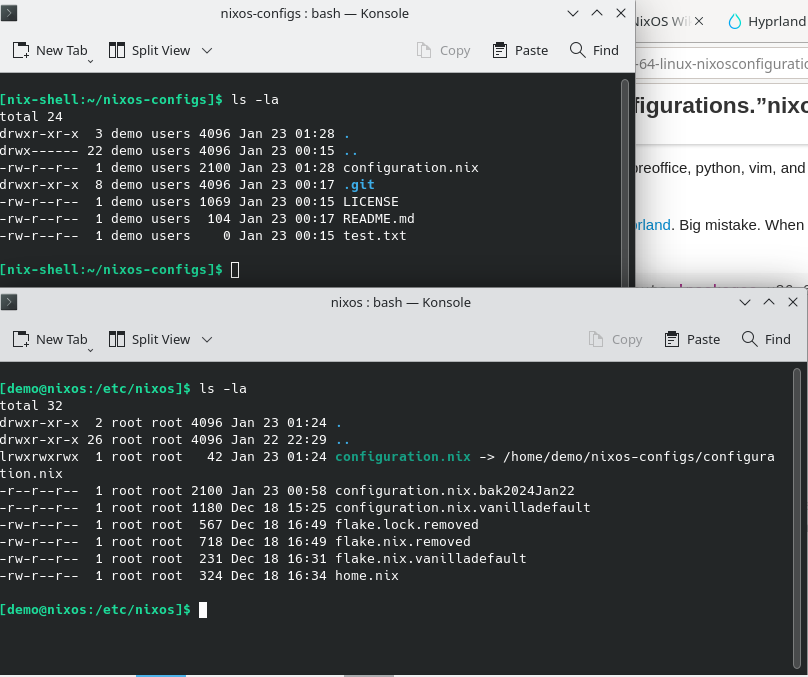
Now I have userland version control of `configuration.nix` using git. The advantage is that now when I track every change I make, if I bork the configuration with a syntax error or some other hard to diagnose, I can very easily revert back to the last known working state. Excellent! I am stoked.
If I ever start a fresh install and I clone my repo with, I just need to change directory into `/etc/nixos`, remove `configuration.nix`, and then issue the symbolic link command above. All that is left to do is run `$ nixos-rebuild switch` and it will swap to the config and start building.
---
### Author:  [@enoren5](https://discourse.nixos.org/u/enoren5)
#### Post date: [March 8, 2024, 5:46am UTC](https://discourse.nixos.org/t/using-git-to-handle-and-manage-configuration-nix/38337/5 "2024-03-08T05:46:05Z")
After exploring some more NixOS and Flakes documentation around the web, I discovered @ryan4yin’s Flakes book which has a specific section covering how to handle configuration files with git:
> **[Other Useful Tips | NixOS & Flakes Book](https://nixos-and-flakes.thiscute.world/nixos-with-flakes/other-useful-tips#managing-the-configuration-with-git)**
>
> An unofficial and opinionated book for beginners
Thank you Ryan!
I am sharing this here for others but also in part for my future reference.
---
### Author:  [@tripleo](https://discourse.nixos.org/u/tripleo)
#### Post date: [March 8, 2024, 11:48pm UTC](https://discourse.nixos.org/t/using-git-to-handle-and-manage-configuration-nix/38337/6 "2024-03-08T23:48:41Z")
That’s true, but more something like this (if it works, I’ll update laterrr):
> **[GitHub - nlewo/comin: Git Push NixOS Machines](https://github.com/nlewo/comin)**
>
> Git Push NixOS Machines. Contribute to nlewo/comin development by creating an account on GitHub.