Hi. I’m used to work with a french software called “Comptes et budget”.
I’m 99% happy of using NixOS and I’m ready to switch my Ubuntu and Debian 3 machines to NixOS.
To do this, I’d like to install this software shown below. I tried sudo apt install “app_name” which obviously did not work.
Is there a way to install manually an application?
Or can you add “Comptes et budget” to the listed packages?
Have a good day
Apart from someome packaging it to nixpkgs repo, another option is to use wine (maybe through Bottles) to install the windows version on your machine.
Not gonna be as good as using it natively, but it’s something I guess.
Another option is to use distrobox (be careful when selecting it’s /home dir, I wouldnt put it in the same /home dir of my system) and essentially run debian on your nixos installation to run the .deb package.
Vu que nous sommes dans la section “french” je suppose que l’on peut continuer en français.
Je propose déjà une version crade (basée sur nix-ld) mais qui fonctionne. nix-ld est un super moyen pour lancer des binaires plus ou moins arbitraires sous nixos (bon y’a des petits mais bien sûr) et je trouve que c’est super pratique de l’activer, comme ça je peux développer par exemple via npm sans me poser de questions etc.
Pour activer nix-ld, il suffit de lui donner la liste des librairies qu’il peut utiliser pour charger des binaires non-nixos. De mon côté j’ai donc créé ce fichier que je charge dans mes imports de mon configuration.nix:
❯ cat /etc/nixos/nix-ld.nix
{ config, pkgs, lib, ... }:
{
  # Allow unfree packages
  nixpkgs.config.allowUnfree = true;
  # Automatically creates a loader in /lib/* to avoid patching stuff
  # To disable it temporarily use
  # unset NIX_LD
  programs.nix-ld = {
    enable = true;
    libraries = with pkgs; [
      # List by default
      zlib
      zstd
      stdenv.cc.cc
      curl
      openssl
      attr
      libssh
      bzip2
      libxml2
      acl
      libsodium
      util-linux
      xz
      systemd

      # My own additions
      xorg.libXcomposite
      xorg.libXtst
      xorg.libXrandr
      xorg.libXext
      xorg.libX11
      xorg.libXfixes
      libGL
      libva
      pipewire
      xorg.libxcb
      xorg.libXdamage
      xorg.libxshmfence
      xorg.libXxf86vm
      libelf

      # Required
      glib
      gtk2

      # Inspired by steam
      # https://github.com/NixOS/nixpkgs/blob/9681f23e1dcb633f89e83383fac986277d89b1a1/pkgs/by-name/st/steam/package.nix#L36-L85
      networkmanager
      vulkan-loader
      libgbm
      libdrm
      libxcrypt
      coreutils
      pciutils
      zenity
      # glibc_multi.bin # Seems to cause issue in ARM

      # # Without these it silently fails
      xorg.libXinerama
      xorg.libXcursor
      xorg.libXrender
      xorg.libXScrnSaver
      xorg.libXi
      xorg.libSM
      xorg.libICE
      gnome2.GConf
      nspr
      nss
      cups
      libcap
      SDL2
      libusb1
      dbus-glib
      ffmpeg
      # Only libraries are needed from those two
      libudev0-shim

      # needed to run unity
      gtk3
      icu
      libnotify
      gsettings-desktop-schemas
      # https://github.com/NixOS/nixpkgs/issues/72282
      # https://github.com/NixOS/nixpkgs/blob/2e87260fafdd3d18aa1719246fd704b35e55b0f2/pkgs/applications/misc/joplin-desktop/default.nix#L16
      # log in /home/leo/.config/unity3d/Editor.log
      # it will segfault when opening files if you don’t do:
      # export XDG_DATA_DIRS=/nix/store/0nfsywbk0qml4faa7sk3sdfmbd85b7ra-gsettings-desktop-schemas-43.0/share/gsettings-schemas/gsettings-desktop-schemas-43.0:/nix/store/rkscn1raa3x850zq7jp9q3j5ghcf6zi2-gtk+3-3.24.35/share/gsettings-schemas/gtk+3-3.24.35/:$XDG_DATA_DIRS
      # other issue: (Unity:377230): GLib-GIO-CRITICAL **: 21:09:04.706: g_dbus_proxy_call_sync_internal: assertion 'G_IS_DBUS_PROXY (proxy)' failed

      # Verified games requirements
      xorg.libXt
      xorg.libXmu
      libogg
      libvorbis
      SDL
      SDL2_image
      glew110
      libidn
      tbb

      # Other things from runtime
      flac
      freeglut
      libjpeg
      libpng
      libpng12
      libsamplerate
      libmikmod
      libtheora
      libtiff
      pixman
      speex
      SDL_image
      SDL_ttf
      SDL_mixer
      SDL2_ttf
      SDL2_mixer
      libappindicator-gtk2
      libdbusmenu-gtk2
      libindicator-gtk2
      libcaca
      libcanberra
      libgcrypt
      libvpx
      librsvg
      xorg.libXft
      libvdpau
      # ...
      # Some more libraries that I needed to run programs
      pango
      cairo
      atk
      gdk-pixbuf
      fontconfig
      freetype
      dbus
      alsa-lib
      expat
      # for blender
      libxkbcommon

      libxcrypt-legacy # For natron
      libGLU # For natron

      # Appimages need fuse, e.g. https://musescore.org/fr/download/musescore-x86_64.AppImage
      fuse
      e2fsprogs

      # darktable nightly AppImage https://github.com/darktable-org/darktable/releases
      gmp

      # RapidRaw
      harfbuzz
      libgpg-error
      # https://github.com/xournalpp/xournalpp/releases/download/v1.2.4/xournalpp-1.2.4-x86_64.AppImage
      fribidi
      librsvg
      # https://github.com/nix-community/nix-ld/issues/95#issuecomment-3041993870
      (runCommand "librsvg" {} ''
        mkdir -p $out/lib/gdk-pixbuf-2.0/2.10.0/loaders
        ln -s "${librsvg}/lib/gdk-pixbuf-2.0/2.10.0/loaders/libpixbufloader_svg.so" "$out/lib/libpixbufloader-svg.so"
      '')

      # pdfmastereditor
      sane-backends
      pkcs11helper
    ];
  };

}
Ensuite, pour ton logiciel précisément, le logiciel ne propose qu’un .deb donc il faut faire avec. Pour ça j’ai donc téléchargé (dans un dossier seul) et décompressé le .deb via:
❯ nix-shell -p dpkg
❯ dpkg -x comptes-et-budget.deb .
❯ ls
comptes-et-budget.deb  opt  usr
Ces deux dossiers sont en gros copié/collé dans une installation debian à la racine. Nous on va éviter de faire ça (trèsssssssss crade), il faudrait mieux le packager proprement. Sauf qu’on a aussi une manière pour le faire fonctionner rapidement sans trop s’embéter : après inspection du usr il y a juste deux fichiers qui pointent vers le dossier opt:
❯ cat usr/bin/comptes-et-budget
#!/bin/bash
/opt/alauxsoft-comptesetbudget/Javaruntime/run.command
donc on va essayer de regarder ce fichier:
❯ cat opt/alauxsoft-comptesetbudget/Javaruntime/run.command
#!/bin/bash
cd -- "$(dirname -- "$BASH_SOURCE")"
cd bin
./java @release_java_modules.txt  -m b4j/alauxsoft.comptesetbudget.main
exit 0
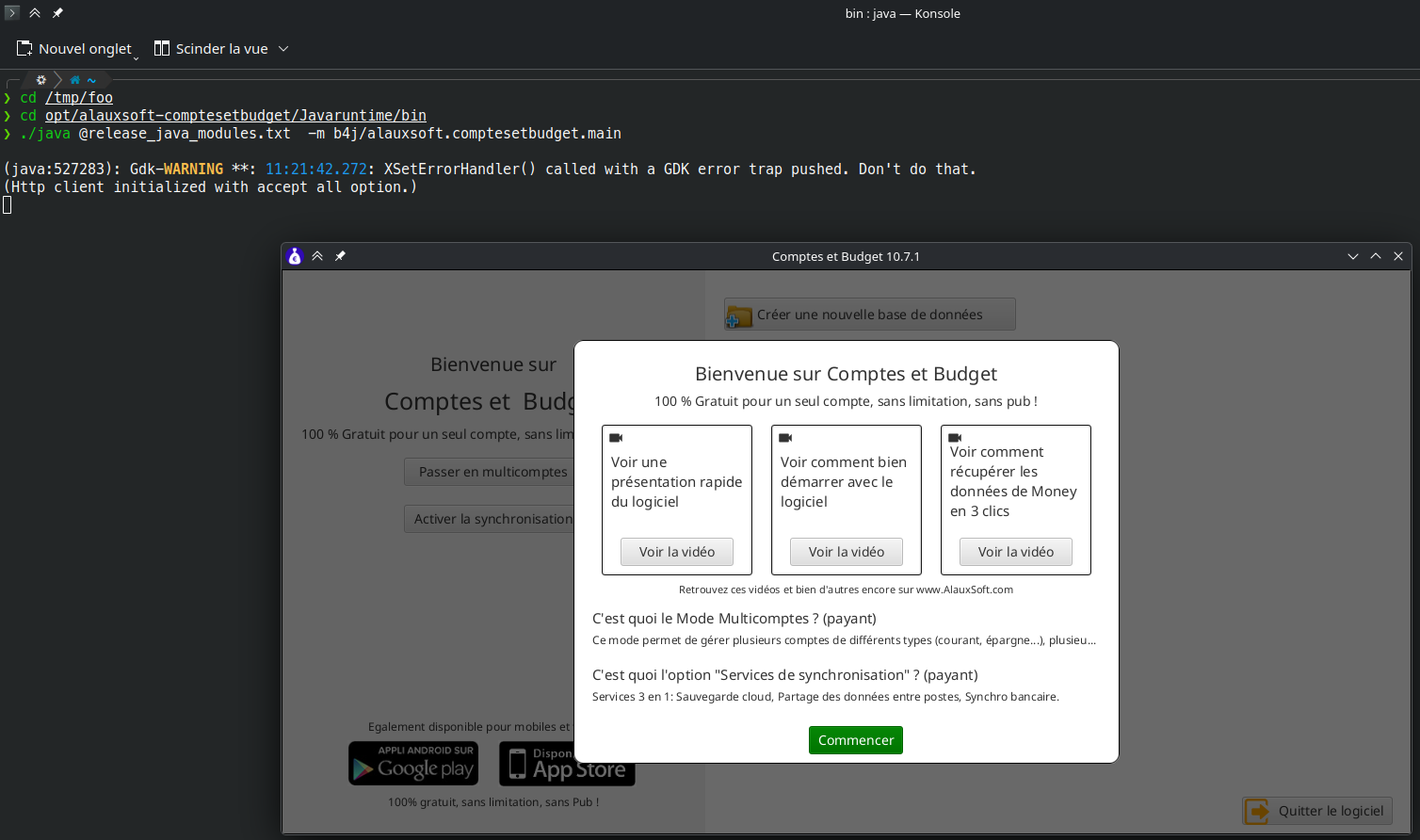
Il suffit donc de faire:
❯ cd opt/alauxsoft-comptesetbudget/Javaruntime/bin
❯ ./java @release_java_modules.txt  -m b4j/alauxsoft.comptesetbudget.main

(java:525866): Gdk-WARNING **: 11:14:16.814: XSetErrorHandler() called with a GDK error trap pushed. Don't do that.
(Http client initialized with accept all option.)
et voila ça fonctionne (bon j’ai pas plus testé hein, y’a ptet des surprises ?) !
Après une méthode plus clean (qui ne se base pas sur nix-ld et qui fonctionne sur tous les OS), c’est de le packager. Je vais devoir y aller donc pas le temps de le faire tout de suite mais ce n’est pas très compliqué. En faisant un simple rg "dpkg -x" -C 30 (installe rg c’est super pratique) dans nixpkgs tu as une liste de plein de paquets qui installent des .deb, par exemple au pif:
❯ cat pkgs/by-name/ed/edgetpu-compiler/package.nix
{
  autoPatchelfHook,
  dpkg,
  fetchurl,
  lib,
  libcxx,
  stdenv,
}:
stdenv.mkDerivation rec {
  pname = "edgetpu-compiler";
  version = "15.0";

  src = fetchurl rec {
    url = "https://packages.cloud.google.com/apt/pool/${pname}_${version}_amd64_${sha256}.deb";
    sha256 = "ce03822053c2bddbb8640eaa988396ae66f9bc6b9d6d671914acd1727c2b445a";
  };

  nativeBuildInputs = [
    autoPatchelfHook
    dpkg
  ];

  buildInputs = [
    libcxx
  ];

  unpackPhase = ''
    mkdir bin pkg

    dpkg -x $src pkg

    rm -r pkg/usr/share/lintian

    cp pkg/usr/bin/edgetpu_compiler_bin/edgetpu_compiler ./bin
    cp -r pkg/usr/share .

    rm -r pkg
  '';

  dontConfigure = true;
  dontBuild = true;

  installPhase = ''
    runHook preInstall

    mkdir -p $out
    cp -r ./{bin,share} $out

    runHook postInstall
  '';

  meta = {
    description = "Command line tool that compiles a TensorFlow Lite model into an Edge TPU compatible file";
    mainProgram = "edgetpu_compiler";
    homepage = "https://coral.ai/docs/edgetpu/compiler";
    sourceProvenance = with lib.sourceTypes; [ binaryNativeCode ];
    license = lib.licenses.asl20;
    maintainers = with lib.maintainers; [ cpcloud ];
    platforms = [ "x86_64-linux" ];
  };
}
Tu peux facilement modier ça pour l’adapter à ton cas. Il faut juste copier les dossiers opt et usr dans $out, patcher les quelques fichiers qui pointent vers /opt en $out/opt via:
 postPatch = ''
   substituteInPlace yourbadfile \
     --replace-fail "/opt" "$out/opt"
 '';
Il faut aussi ajouter autoPatchelfHook dans les nativeBuildInputs qui va s’occuper de fixer les dépendances (tu auras des messages d’erreur avec des librairies manquantes : ajoute les au fur et à mesure dans buildInput)
Tu peux voir aussi ma réponse ici https://unix.stackexchange.com/questions/522822/different-methods-to-run-a-non-nixos-executable-on-nixos method 4.
J’espère que ça t’aide, si besoin n’hésite pas à me redemander.
Merci pour ta réponse bien détaillée.
Je tente tout ça bientôt
;o)