Hello. I’ve been testing Nix install (the package manager) on multiple different Linux distros, and I’ve run into the same issue on multiple different ones. Mainly, this one right here:
env: can't execute 'groupadd': No such file or directory
This issue comes up, and the Nix install just comes to a halt right there. I am using the multi-user install setup for Nix.
I’m wondering, how do I fix this issue? I’ve noticed that on the multiple Linux distros, there’s an “addgroup” command, but not a “groupadd” command, meaning they’re different commands. I’ve tried to make “groupadd” a symlink for the “addgroup” command, but since the programs are different, it doesn’t work well.
Linux distros tested this on that result in the same error: TinyCore Linux 17.0, Puppy Linux (NoblePup32 24.04)
Don’t think so, AFAICT you just need to configure your non-systemd service manager to automatically start nix-daemon as root. The NixOS/nixinstall script documents this, but NixOS/nix-installer seems to not support/document it.
if you can grab gnu coreutils via its coreutils extension that’ll be the easiest and best way. based on a quick read of the tce-load script i think something around tce-load -wi coreutils is what you’re after for that.
otherwise you can patch the install script to patch the other install script to use -p instead of --preserve by adding something like sed -i 's/--preserve=ownership,timestamps/-p/' "$script" to the script curl downloads, after export INVOKED_FROM_INSTALL_IN=1. this may end up not being fun later.
in the puppy linux case, you’re doing a single-user installation as root. there are a bunch of ways to get around this problem but realistically none of them are particularly fun later, either. just use a non-root user.
I managed to get the install on Puppy Linux to work by logging in as a different user in the terminal via su - username and doing the single-user install for that user, but after the install, the commands nix-shell and nix don’t do anything, as if they aren’t recognized commands. That’s strange.
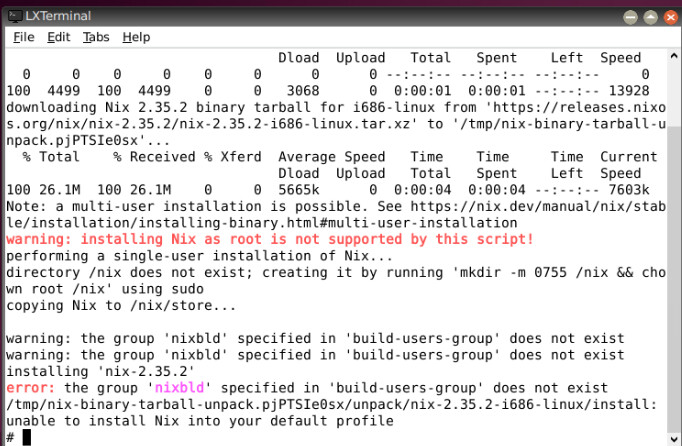
On TinyCore Linux, I ran the tce-load -wi coreutils command, then did the Nix single-user install, but I ran into this new error that says this: