Electron apps installed through flatpak not using system fonts

Here is a screenshot of obsidian installed through nixpkgs,

image

And, here is the screenshot of obsidian installed through flatpak,

image

The first one is using Noto Fonts and the second one is most likely using GNU Free Fonts, which I do not have installed. How can I fix this? Should I open any issue about it in Flatpak or Electron? Currently, I have this nixos configuration,

  fonts = {
    fontDir.enable = true;
    enableDefaultPackages = false;
    fontconfig.defaultFonts = {
      emoji = [ "Noto Color Emoji" ];
      monospace = [
        "JetBrains Mono"
        "JetBrainsMono Nerd Font"
      ];
      sansSerif = [
        "Noto Sans"
        "Noto Color Emoji"
      ];
      serif = [
        "Noto Serif"
        "Noto Color Emoji"
      ];
    };
    packages = with pkgs; [
      adwaita-fonts
      jetbrains-mono
      liberation_ttf
      nerd-fonts.jetbrains-mono
      noto-fonts
      noto-fonts-cjk-sans
      noto-fonts-cjk-serif
      noto-fonts-color-emoji
    ];
  };

Sorry for the inconvenience, I thought I create a new category in my previous post and instantly deleted that, then I realized, I just could have changed the category from “Uncategorized” to “Help”.

does deleting ~/.var/app/md.obsidian.Obsidian/cache/fontconfig/ help in any way?

Does flatpak allow acces to your nix store?

2 Likes

Sadly, It didn’t help.

How can I know that?

Flatseal and similar tools.

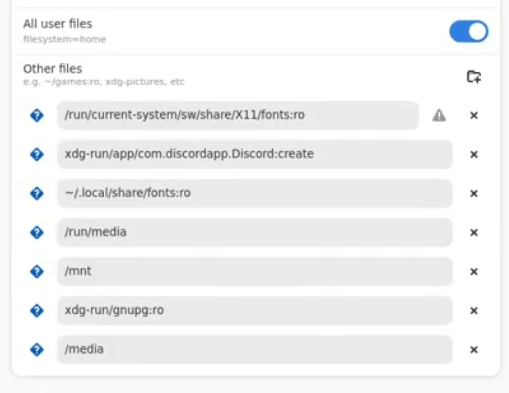
I installed it but I don’t know if it allows access to my nix store. Can you check from the screencapture, if it does allow? If not how can I allow that?

Doesn’t look like it was allowed.

Even though you allow read only access to a location that might have symlinks to fints, you simply do not allow the final location of the links to be read.

1 Like

Inside ~/.local/share/fonts/ there is another directory which includes all the fonts.

[qp@db:~]$ l ~/.local/share/fonts/
lrwxrwxrwx - qp 14 Mar 21:35 system-fonts -> /run/current-system/sw/share/X11/fonts

[qp@db:~]$ l ~/.local/share/fonts/system-fonts
lrwxrwxrwx - root  1 Jan  1970 4x6-ISO8859-1.pcf.gz -> /nix/store/f0nys66h9m6m17l1lb3hwy9a3va1f2ln-X11-fonts/share/X11/fonts/4x6-ISO8859-1.pcf.gz
lrwxrwxrwx - root  1 Jan  1970 4x6-ISO8859-2.pcf.gz -> /nix/store/f0nys66h9m6m17l1lb3hwy9a3va1f2ln-X11-fonts/share/X11/fonts/4x6-ISO8859-2.pcf.gz
lrwxrwxrwx - root  1 Jan  1970 4x6-ISO8859-3.pcf.gz -> /nix/store/f0nys66h9m6m17l1lb3hwy9a3va1f2ln-X11-fonts/share/X11/fonts/4x6-ISO8859-3.pcf.gz

I tried add ~/.local/share/fonts/system-fonts:ro manually through flatseal but it didn’t help.

Can you try adding the directory he mentioned?

I didn’t understand. Which directory did he mention? /nix/store/?

The “nix store”, which is /nix/store indeed.

Alright, I did add it but the issue is still not fixed. I also did a system restart afterwards.

This also happens on Brave Browser, I think this is something to do with Chromium and Electron. Because, Firefox based browsers and other applications written Qt or GTK works just fine.


Brave is based on Chromium.

1 Like