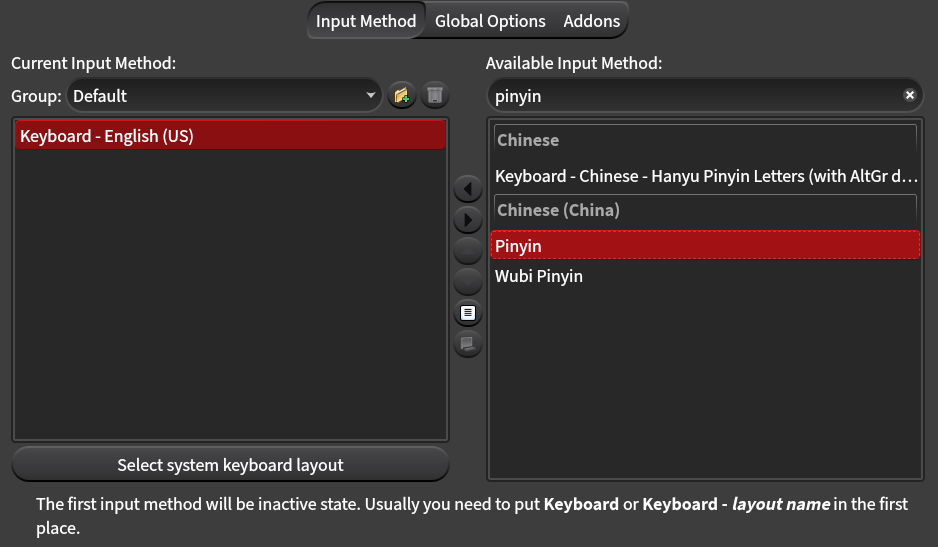
I do not have the “简体中文” entry in the fcitx5-configtool, which seems to be the one I need: Pinyin input method in Hyprland / Wayland for Simplified Chinese - #2 by sshine , even though I’ve tried both kdePackages.fcitx5-chinese-addons and qt6Packages.fcitx5-chinese-addons . I only have “Keyboard - Chinese” as an input method.
On super+;, I get a “quick phrase” menu but can’t seem to trigger a menu to enter Hanzi with pinyin. I do not get any popups when I’m just typing (should I? I’m not sure - this seems to say it should always be there: Chinese input - almost there - #9 by shamrocklee). I do have a notification bar icon with the current input method.
I use fcitx5 with Sway just fine. We need a lot more details like what app are you using or what app are you typing in? What input methods do you have configured in the fcitx5 config tool? A screenshot of the input methods would be helpful, along with any other config you set.
After nixos-rebuild switch you need to do a reboot and then you may can see the pinyin input method lies in the fcitx5-configtool. Don’t forget to turn off the Only Show Current Language.
Thanks for trying to help! I’ve changed my config to follow @waffle8946 minimal example.
Reboot doesn’t seem to change anything, I still don’t have a Chinese (China) category in the list of input modes, nor do I have the Pinyin entry in configtool.
I’ve been trying to type into Firefox’s search bar as a quick test, and it is suggesting English words if I activate “hint mode” (alt+ctrl+h by default) with English input method selected. If I select the Chinese - Hanyu Pinyin Letters (with AltGr dead keys) input method (which is the only input method with “pinyin” I can see) in hint mode, it’s still doing something (the word is selected and blue), but it’s not suggesting any options and isn’t turning pinyin into characters when i finish the word.
Maybe I should be using some other mode? But “quick phrase” seems to be something else entirely, and I don’t see anything else that could be useful.
That may sounds crazy, I think you may still reboot in the old generation. If you used to use systemd-boot and then switch to grub or any other bootloader, you may face this.
I found the same problem. I use rime instead of kdePackages.fcitx5-chinese-addons, but when I tried to add chinese-addons to the configuration and then rebuild, fcitx5 crashed, and so did fcitx5-configtool. Maybe there is something wrong with this package, I can’t be sure, but as long as I remove it, everything returns to normal.
EDIT: I found that it was me setting QT_QPA_PLATFORM to xcb that caused it. Have you set this environment variable?