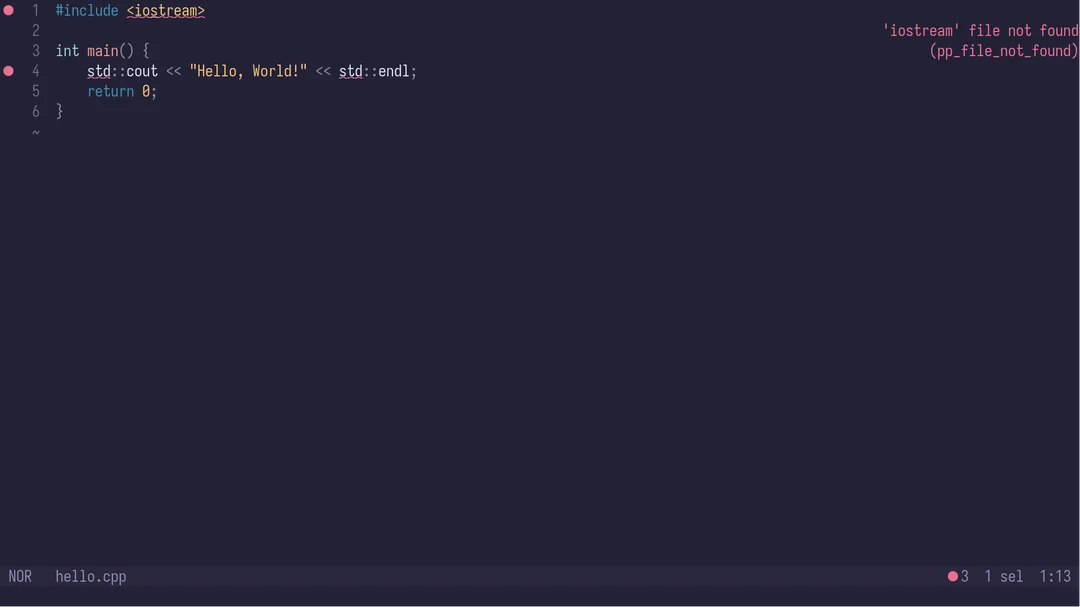
I’ve tried everything I can think of, and Helix cannot pick up any std libraries.
[~] hx --health cpp
Configured language servers:
  ✓ clangd: /etc/profiles/per-user/maezr/bin/clangd
Configured debug adapter:
  ✓ /etc/profiles/per-user/maezr/bin/lldb-dap
Configured formatter: None
Tree-sitter parser: ✓
Highlight queries: ✓
Textobject queries: ✓
Indent queries: ✓
I would greatly appreciate any help. I have been using this setup while I learn C++, but it just makes me sad every time I open the editor
NobbZ
August 23, 2025, 8:30pm
2
How have you set up your devshell, and are you entering it before starting helix?
yes I do, here is the shell (I know it’s ugly)
{ pkgs ? import <nixpkgs> {
    config = {
      allowUnfree = true;
    };
} }:
let
  buildToolsVersion = "33.0.1";
in pkgs.mkShell {
  systempkgs = with pkgs; [
    libgcc
  ];
  nativeBuildInputs = with pkgs; [
    clang
    cmake
    ninja
    pkg-config
    gtk3

    # flutter
    # androidSdk
    # android-studio
    # jdk17
    # firebase-tools

    chromium
  ];

  LD_LIBRARY_PATH = with pkgs; lib.makeLibraryPath [
    fontconfig.lib
    sqlite.out
  ];

  GSETTINGS_SCHEMA_DIR="${pkgs.gtk3}/share/gsettings-schemas/gtk+3-3.24.41/glib-2.0/schemas/";
}
NobbZ
August 23, 2025, 8:40pm
4
It seems a bit weird to see clang there, without adjusting the shells stdenv. Also I don’t see a package providing clangd.
Please also give The Nix development workflow a read.
1 Like
OMG, it totally worked, tysm, I would love to have this more minimal, you know, without using cmake, but this is totally great and acceptable, I just needed to use cmake with the set(CMAKE_EXPORT_COMPILE_COMMANDS ON) in the CMakeLists.txt, and everything was picked up by Helix, no problem, besides, it’s probably best practice to use cmake anyways.