Mershl
1
Hi everybody,
I’m new to NixOS. Excuse me if the solution to this issue is obvious.
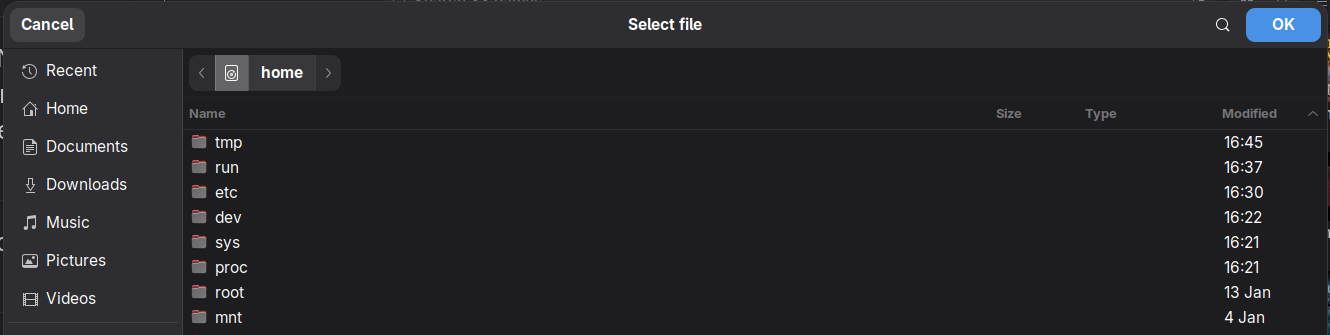
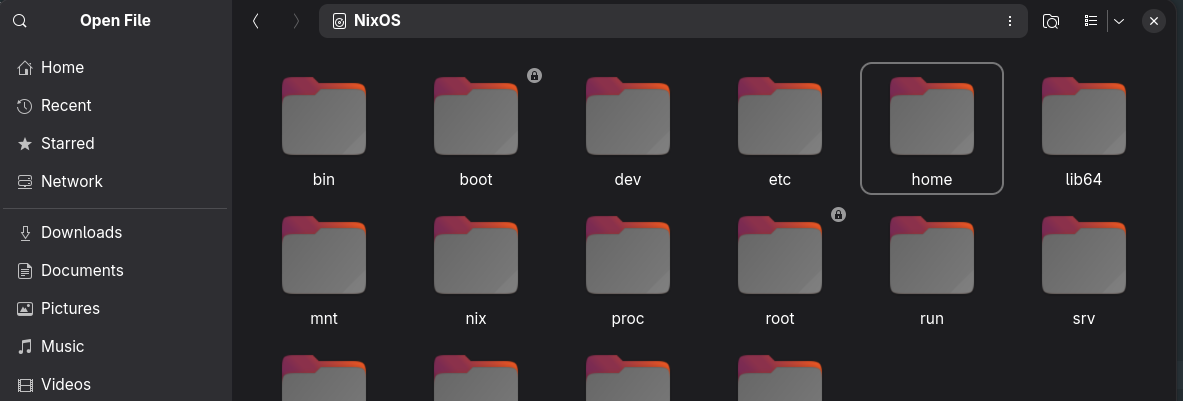
Installing several gtk apps I noticed that some of them use a different filepicker compared to others or compared to the default Gnome apps.
As an example. Lutris (a gtk application) uses a filepicker without previews and without the option of icon view:
while applications like VSCode use a filepicker that looks like Nautilus:
Is this something that can be fixed in configuration.nix or is this an issue that each application needs to fix by using a Gnome specific portal?
Could you share your configuration?
In some cases this issue could be caused by an application ignoring the XDG Desktop Portal and using their own file chooser from either GTK or Qt.
Mershl
3
using the environment variable GTK_USE_PORTAL=1 works around the issue for all tested gtk apps so far. I’ll keep you posted.
Mershl
4
gnome.nix:
{ config, pkgs, ... }:

{
  # Enable the GNOME Desktop Environment.
  services.desktopManager.gnome.enable = true;
  services.displayManager.gdm.enable = true;
  services.displayManager.gdm.autoSuspend = false;

  services.gnome.gnome-browser-connector.enable = false;

  # disable ibus
  i18n.inputMethod.enable = false;

  # set theme for KDE apps on GNOME
  qt.enable = true;
  qt.style = "adwaita-dark";
  qt.platformTheme = "gnome";

  environment.gnome.excludePackages = with pkgs; [
    decibels
    epiphany
    geary
    gnome-connections
    gnome-console
    gnome-music
    gnome-software
    gnome-text-editor
    gnome-tour
    gnome-user-docs
    showtime
    sushi
    yelp
  ];

  programs.nautilus-open-any-terminal = {
    enable = true;
    terminal = "ptyxis";
  };

  environment.systemPackages = with pkgs; [
    adw-gtk3
    dconf-editor
    ffmpegthumbnailer
    gnome-extension-manager
    gnome-tweaks
    gradia
    ptyxis
    yaru-theme
  ];
}