Cross posting for visibility as well, regarding a related matter I just can’t seem to wrap my head around, and thought you lovely folk might be able to help clear up a thing or two!
I’ve also been having trouble getting alsa and pipewire to handle selecting the correct default sound card at boot + unmuting the speaker properly, and this was the closest thread I found that dealt with a similar issue. It’s similar to this user’s problem listed in the PR thread here.
I’ve been troubleshooting for hours, hopping across various threads and am generally just in a bit of a pickle about how pipewire and alsa should be best configured (in a persistent manner) on NixOS, especially when Pipewire isn’t able to intelligently select the right sound card/channels by default. This apparently can often happen on older devices (like my late 2000s CF-SX2 LetsNote) and as such, there may be some value in properly documenting an up to date way of writing drop-in configurations to specify these within configuration.nix, if possible. These may already exist online somewhere, but I cannot for the life of me find which one works/is still relevant.
Please forgive me for my relative newness to the NixOS landscape; I fully appreciate that I am still learning the ropes, but I am more than willing to RTFM (and have already on this matter to the extent i’m able to, in the form of the Nix Wiki and many forum posts… but their pages on ALSA and Pipewire are a little messy/listed as out of date, and I’m not sure what is and isn’t still relevant; e.g. sound-enable = true is listed at the top of the wiki but officially deprecated, and several other troubleshooting steps on the alsa page in particualar are a bit vague)
Device: Panasonic CF-SX2 LetsNote
Sound Card: HDA Intel PCH. Chip: Realtek ALC269VC
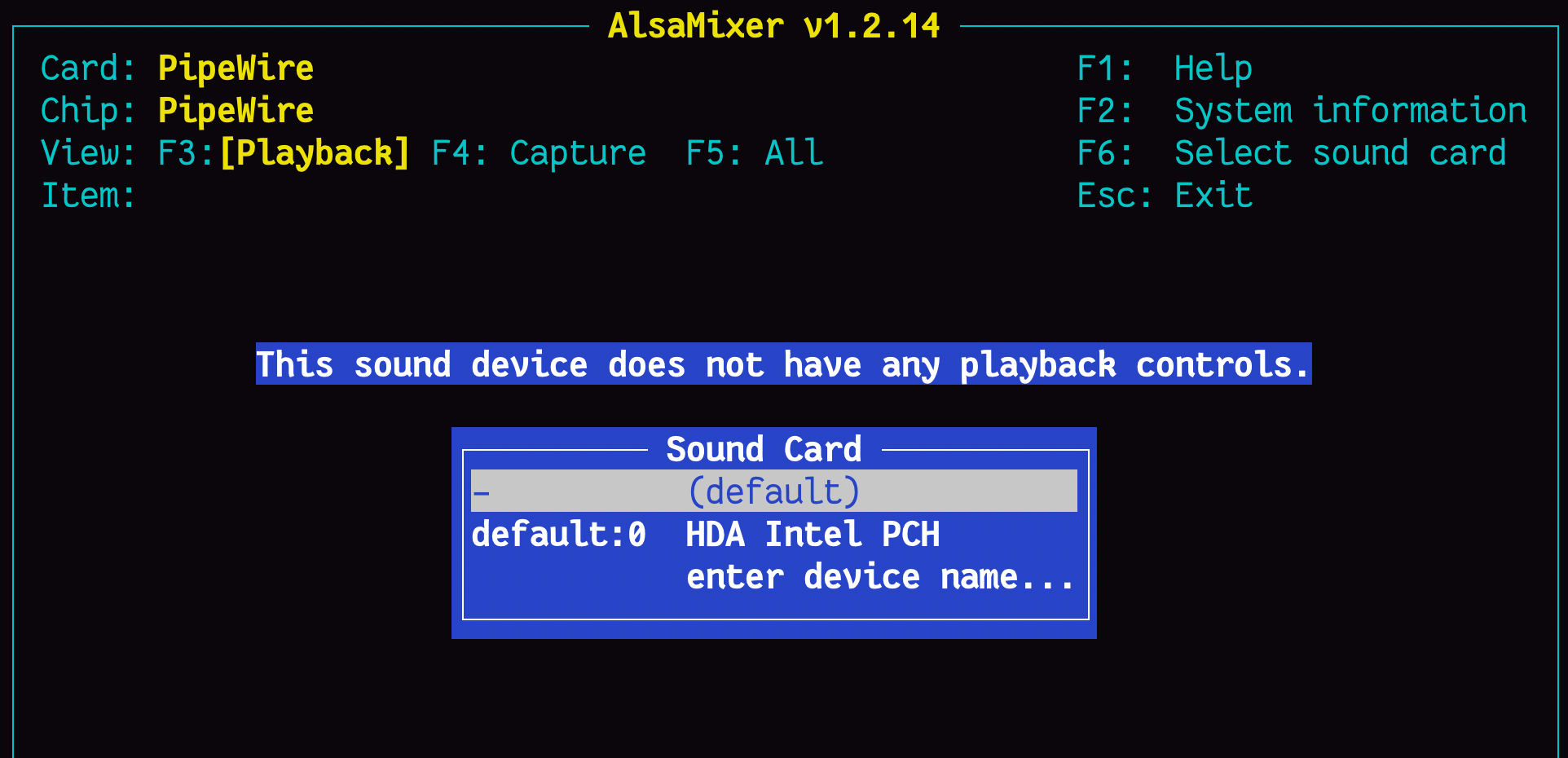
My Problem: Upon boot, laptop does not output audio. Running alsamixer shows the default sound card selected by PipeWire is - (default) (at least this is my interpretation of it; i may be wrong) and the message displayed shows This sound device does not have any playback controls.
If I go down and select the real sound card, default:0 HDA Intel PCH, I can actually see the channels. However, I then need to unmute the Speaker channel (muted by default).
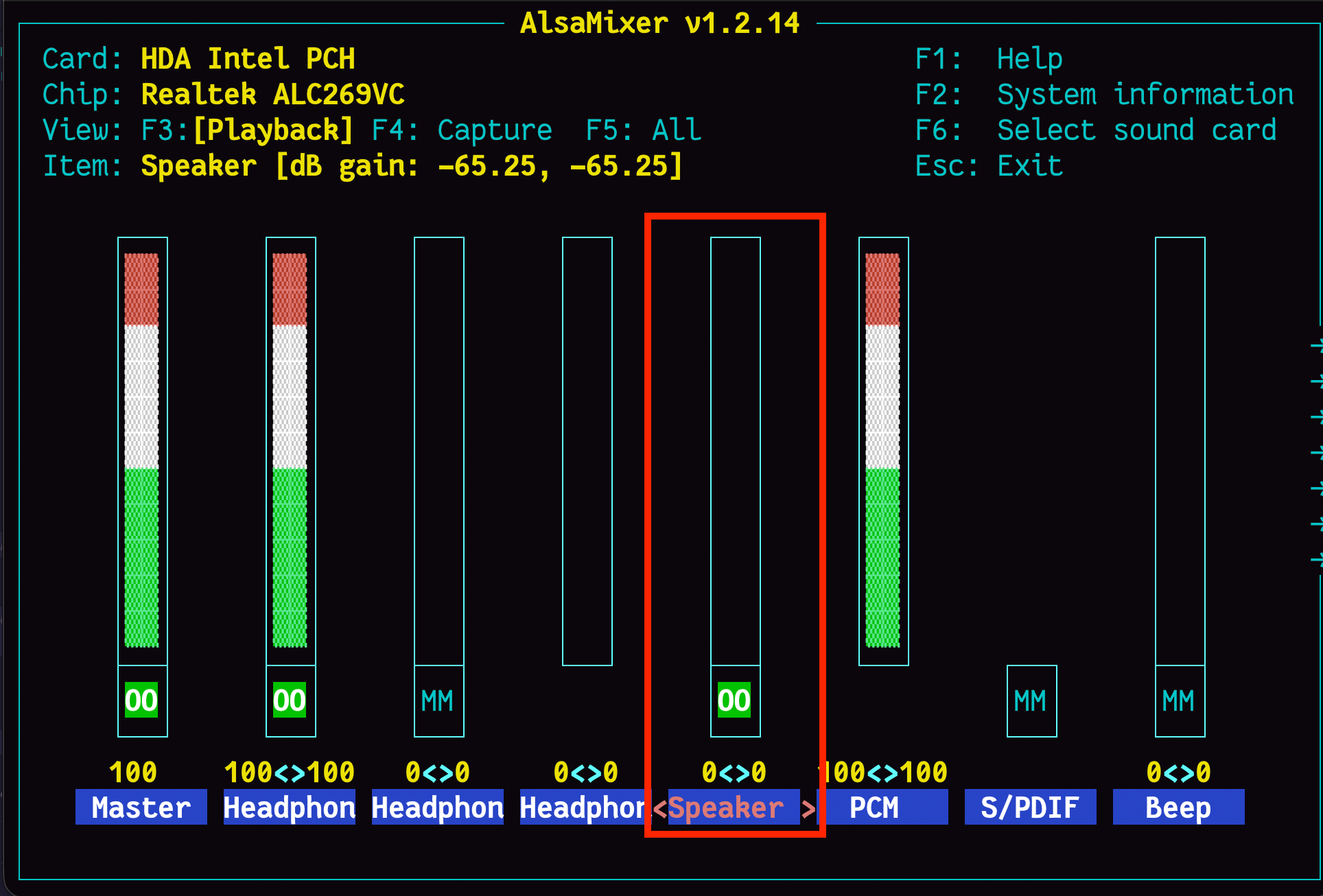
Then, I need to switch the audio output device selected (seen in pavucontrol) from the default of Speakers, to Headphones (unplugged), and then sound seems to work. This behaviour seems to be noted elsewhere online for some older thinkpads at least.
My question: How could I drop this combination of settings (select default sound card, choose which channels are muted/unmuted/adjust volume, and choose defuault output profile/device in pavucontrols) into my configuration.nix, if that’s even possible?
There are just so many services at play here (alsa for low level sound card management, pipewire as an overarching audio server, wireplumber, pavucontrol frontend, etc…) that I’m a bit confuzzled.
I’m happy to run any more commands to give more details about the sound cards/my current configuration if anyone has any pointers, but I’ve added at least my (barebones/trimmed) configuration.nix below:
{ config, lib, pkgs, ... }:

{
  imports =
    [ # Include the results of the hardware scan.
      ./hardware-configuration.nix
    ];

  # Bootloader.
  boot.loader.grub.enable = true;
  boot.loader.grub.device = "/dev/sda";
  boot.loader.grub.useOSProber = true;

  # Use latest kernel.
  boot.kernelPackages = pkgs.linuxPackages_latest;

  # Enable experimental features
  nix.settings.experimental-features = [ "nix-command" "flakes" ];

  networking.hostName = "nixos-dj"; # Define your hostname.

  # Enable networking
  networking.networkmanager.enable = true;

  # Enable the X11 windowing system.
  services.xserver.enable = true;

  # Enable the XFCE Desktop Environment.
  services.xserver.displayManager.lightdm.enable = true;
  services.xserver.desktopManager.xfce.enable = true;

  # Configure keymap in X11
  services.xserver.xkb = {
    layout = "au";
    variant = "";
  };

  # Enable CUPS to print documents.
  services.printing.enable = true;

  # Set default sound card ?:
  boot.extraModprobeConfig = ''
    options snd slots=snd-hda-intel
  '';

  # Set default sound card ?:
  sound.extraConfig = ''
  defaults.pcm.!card 0
  '';


  # Enable sound with pipewire.
  services.pulseaudio.enable = false;
  security.rtkit.enable = true;
  services.pipewire = {
    enable = true;
    alsa.enable = true;
    alsa.support32Bit = true;
    pulse.enable = true;
  };

  hardware.alsa.enablePersistence = true;

  systemd.services.alsa-restore-fix = {
  description = "Restore ALSA mixer state";
  wantedBy = [ "multi-user.target" "sound.target"];
  after = [ "sound.target" ];

  serviceConfig = {
    Type = "oneshot";
    ExecStart = "${pkgs.alsa-utils}/bin/alsactl restore";
  };
};

  # Enable touchpad support (enabled default in most desktopManager).
  # services.xserver.libinput.enable = true;

  # Define a user account. Don't forget to set a password with ‘passwd’.
  users.users.diskjockey = {
    isNormalUser = true;
    description = "discjockey";
    extraGroups = [ "networkmanager" "wheel" ];
    packages = with pkgs; [
    #  thunderbird
    ];
  };

  # Install firefox.
  programs.firefox.enable = true;

  # Allow unfree packages
  nixpkgs.config.allowUnfree = true;

  # Install and enable neovim
  programs.neovim = {
    enable = true;
    defaultEditor = true;
  };

  # Set neovim as default editor
  environment.variables = { EDITOR = "neovim"; };

  # List packages installed in system profile. To search, run:
  # $ nix search wget
  environment.systemPackages = with pkgs; [
    vim # Do not forget to add an editor to edit configuration.nix! The Nano editor is also installed by default.
    wget
    git
    btop
    fastfetch
    curl
    zsh
    oh-my-zsh
    gtk3
    xfce.xfce4-panel-profiles
    xfce.xfce4-panel
    python3
    plymouth
    libreoffice-still
    hunspell
    hunspellDicts.en_AU
    tealdeer
    alsa-utils
    yt-dlp
    kdePackages.k3b
    pciutils
    pwvucontrol
    tree
   ];


  fonts.packages = with pkgs; [
  ];

  # Enable the OpenSSH daemon.
  services.openssh.enable = true;

  system.stateVersion = "25.11"; # Did you read the comment?

}
Sound Card Details:
[diskjockey@nixos-dj:~]$ cat /proc/asound/card0/codec* | grep Codec
Codec: Realtek ALC269VC
Codec: Intel PantherPoint HDMI

[diskjockey@nixos-dj:~]$ aplay -l
**** List of PLAYBACK Hardware Devices ****
card 0: PCH [HDA Intel PCH], device 0: ALC269VC Analog [ALC269VC Analog]
  Subdevices: 1/1
  Subdevice #0: subdevice #0
card 0: PCH [HDA Intel PCH], device 3: HDMI 0 [HDMI 0]
  Subdevices: 1/1
  Subdevice #0: subdevice #0

[diskjockey@nixos-dj:~]$ cat /etc/modprobe.d/nixos.conf
blacklist usblp

options snd slots=snd-hda-intel
My dmsg:
[diskjockey@nixos-dj:~]$ sudo dmesg | grep -C 5 audio
[sudo] password for diskjockey:

[    5.455277] ACPI: video: Video Device [GFX0] (multi-head: yes  rom: no  post: no)
[    5.455477] input: Video Bus as /devices/LNXSYSTM:00/LNXSYBUS:00/PNP0A08:00/LNXVIDEO:00/input/input16
[    5.479113] fbcon: i915drmfb (fb0) is primary device
[    6.261077] Console: switching to colour frame buffer device 200x56
[    6.312882] i915 0000:00:02.0: [drm] fb0: i915drmfb frame buffer device
[    6.327398] snd_hda_intel 0000:00:1b.0: bound 0000:00:02.0 (ops intel_audio_component_bind_ops [i915])
[    6.363745] snd_hda_codec_alc269 hdaudioC0D0: ALC269VC: picked fixup  for PCI SSID 10f7:8338
[    6.364162] snd_hda_codec_alc269 hdaudioC0D0: autoconfig for ALC269VC: line_outs=1 (0x14/0x0/0x0/0x0/0x0) type:speaker
[    6.364170] snd_hda_codec_alc269 hdaudioC0D0:    speaker_outs=0 (0x0/0x0/0x0/0x0/0x0)
[    6.364175] snd_hda_codec_alc269 hdaudioC0D0:    hp_outs=1 (0x15/0x0/0x0/0x0/0x0)
[    6.364179] snd_hda_codec_alc269 hdaudioC0D0:    mono: mono_out=0x0
[    6.364181] snd_hda_codec_alc269 hdaudioC0D0:    inputs:
[    6.364183] snd_hda_codec_alc269 hdaudioC0D0:      Internal Mic=0x12
[    6.364186] snd_hda_codec_alc269 hdaudioC0D0:      Headset Mic=0x19
[    6.364188] snd_hda_codec_alc269 hdaudioC0D0:      Headphone Mic=0x18
[    6.394592] input: HDA Digital PCBeep as /devices/pci0000:00/0000:00:1b.0/sound/card0/input17
[    6.394763] input: HDA Intel PCH Headphone Mic as /devices/pci0000:00/0000:00:1b.0/sound/card0/input18
[    6.394857] input: HDA Intel PCH HDMI/DP,pcm=3 as /devices/pci0000:00/0000:00:1b.0/sound/card0/input19
[    6.883122] iwlwifi 0000:02:00.0: Radio type=0x1-0x2-0x0
[    7.182396] iwlwifi 0000:02:00.0: Radio type=0x1-0x2-0x0
My current solution: Far from perfect, I’ve added hardware.alsa.enablePersistence = true; after reading somewhere it would enable tweaking the alsamixer settings as described above and storing the state (after creating the initial file for it to write to as prompted) with sudo alsactl store. I can then select Headphones (unplugged) in pavucontrol upon reboot when there’s no sound again, and then run sudo alsactl restore to switch back to the saved correct sound card + unmuted speaker settings again. Janky AF, but it gets the job done.
Tried adding this as a systemd service in my configuration.nix, but doesn’t seem to work/gets overwritten (the services does successfully run and exit when checking the daemon status, but seems to be overwritten)
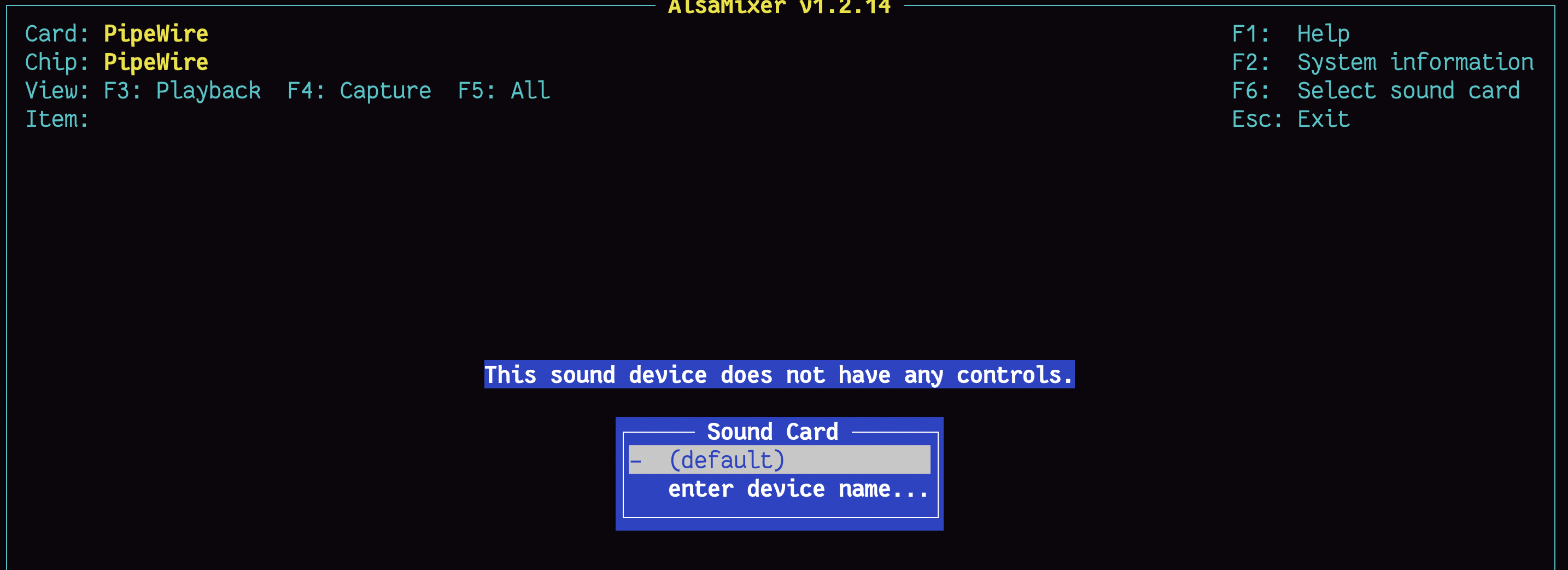
I suspect creating and editing asound.conf may solve this issue, but I’m a bit at a loss of where to start with it for my setup. I tried adding my default sound card 0 to my configuration.nix above as suggested, but that didn’t work, and actually removed my sound card from alsamixer:
Appreciate you all for reading through, and your time spent supporting this community and helping it grow <3
Side Note: It looks like there was a PR which documented in a bit more detail how to set the default sound card via configuration file, but this is back from 2020 and I couldn’t seem to get it to work. It also was introducing Wireplumber and Jack into the mix, and its relevance/necessity was unclear, as if there’s a way to select the default sound card + muted/unmuted channels within configuration.nix itself, that would be endlessly cleaner.
services.pipewire.config.pipewire = {
      "context.objects" = [
        {
          factory = "metadata";
          args = {
            "metadata.name" = "default";
          };
        }
        <SNIP>
          "api.alsa.path" = "hw:0"; # replace with the right path for your system
          "channelmix.disable" = true;
          "factory.name" = "api.alsa.pcm.source";
          "media.class" = "Audio/Source";
          "node.description" = "system";
          "node.name" = "system";
          "node.suspend-on-idle" = true;
          "resample.disable" = true;
          };
          factory = "adapter";
        }
        {
          args = {
          "adapter.auto-port-config" = {
            mode = "dsp";
            monitor = false;
            position = "unknown";
          };
          "api.alsa.path" = "hw:0"; # replace with the right path for your system
          "channelmix.disable" = true;
          "factory.name" = "api.alsa.pcm.sink";
          "media.class" = "Audio/Sink";
          "node.description" = "system";
          "node.name" = "system";
          "node.suspend-on-idle" = true;
          "resample.disable" = true;
          };
          factory = "adapter";
        }
      ];
    };
  };
Other places I’ve looked for semi-relevant info (although relevancy to how it’s configured on NixOS is unclear, as many files here don’t exist on my system at present so hard to tell):
- Advanced Linux Sound Architecture - ArchWiki
- https://stackoverflow.com/questions/56040230/nixos-default-audio-device
- PipeWire - Official NixOS Wiki
- Asound.conf: What's the best way to implement this? - #7 by nPrevail
- https://nixos.wiki/wiki/PipeWire
- PipeWire status tracking issue · Issue #102547 · NixOS/nixpkgs · GitHub
- HdaIntelSoundHowto - Community Help Wiki
- A close look at ALSA
- Issue with ALSA when enabled via PipeWire · Issue #330606 · NixOS/nixpkgs · GitHub
- Can't get alsa + nixos working - #10 by saggzz
- Audio not working on new install - #6 by saurabh