Missing wireless adpater firmware and incredibly slow/unstable wireless connection

Hi all,

I’ve recently switched to nixos, and things are pretty good, though I’m still very much figuring things out.

My system seems to be running pretty well save for my wireless adaptor apparently not having any firmware. I’m on wireless right now and there is a connection, so it works, but very poorly. There are drivers, but as stated before, no firmware.

The only reason I decided to investigate my wireless adaptor is because my connection is unbelievably slow and quite unstable. It drops pretty often, especially if I’m downloading something. In writing just up to this part, the connection dropped twice.

It often takes upwards of an hour to download 1GB, but it has taken as long as 10 minutes to download 50MB. It will sometimes also just struggle to get the package specs for nixos

I know that it’s not the network itself, as i have other devices in the vicinity that have no problems whatsoever, and back when i was on linux mint, I had a wired connection that was incredibly fast. Unfortunately I am not in a position to use a wire connection currently. I am working on it, but in the meantime I’d really like to have a usable wireless one.

Below is some information that provides some context and might be useful, but I’m not certain what more is needed.

My configuration.nix pretty much has two lines for networking. A line for setting my hostname, and a line to enable networkmanager. I have no idea if I need more than that. That’s what was provided by the gui installer.

I did need to specify bus ids for my GPU, but as far as I can tell that’s because I have have a laptop with both integrated and discrete graphics. Do I need to provide similar ids for the wireless adaptor? Or perhaps some other configuration?

Any assistance would be greatly appreciated.

Cropped output from lspci -k

Cropped output from sudo lshw -c network

P.S I did try looking for packages related to my wireless adaptor on nixos packages, but there seems to be nothing for rtl8821ae, so I am not certain what my options are

Why do you think you don’t have firmware for this device? NixOS installs redistributable firmware by default, which includes everything from linux-firmware, including the file your card’s driver seems to load.

Your messages show a device that has a driver loaded properly, and don’t say anything about firmware.

Do you see anything fishy in dmesg?

I think it’s unlikely lacking firmware would be the cause of these kinds of connection woes anyway. What networking service are you using (i.e. NetworkManager or…?)?

I believe there is no firmware as in the second image, it shows firmware=N/A, which I don’t really know how to interpret, but from previous trawling across other posts, it seems it should probably not say N/A.

I am not certain what dmesg is or how to access it. I should perhaps have prefaced that I know my way around a linux distribution like a labrat does a lab, which is to say I know what goes on in my little corner, but am blissfully unaware about anywhere else.

I have networking.networkmanager.enable = true; in my configuration.nix and that’s about it.

dmesg is the command to run if you want to see kernel messages. It will tell you if something hardware related is broken, and the first place to look if you’re suspecting firmware issues.

I think the n/a display could mean a number of things, most likely it’s harmless (e.g. the device doesn’t report a firmware version). You’ll want to check the kernel messages to see if anything is actually wrong.

Thank you for the information. I’ve looked at dmesg’s output and it seems that the n/a is probably a red herring:
Screenshot from 2025-11-29 18-33-21

I guess I’ll (try to) close this discussion. Though now I feel I don’t have much of a lead on my connection issues. I suppose I’ll have to open up a separate discussion.

Thank you for your assistance

Nah, we can keep going here.

unkown parameter ‘debug’ ignored

Sounds like you’re mucking with kernel parameters?

Can you share your configuration.nix, as well as the actual text content of your dmesg logs? You can pipe that into a file with dmesg > dmesg.log, or just copy the text from your terminal into a code block.

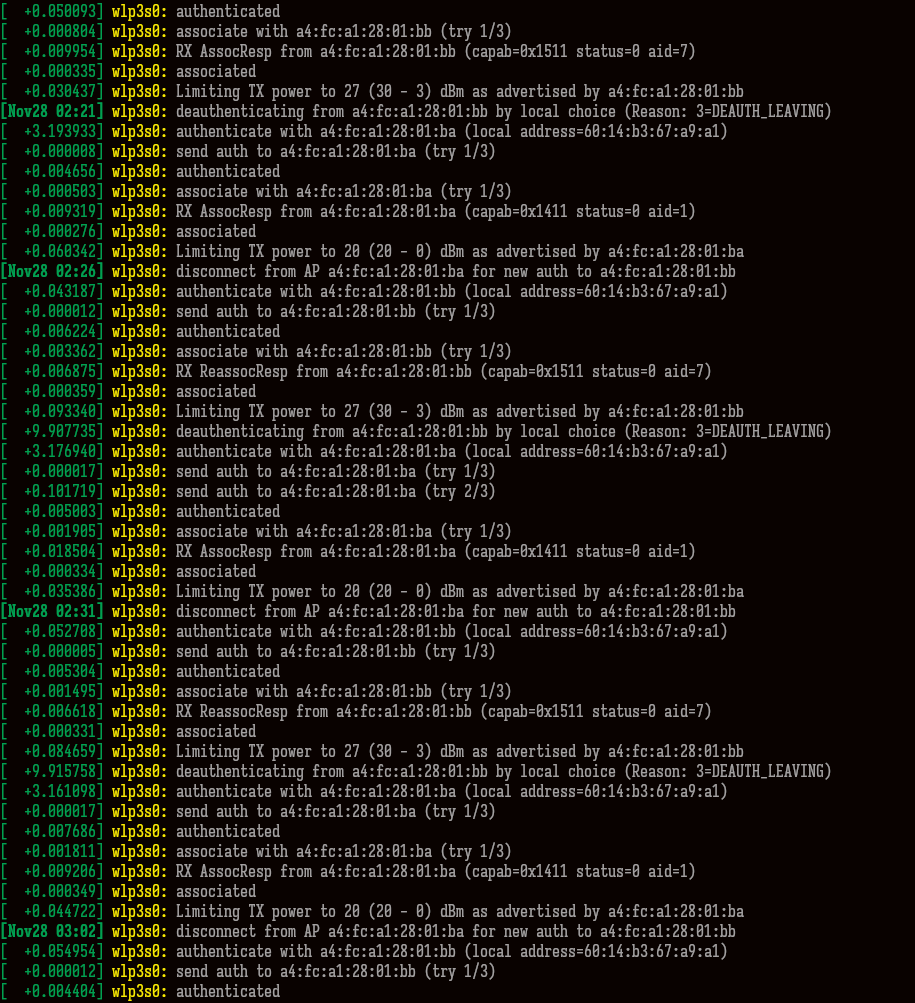
I actually did decide to scroll a bit more and did find this seemingly never-ending list of messages:

This is from yesterday. It loops like this for a while and seems pretty suspicious, but I have no idea what it means or how to interpret it.

I personally have not touched any kernel parameters, or at least not knowingly.

Here’s my configuration.nix (with some text censored)

# Edit this configuration file to define what should be installed on
# your system.  Help is available in the configuration.nix(5) man page
# and in the NixOS manual (accessible by running ‘nixos-help’).

{ config, pkgs, ... }:

{
  imports = [
      ./coding.nix
      ./gaming.nix
      ./general.nix
      ./hardware-configuration.nix
  ];

  config = {
    # Bootloader.
    boot.loader.systemd-boot.enable = true;
    boot.loader.efi.canTouchEfiVariables = true;
    networking.hostName = "<My hostname>"; # Define your hostname.
    # networking.wireless.enable = true;  # Enables wireless support via wpa_supplicant.
    # Configure network proxy if necessary
    # networking.proxy.default = "http://user:password@proxy:port/";
    # networking.proxy.noProxy = "127.0.0.1,localhost,internal.domain";
    # Enable networking
    networking.networkmanager.enable = true;
    nix.settings.experimental-features = [ "nix-command" "flakes" ];
    # Set your time zone.
    time.timeZone = "<My Timezone>";
    # Select internationalisation properties.
    i18n.defaultLocale = "en_GB.UTF-8";
    i18n.extraLocaleSettings = {
      LC_ADDRESS = "en_GB.UTF-8";
      LC_IDENTIFICATION = "en_GB.UTF-8";
      LC_MEASUREMENT = "en_GB.UTF-8";
      LC_MONETARY = "en_GB.UTF-8";
      LC_NAME = "en_GB.UTF-8";
      LC_NUMERIC = "en_GB.UTF-8";
      LC_PAPER = "en_GB.UTF-8";
      LC_TELEPHONE = "en_GB.UTF-8";
      LC_TIME = "en_GB.UTF-8";
    };
    hardware = {
      nvidia = {
        modesetting.enable = true;
        powerManagement = {
          enable = false;
  	finegrained = false;
        };
        open = false;
        nvidiaSettings = true;
        package = config.boot.kernelPackages.nvidiaPackages.stable;
        prime = {
          sync.enable = true;
  	intelBusId = "PCI:00:02:0";
  	nvidiaBusId = "PCI:01:00:0";
        };
      };
      graphics = {
        enable = true;
        enable32Bit = true;
      };
    };
    services.logind.settings.Login.HandleLidSwitchExternalPower = "ignore";
    # Enable the X11 windowing system.
    services.xserver = {
      enable = true;
      videoDrivers = ["nvidia"];
      # Enable the Cinnamon Desktop Environment.
      displayManager.lightdm.enable = true;
      desktopManager.cinnamon.enable = true;
      # Configure keymap in X11
      xkb = {
        layout = "us";
        options = "caps:swapescape";
      };
    };
    # Enable CUPS to print documents.
    services.printing.enable = true;
    # Enable sound with pipewire.
    services.pulseaudio.enable = false;
    security.rtkit.enable = true;
    services.pipewire = {
      enable = true;
      alsa.enable = true;
      alsa.support32Bit = true;
      pulse.enable = true;
      # If you want to use JACK applications, uncomment this
      #jack.enable = true;
      # use the example session manager (no others are packaged yet so this is enabled by default,
      # no need to redefine it in your config for now)
      #media-session.enable = true;
    };
    # Enable touchpad support (enabled default in most desktopManager).
    # services.xserver.libinput.enable = true;
    # Define a user account. Don't forget to set a password with ‘passwd’.
    users.users.ad = {
      isNormalUser = true;
      description = "ad";
      extraGroups = [ "networkmanager" "wheel" ];
      packages = with pkgs; [
      #  thunderbird
      ];
      shell = pkgs.fish;
    };
    # Allow unfree packages
    nixpkgs.config.allowUnfree = true;
    # List packages installed in system profile. To search, run:
    # $ nix search wget
    environment.systemPackages = with pkgs; [
      curl
      gnumake
      htop
      # fish
      # git
      lshw
      mission-center
      neofetch
      nerd-fonts.iosevka-term-slab
      pciutils
      unzip
      # vim
      wget
      xclip
    ];
    # programs.fish.enable = true;
    fonts.packages = with pkgs; [
      nerd-fonts.iosevka-term-slab
    ];
    environment.sessionVariables = {
      STEAM_EXTRA_COMPAT_TOOLS_PATHS = "home/ad/.steam/root/compatibilitytools.d";
    };
    # programs = {
    #   # fish.enable = true;
    #   neovim.defaultEditor = true;
    #   steam = {
    #     enable = true;
    #     gamescopeSession.enable = true;
    #   };
    #   gamemode.enable = true;
    # };
    #
    # fonts.packages = with pkgs; [
    #   nerd-fonts.iosevka-term-slab
    # ];
    # Some programs need SUID wrappers, can be configured further or are
    # started in user sessions.
    # programs.mtr.enable = true;
    # programs.gnupg.agent = {
    #   enable = true;
    #   enableSSHSupport = true;
    # };
    # List services that you want to enable:
    # Enable the OpenSSH daemon.
    # services.openssh.enable = true;
    # networking.firewall.allowedTCPPorts = [ ... ];
    # networking.firewall.allowedUDPPorts = [ ... ];
    # Or disable the firewall altogether.
    # networking.firewall.enable = false;
    # This value determines the NixOS release from which the default
    # settings for stateful data, like file locations and database versions
    # on your system were taken. It‘s perfectly fine and recommended to leave
    # this value at the release version of the first install of this system.
    # Before changing this value read the documentation for this option
    # (e.g. man configuration.nix or on https://nixos.org/nixos/options.html).
    system.stateVersion = "25.05"; # Did you read the comment?
    systemd.user.services.orca.enable = false;
  };
}

It’s pretty much just the generated config with a couple of tweaks, though nothing network related

Yep, nothing looks explicitly problematic as far as networking goes in your configuration.

That said, those messages look like the signal drops regularly, or some other very non-software issue. It might be that you’re using a very congested channel or something.

Also, your nvidia config is subtly broken, but I’ve wasted a lot of electrons on all the cargo culting going on with nvidia config, feel free to search through my post history.

Alright, I’ll guess I’ll investigate a little further on my setup. Also, I’ll check out your posts on nvidia, but is there a particular setting that you see that worries you? I did notice that I had not properly aligned the file, so some of it looks a bit out of wack.

I had heard that I should use the open drivers, but doing so prevented my system from properly booting. I have no idea why. It just got stuck on trying to launch my display manager. I had to roll back to a previous profile (despite the reason, it was kind of nice to try out that nix feature)

The rest of the options i got from a vimjoyer video and some medium article

Mostly you’re redundantly setting a bunch of default values. I’d recommend omitting them to avoid potential future issues.

open is indeed a thing I’d question (as I say nearly weekly, nvidia themselves recommend the open driver now, using the proprietary module at best leaves you with some features missing), but it depends on your GPU. powerManagement.enable should practically always be set to true.

Alright, I’ll fix it up and see if I can get the open drivers working

Thank you for the help

All the best o/