EDIT: Thanks to neobrain in the matrix room, I got some extra info, that sheds some light:
Yes, mouse/keyboard input regressed in 16.0 and that’s only fixed in git so far
You can point service.moonshine.package to the upstream flake as a workaround
When I asked if this is documented anywhere they told me:
Nope, but they’ve been revamping large parts of their compositor backend recently so issues are somewhat expected and I guess remote desktop is a comparatively rarely tested use case (compared to gaming)
Your window displacement issue is also fixed in git btw. For me the only remaining issue is mouse cursor corruption, but that might be nvidia specific
Apparently I could either wait for a fix to come into releases or I could use moonshine’s flake+module instead of nixpkgs’s.
Background
While setting my server, I had initially found Sunshine for remote gaming (and desktop), which worked ok, but had its quirks (it needed me to use something like boot.kernelParams = [ "video=HDMI-A-1:1920x1080R@60D" ]; to fake a display and required a desktop environment.
In mid September of 2026 I was recommened Moonshine and was kinda fascinated. It could run programs in its own compositor and I had even managed to watch a youtube video inside Tor Browser inside a nixos-container, really wild stuff.
Some possilby important information about my system:
- I use KDE
- I connect to the server through tailscale with some policies that specific roles can access specific ports of the whole network
- I have followed this wiki page to fix fonts/themes/icons for flatpak https://wiki.nixos.org/wiki/Fixes_for_non-Nix_applications#Flatpak,_Distrobox,_Appimage_and_other_non-Nix_applications_can’t_find_system_fonts/icons/themes
- Here I have my dotfiles https://codeberg.org/BlastboomStrice/dotfiles
System specs:
- CPU: AMD Ryzen 7 5700X (16) @ 4.66 GHz
- GPU: AMD Radeon RX 7600 [Discrete]
System info
- system:
"x86_64-linux" - host os:
Linux 6.18.60, NixOS, 26.11 (Zokor), 26.11.20261103.1d06008 - multi-user?:
yes - sandbox:
yes - version:
nix-env (Lix, like Nix) 2.95.4 System type: x86_64-linux Additional system types: i686-linux, x86_64-v1-linux, x86_64-v2-linux, x86_64-v3-linux Features: gc, signed-caches System configuration file: /etc/nix/nix.conf User configuration files: /home/base/.config/nix/nix.conf:/home/base/.config/kdedefaults/nix/nix.conf:/etc/xdg/nix/nix.conf:/home/base/.local/share/flatpak/exports/etc/xdg/nix/nix.conf:/var/lib/flatpak/exports/etc/xdg/nix/nix.conf:/home/base/.nix-profile/etc/xdg/nix/nix.conf:/nix/profile/etc/xdg/nix/nix.conf:/home/base/.local/state/nix/profile/etc/xdg/nix/nix.conf:/etc/profiles/per-user/base/etc/xdg/nix/nix.conf:/nix/var/nix/profiles/default/etc/xdg/nix/nix.conf:/run/current-system/sw/etc/xdg/nix/nix.conf Store directory: /nix/store State directory: /nix/var/nix Data directory: /nix/store/ly75bn9mz0sbg20wxknj094b7709fq5p-lix-2.95.4/share - nixpkgs:
/nix/store/wa9kz0gcy4wgakdv28p7i4jc7xkcbbky-source
Issue
Apparently since around mid October of 2026, something broke.
Moonshine does create a compositor and I can run the program, but with 1-2 major issues:
- Only mouse actions work. I cannot use the keyboard as an input anymore, which renders almost every program unusable.
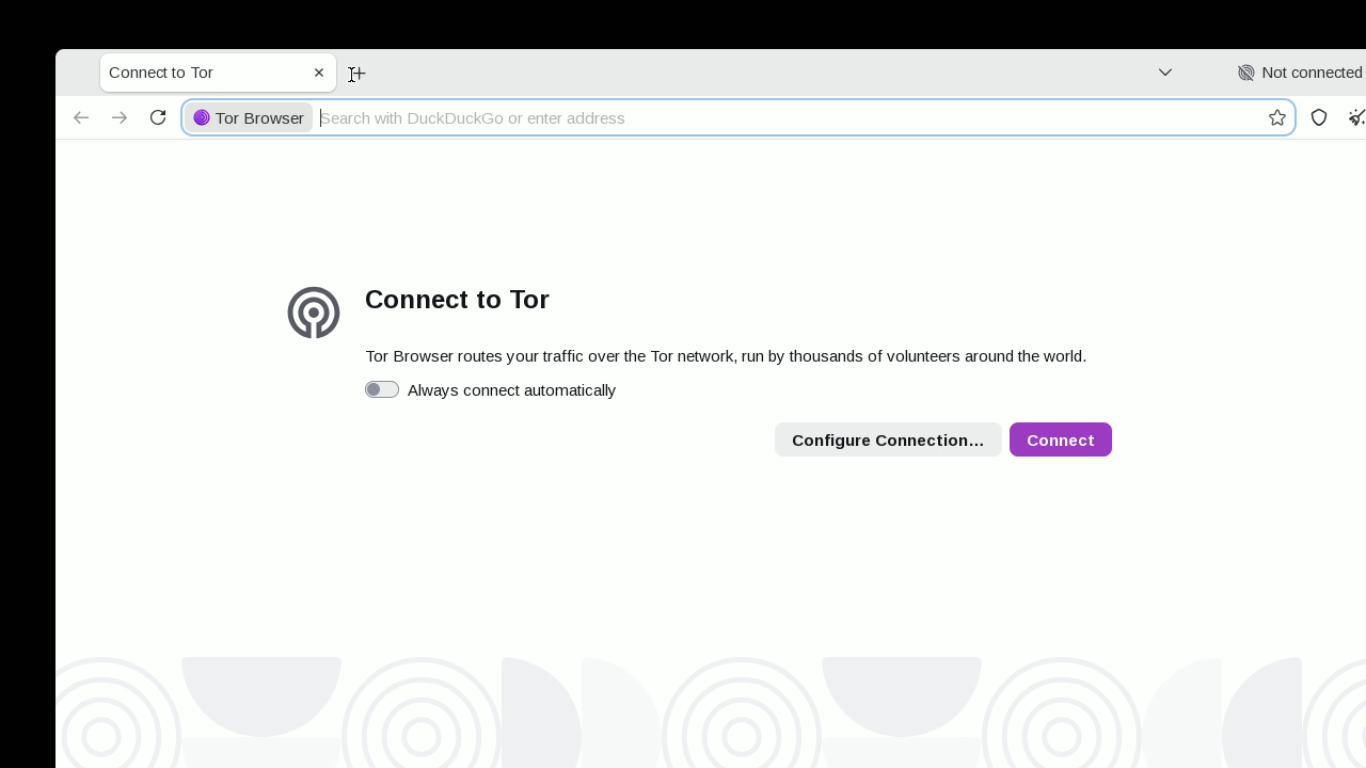
- In many programs (exception being KDE settings window), like Tor Browser and Flatseal (the latter is installed through nix-flatpak, the former is a nix package), the window seems to be moved a bit to the right and down. This means that about 1/10th of the window area is lost somehow, it cannot be viewed.
- While the window is moved, the mapping to the cursor icon isn’t. That way, the cursor clicks the items with a right+down offset.
Example picture:
What do the docs say
Welp, there is no wiki.nixos.org page for moonshine.
Things I’ve tried
I’ve tried various combinations:
- Setting
boot.kernelParams = [ "video=HDMI-A-1:1920x1080R@60D" ];on and off - Creating and using a separate user than the main pc user
- Enabling/Disabling
hardware.uinput.enable = true;(this was needed for Sunshine) - Adding the user to
input(the module already does this, so it’s redundant),uinput,videoandrender - Using the container configuration that seemed to work in September of 2026
- Allowing the both server and the user machine to see all open ports of eachother
The related part of my current configuration is this:
configuration.nix
# Set up moonshine for remote gaming
users = {
  users."gamer" = {
    enable = true;
    isNormalUser = true;
    uid = 46000;
    group = "gamer";
    extraGroups = [
      "video"
      "render"
      "uinput" # For Sunshine
    ];
  };
  groups."gamer".gid = 46000;
};
hardware.uinput.enable = true; # https://github.com/NixOS/nixpkgs/issues/564148
services.moonshine = {
  enable = true;
  # environment = { };
  firewallInterfaces = [
    "lo"
    "tailscale0"
  ];
  # https://github.com/NixOS/nixpkgs/blob/efe6f071ede9d21c37462d2d6682d5e670099684/nixos/modules/services/networking/moonshine.nix#L139-L151
  # extraPackages = [ ];
  user = "gamer";
  settings = {
    name = "nixos-base";
    address = "0.0.0.0";
    application = [
      # {
        # # https://github.com/hgaiser/moonshine
        # # https://github.com/hgaiser/moonshine/issues/168
        # # https://github.com/ianepreston/nixos/issues/456
        # # https://github.com/hgaiser/moonshine/blob/82478577fe447f0e0ef37bd6ac044f3c705057ca/TIPS.md#run-a-desktop-environment-for-a-full-remote-desktop
        # # title = "KDE";
        # command = [
          # "${pkgs.kdePackages.krdp}/bin/dbus-run-session"
          # "--"
          # "DISPLAY=:0"
          # "${pkgs.kdePackages.kwin}/bin/kwin_wayland"
          # "--replace"
        # ];
      # }
      # {
        # I guess this would work if we used the main account instead of "gamer"
        # title = "KDE Settings";
        # command = [
          # "${pkgs.kdePackages.systemsettings}/bin/systemsettings"
        # ];
      # }
      {
        title = "Tor Browser";
        command = [
          "${pkgs.tor-browser}/bin/tor-browser"
        ];
      }
      {
        title = "Flatseal Flatpak";
        command = [
          "${pkgs.dbus}/bin/dbus-run-session"
          "--"
          "flatpak"
          "run"
          "com.github.tchx84.Flatseal"
        ];
      }
      {
        title = "Bottles Flatpak";
        command = [
          "${pkgs.dbus}/bin/dbus-run-session"
          "--"
          "flatpak"
          "run"
          "com.usebottles.bottles"
        ];
      }
      # Example of bottles game
      {
        title = "Outer Wilds";
        command = [
          "${pkgs.dbus}/bin/dbus-run-session"
          "--"
          "flatpak"
          "run"
          "--command=bottles-cli"
          "'com.usebottles.bottles'"
          "run"
          "-p"
          "OuterWilds"
          "-b"
          "Outer_Wilds"
          "--"
          "'%u'"
        ];
      }
    ];
    # application_scanner = [
      # {
        # type = "desktop";
        # directories = [
          # "/run/current-system/sw/share/applications"
        # ];
        # include_terminal = false;
        # resolve_icons = true;
      # }
    # ];
  };
};

# Tailscale
services.tailscale = {
  enable = true;
};

# Flatpak
# Declarative - convergent mode approach
# https://wiki.nixos.org/wiki/Flatpak
services.flatpak = {
  enable = true;
  # Set the remotes to official flathub repo - Unecessary
  remotes = [
    {
      name = "flathub";
      location = "https://dl.flathub.org/repo/flathub.flatpakrepo";
    }
  ];
  # The packages to install
  packages = [
    "com.github.tchx84.Flatseal"
    "com.usebottles.bottles" # bottles
    "org.freedesktop.Platform.VulkanLayer.vkBasalt/x86_64/25.08" # bottles # gets pinned
    "org.freedesktop.Platform.VulkanLayer.gamescope/x86_64/25.08" # bottles # gets pinned
    "org.freedesktop.Platform.VulkanLayer.MangoHud/x86_64/25.08" # bottles # gets pinned
    "com.obsproject.Studio.Plugin.OBSVkCapture" # bottles # gets pinned
  ];
};

# XDG portal - useful for including paths
xdg.portal.enable = true; # flatpak already enables this
xdg.portal.extraPortals = [
  pkgs.kdePackages.xdg-desktop-portal-kde
  pkgs.xdg-desktop-portal-gtk
];
Other solutions
I guess I could use Sunshine as a fallback plan, but I would like to avoid it..
I also use krdp (KDE’s rdp/vnc server) for remote desktop, but it probably won’t work well for games.
Question
Does anyone have a working configuration for moonshine that I could try? I suppose it is working for the others, so I’m probably doing something wrong..