bob_h
January 9, 2026, 3:28pm
1
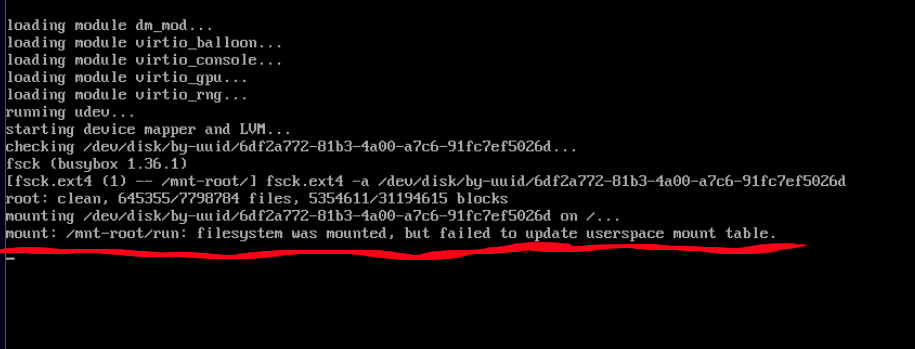
I have setup vm so I can do some dev work all has gone well until rebuild and on reboot I get this message [mount: /mnt-root/run: filesystem was mounted, but failed to update userspace mount table]
I check out jouralctl but can not find any errors relating to this message. I look through configuration.nix and hardware-configuration.nix and can not find any errors.
Has anyone come across this error message and possible way to fix it.
Bob_H
1 Like
I am observing the same message. Did you fix the problem?
I found two other sources showing the same message:
opened 08:24AM - 15 Jun 25 UTC
closed 10:29AM - 19 Jun 25 UTC
I'm using a [patched](https://github.com/NixOS/nixpkgs/pull/414391) NixOS system… where root is a bcachefs subvolume mounted with X-mount.subdir. When stage 1 gets to [here](https://github.com/NixOS/nixpkgs/blob/fd487183437963a59ba763c0cc4f27e3447dd6dd/nixos/modules/system/boot/stage-1-init.sh#L666) I'm seeing
"mount: /mnt-root/run: filesystem was mounted, but failed to update userspace mount table."
My system has cfb80587da7bf3d6a8eeb9b846702d6d731aa1c6 and 22b91501d30a65d25ecf48ce5169ec70848117b8 applied, I've ran it with ae19f7546ccb038966fc121e287e1a1385ba94bb and saw the same error.
System hands off to stage 2 and operates without issue.
I’m using this sd-card image generator for a RiscV board, similar to others like RaspberryPi etc. NixOS on RISCV/VisionFive 2 - Official NixOS Wiki
I changed the root filesystem from ext4 to Btrfs using this:
sdImage = {
compressImage = false;
rootFilesystemCreator = "${pkgs.path}/nixos/lib/make-btrfs-fs.nix";
# do this manually as replacing the resize2fs string in postBootCommands
# might be too complex. btrfs uses its own resize command.
expandOnBoot = false;
};
nixpkgs.overlays =…