Hello. I installed NixOS using the minimal ISO image on a laptop with integrated Intel graphics and a dedicated Nvidia GPU, but I’m having trouble configuring the Nvidia GPU for use. The NixOS Wiki and Manual haven’t been helpful. The system doesn’t even detect the Nvidia GPU; the lspci command only shows the Intel GPU. This issue doesn’t occur when I install NixOS using the graphical ISO.
Please share what config you tried so far for your nvidia card, as well as the specific model.
1 Like
If you install with the graphical ISO. Once you have installed you could look at that configuration.nix and see what is different from the one you are creating when you use minimal. There are also some helpful notes in the Wiki.
1 Like
My configuration file
“It’s been a long time since I installed it with a graphical ISO. Even back then, when I tried to use a minimal ISO, I ran into the exact same problem.”
And the other part? What is your GPU model?
1 Like
GPU Model - GeForce 940mx
That card is just barely still in the window for modern driver support, but it isn’t supported by the open driver.
You’ll need something like:
{
  services.xserver.videoDrivers = [ "nvidia" ];
  hardware.nvidia.open = false;
  # Don't set modesetting manually
}
I’m unsure if the gsp support that’s enabled by default might cause issues, too.
For the time being, try to get it to run without sync first. I.e., don’t set any other nvidia settings beyond those two.
If it still doesn’t work, try to get us dmesg output. This sentence makes me suspect hardware issues:
1 Like
“Thanks, everyone. In the end, I just gave up on NixOS and installed Ubuntu.”
Yo man! Im have same problem with nvidia 940mx
Can u whath it and saw what possibly wrong with it please?
This is my nvidia configuration file
{config, pkgs, lib, ...}: { ### NVIDIA hardware.graphics.enable = true; nixpkgs.config.nvidia.acceptLicense = true; services.xserver.videoDrivers = [ "modesetting" "nvidia" ]; hardware.nvidia.package = config.boot.kernelPackages.nvidiaPackages.legacy_470; hardware.nvidia.modesetting.enable = true; hardware.nvidia.open = false; }
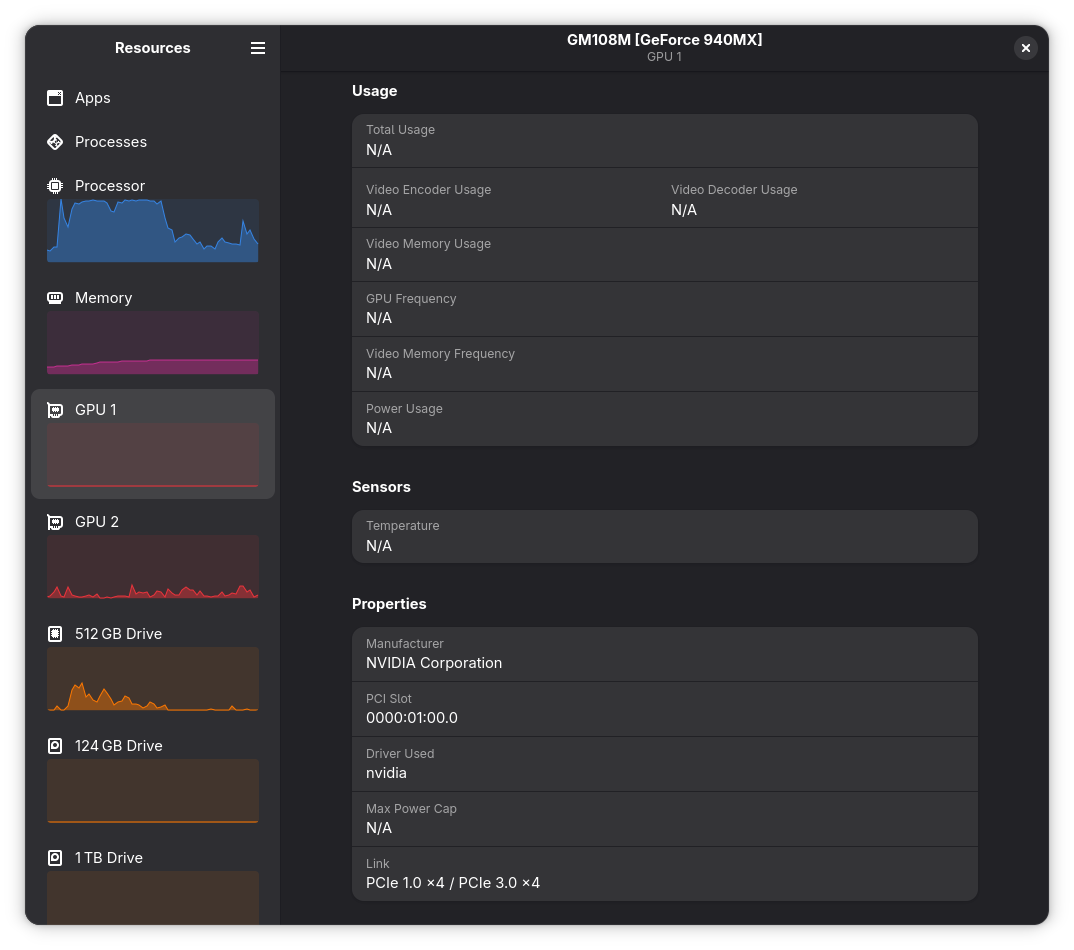
Even though OP has given up, it seems the topic is still relevant.
Looking at https://www.nvidia.com/en-us/geforce/drivers/ - it seems the GPU is still supported by the latest proprietary drivers.
Here’s my recommendation:
hardware.graphics.enable = true;
hardware.graphics.enable32Bit = true;

# Although they've come a long way, the closed-source driver are still better in some scenarios. Disable the open-source kernel modules
hardware.nvidia.open = false;

# Make sure the nvidia driver is listed in videoDrivers
# You should also add your iGPU's driver here - modesetting or amdgpu
services.xserver.videoDrivers = [ ... "nvidia" ... ];
This is the minimal required configuration to have working Nvidia drivers.
If you’re on X11, you should declare your PRIME configuration as well:
hardware.nvidia.prime.intelBusId = ""; # Fill this in if you have an Intel iGPU
hardware.nvidia.prime.amdgpuBusId = ""; # Fill this in if you have an AMD iGPU
hardware.nvidia.prime.nvidiaBusId = ""; # Fill this in with your Nvidia GPU Bus ID
hardware.nvidia.prime.offload.enable = true;
Read more on the Wiki: https://wiki.nixos.org/wiki/NVIDIA#Hybrid_graphics_with_PRIME
Also keep in mind the current latest driver in NixOS’s repos has a critical bug with display resolutions and will mostly force displays to 1080p resolution. I’ve posted a fix here: Nvidia driver detected wrong monitor resolution! - #5 by Kaukov
Hey, please don’t contribute to the misinformation about the nvidia drivers floating around. Specifically:
This is superfluous. hardware.graphics.enable is set by your WM/DE module, and the 32bit variant is set by the steam module.
You don’t need to set these yourself, unless you build your own WM setup without any NixOS modules, or don’t use steam - though if you don’t use steam you probably also don’t need 32 bit libraries, so I’d recommend not enabling that option in that case - that only makes sense with some homebrew wine setups, but even wine defaults to 64bit binaries at this point AIUI.
They are ultimately probably harmless, hardware.graphics.enable will be set on most desktop systems anyway. Adding the 32bit libs adds quite a bit of disk space overhead, so avoiding that where possible is best, but it’s not going to break anything.
Regardless, insisting people add this to their configuration to use an nvidia GPU at all suggests that you’ve not really grokked how the NixOS modules for this fit together. It’d be best if we stopped recommending this and just let the pieces do their job as intended, instead of brute forcing hacks for everyone that only work around some influential person’s really specific broken setup.
This is simply false. The proprietary module is all but deprecated. It simply has fewer features at this point; as per nvidia: https://download.nvidia.com/XFree86/Linux-x86_64/580.105.08/README/kernel_open.html
Specifically, this quote from those docs pages:
We recommend the use of open kernel modules on all GPUs that support it.
Don’t use the proprietary driver if you have a choice.
However:
The open flavor of kernel modules supports Turing and later GPUs. The open kernel modules cannot support GPUs before Turing, because the open kernel modules depend on the GPU System Processor (GSP) first introduced in Turing.
So if you have an older GPU, such as both people in this thread, you cannot use the open driver. I think the perception of one being “better” than the other is simply from people who don’t understand this.
Please don’t, that’s wrong and will at best lead to prime failing to work, at worst you won’t be using the nvidia driver at all. Only add nvidia. I know the unofficial wiki recommends adding more drivers for god knows what reason, don’t read the unofficial wiki, it’s unmaintained.
… wait, why did people add this back to the official wiki, I explicitly removed that because it’s stupid and the nvidia driver docs themselves disrecommend this. FFS.
FWIW, on modern systems this is almost certainly useless, since it doesn’t come with appropriate wayland configuration. It also doesn’t help if you don’t explain how to use the nvidia-offload command.
Plus, in this case, muddying the waters with more configuration that might or might not be wrong makes it harder to see what the issue is.
FWIW, that doesn’t affect the proprietary driver, so shouldn’t be an issue for a 940M user.
1 Like
Can you try what I suggested to the OP? I.e., just this configuration:
{
  services.xserver.videoDrivers = [
    "nvidia"
  ];

  # Using 940M, which is older than Turing and hence unsupported by the open driver
  hardware.nvidia.open = false;
}
You shouldn’t need to set anything else; adding the modesetting driver ahead of nvidia in the list will break stuff.
As @Kaukov says, and as I’ve noted earlier in the thread, too, this GPU should be supported by the latest driver, albeit not the open one, so we don’t try to set a legacy package.
The acceptLicense thing is specifically for CUDA stuff, which you’re not indicating you’re using here. All the other options you set are default settings. The defaults may change upstream, and if they do they change for good reason, so I recommend not setting them at all; that way you can benefit from upstream maintenance, and get appropriate warning if you need to make a significant choice of some kind in the future.
If you do in fact have a multi-GPU setup, we can try getting that to work after we get the nvidia GPU to work at all.
3 Likes
I’m speaking from experience with an RTX 4090 and the proprietary driver. It is definitely an issue with it as well.
That’s why I mentioned specifically X11 and then linked to the Wiki page.
https://wiki.nixos.org/wiki/NVIDIA Is this not the official Wiki? If so, it’s definitely mentioned there.
I agree this is a mistake on my part. I’ve had issues with the open kernel modules before so that’s why I’ve always used the proprietary ones. I will stop recommending the proprietary drivers on new GPUs. However, as you noted, this isn’t the case with OP’s GPU.
I agree completely with you, I’m in the wrong here. However, explicitly enabling the 32bit variant is necessary when Steam isn’t enabled via programs.steam.enable and/or only Wine and Lutris are installed, from what I was able to gather.
Yes, and both wikis are currently wrong. Hence:
I’ve gone and tested it again to confirm, at least amdgpu is loaded automatically by the kernel if needed. It’s a built-in module, this should be unsurprising. The nvidia driver is the one coordinating the offload, and needs to be explicitly added. If you mis-order the drivers, like the wiki suggests, the amdgpu driver is loaded first and we never end up being able to run things via offload. In fairness, I extrapolate that this is true for the modesetting driver as well, but in either case the wiki is wrong for at least amdgpu.
I’d love to have more devices for testing, but I am pretty sure (especially given additional fishy recommendations like hardware.graphics.enable) that the people contributing to that article aren’t particularly rigorous in figuring out what is actually needed or why.
Yes, I said as much:
Emphasis added this time.
That said:
Steam is pretty much the only user of 32 bit libraries on your average desktop system. Yes, you might also need them if you do some custom stuff with wine, and in exactly that case setting the option makes sense, but almost nobody does. Don’t enable 32 bit libraries if you don’t need them.
Fair enough, odd that the upstream bug tracker disagrees with you, but there’s a lot of dangerous half-information there as well, especially regarding the proprietary driver - looks like a good number of the comments there don’t realize they’re on the wrong bug tracker.
Sigh, I really hate the nvidia driver.
1 Like
I try this but it doesn’t work 
Alright, what does “doesn’t work” mean exactly?
Besides explaining the outcome a bit better, can you log into a tty (press ctrl+alt+F3 instead of logging into your graphical DM), and share the output of sudo dmesg and sudo journaltctl --boot -e?
1 Like