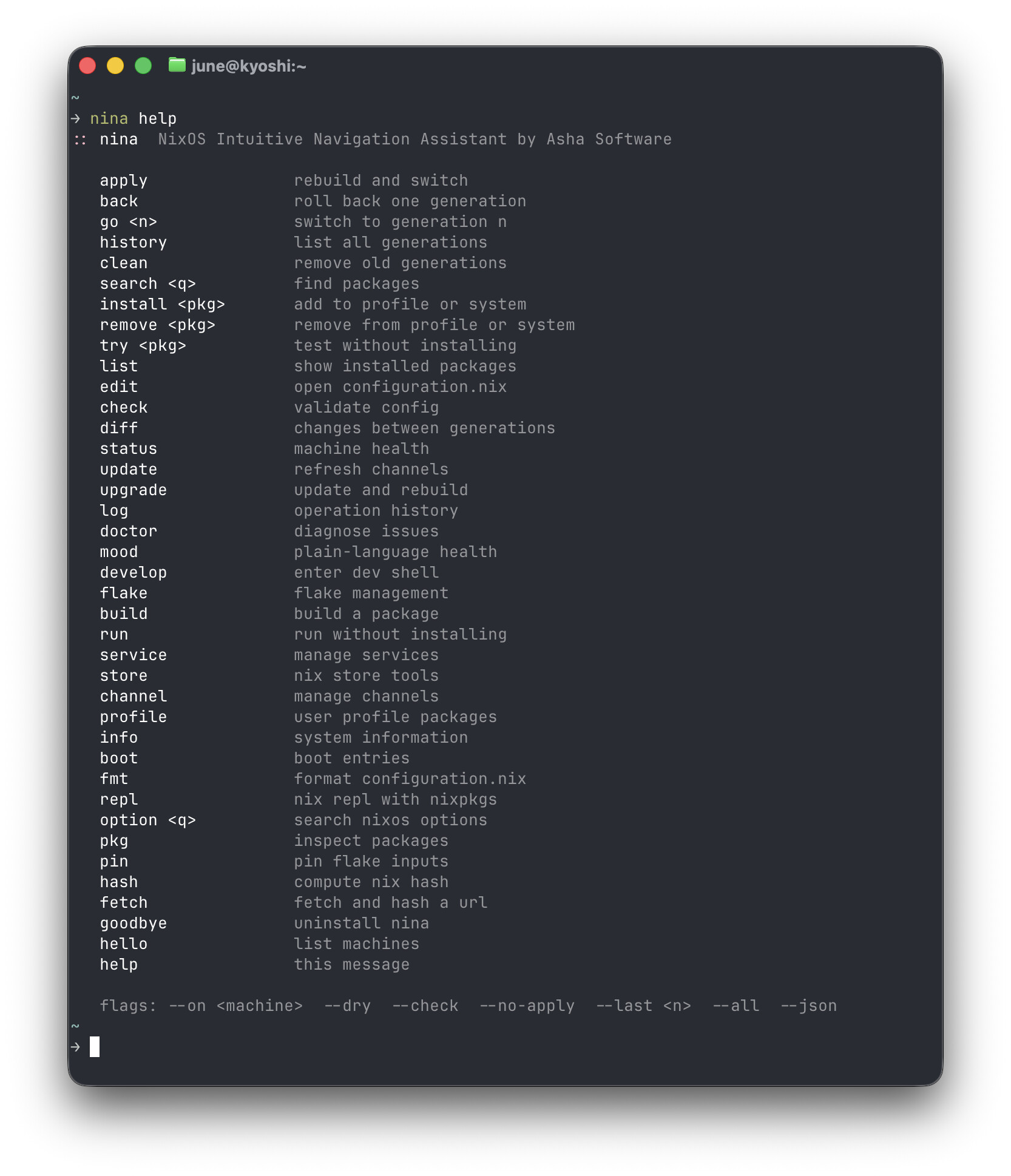
Nina: NixOS Intuitive Navigation Assistant
Hey guys, June here! I’ve been building Nina for a while because NixOS became my favorite linux distro to use but the command surface is brutal and confusing with way too many layers of abstraction.
I have actually some really exciting ambitious things planned for NixOS as a whole but i’ll talk more about that at a later date!
UPDATE: My account is under review and i can’t reply to comments. I have resolved the flake.lock and archive list issues. Thankyou for bringing them to my attention!*
Nina wraps the full NixOS command surface in plain memorable verbs. One binary, zero dependencies, written in Zig 0.16.

The search widget is the part I’m most proud of — it opens inline, results scroll with you as you navigate, you can backspace and search for something else without leaving. No more switching to the browser and searching the nixpkgs site for everything.
Install on NixOS:
curl -fsSL kepr.uk/nina/install.sh | sh

koh steal kepr.uk/nina && koh build
Source at nina — kepr .
More info and Documentation available at nina - homepage
Built by Asha Software — a privacy-first indie studio.
llm — used Claude as an implementation partner. Architecture and all decisions are mine. Every agent save is attributed and auditable in the history.
7 Likes
I see that the source code is available at https://kepr.uk/nina/archive/HEAD.tar.gz . Is the any way to pin it to a particular commit/save? And also there is no flake.lock file so it is not a proper flake. But it builds with --no-write-lock-file
❯ nix build --no-link --print-out-paths --no-write-lock-file https://kepr.uk/nina/archive/HEAD.tar.gz
warning: not writing modified lock file of flake 'https://kepr.uk/nina/archive/HEAD.tar.gz':
• Added input 'nixpkgs':
    'github:NixOS/nixpkgs/331800de5053fcebacf6813adb5db9c9dca22a0c?narHash=sha256-x5UQuRsH3MqI0U9afaXSNqzTPSeZlRLvFAav2Ux1pNw%3D' (2026-05-31)
/nix/store/aqdkla6ni9n07m5zis8b51wxx447qfr7-nina-3.0.15
2 Likes
Apparently the snapshot list is here: nina — kepr
So HEAD as of writing this could also be retrieved thru https://kepr.uk/nina/archive/e4b3b0360ecc.tar.gz
2 Likes
Thank you for sharing!
Did anyone try this and willing to share impressions?
1 Like
Why not host source code on github so it can be audited and packaged in nixkpgs?
3 Likes
Sorry for the late response but thanks for bring that one to my attention, I have since resolved it. Specific saves are available to be pinned now and the flake.lock was fixed
I personally do not use git or github and they were not the ideal fit for my workflow, I also do not wish to support or use anything that Microsoft has control of. That is why I created my own version control system and source hosting platform to adapt to how I work. However the source being on Github is not a requirement as far as I understand to be added to nixpkgs. It seems like you just need a stable tarball url and hash, both of which are provided by Kepr. If a community member would like to open a PR for this they absolutely can.
5 Likes
I think you might have to take one for the team hahah
I’m still unable to update the post at the moment but I wanted to clarify that the install script is actually discontinued and now installing nina is as simple as
nix profile add https://kepr.uk/nina/archive/HEAD.tar.gz
1 Like
One more thing, please feel free to file issues on Kepr if you encounter any weird stuff or problems with nina! I am trying to make Kepr easy and pleasant to use. You do not need any account or anything to file an issue, it takes only a moment to do so, no friction.
1 Like
I like it! Having nina service logs <service> is very nice, since systemctl doesn’t have a log command (I’ve never liked having to use journalctl instead and remember the flags).
The interactive package search with tryout option is also awesome.
I have some feature requests 
- Store the config file in
$XDG_CONFIG_HOME/ instead of in my home dir
- Support flake-based system configuration for rollbacks and such – and, ideally, disable channel commands for flake-based systems. It’d be nice if the first-time-run “where’s your configuration?” prompts accounted for this – like, asking whether you’re using a flake or not. I found the prompts really confusing. I just put ~/nixos-config for both prompts, since that’s where my git clone of my nixos configs resides. But I don’t think it’s making any use of that config since I’m using a flake…? (Or maybe
nina list does?)
nina why <pkg> to tell me what package(s)/derivation(s) caused a certain package to be installed- Show a help message when a command is missing a sub-command, like
nina flake (bonus, make nina flake help also show the help) - so I can discover how to use it directly on the command line
nina service --user logs <user service>- Support (flake-based) home manager configuration
I am very happy with nh as a wrapper for rebuilding my system and home-manager configurations, but I haven’t really had to do rollbacks or anything… I’d love to use nina for that.
Nice job on Nina, it’s already quite nice!
1 Like
Thanks for the feedback! Check back around tomorrow morning or so and everything but home manager will be done. I intended to add support anyway. So all of it will be taken care of shortly! I want nina to be an excellent experience for everyone and I’m glad you enjoy her!
1 Like
Nina — What’s New
v3.1.3 — Flake and Home Manager support
Home Manager
A new nina home command group manages your Home Manager configuration alongside your system. All commands work with both standalone and NixOS module setups.
nina home apply       apply your home configuration
nina home apply --dry preview changes without applying
nina home back        roll back to the previous home generation
nina home history     list all home manager generations
nina home diff        what changed between generations
nina home check       validate without applying
nina home edit        open home.nix in your editor
nina home packages    list packages managed by home manager
nina status and nina doctor now show your Home Manager generation and health alongside system information.
Flake-aware system commands
nina apply and nina upgrade now detect whether your config directory contains a flake.nix and use the correct rebuild path automatically. No configuration needed — it just works.
The setup wizard scans for flake.nix on first run and configures itself accordingly. Channel commands note themselves as irrelevant on flake systems and point you to nina flake update instead.
v3.0.24 — Community feedback improvements
- Config now stored at
~/.config/nina/config following XDG conventions. Existing ~/.nina.conf is migrated automatically on first run.
nina why <pkg> added as a top-level alias for nina pkg whynina flake, nina service, nina store, nina channel, nina gen, and nina pkg now show a subcommand list when called with no arguments- All service commands support
--user for user-managed systemd services
2 Likes
Awesome, wow! Thanks so much. I’m trying it out now and am adding nina as an input to my main flake! 
I’m finding some issues, so I will file reports on kepr.
1 Like
No thank you Adam for the great suggestions and for your patience!
Your issue should be fixed in the latest build now. All five nina pkg commands now resolve packages as nixpkgs# consistently. Verified on a VM matching your setup, including the exact ffmpeg cases. Let me know if its all good on your end now!
Like the way this manages things with arrow key navigation for search queries and is seems, at a glance, comprehensive in providing nix features.
I also really like this wraps other commands into the wrapper, to ease actual system use and not just using the nix subcommands and maybe bundling in flags. Helper scripts can be hard to write because anticipating use cases and patterns is hard but this one looks better than the others intended for community use.
Also noticed the use of zig, very nice. Been meaning to write something in it.
Not the biggest fan of the site and kepr repo’s fonts + color schemes but that is my arbitrary preferences and doesn’t detract from the overall high quality project. Great work.
1 Like
Appreciate your feedback Thomas. I hope nina will be really useful to people and help bring more to NixOS which has quite the learning curve!
I personally do not wish to support or use anything that Anthropic has tainted, so I understand the desire to avoid Microsoft when possible.
That is why I created my own version control system and source hosting platform to adapt to how I work.
Making your own personal VCS is neat and probably also a great learning experience.
You could potentially mirror the source code to codeberg or gitlab so that it’s available for more people to discover and audit.
6 Likes
Nina — What’s New (v3.2.x)
Lifecycle hooks
Pre and post hooks for apply, back, home apply, and upgrade. Drop executable shell scripts in ~/.config/nina/hooks/ — nina runs them and checks the exit code before and after each operation.
# ~/.config/nina/hooks/pre-apply
# example: check for uncommitted changes before applying
if koh status | grep -q "unsaved changes"; then
    echo "unsaved changes — save before applying"
    exit 1
fi
If a pre-hook fails, nina warns and asks whether to continue. Post-hook failure shows a warning without affecting the command result.
Plain-english error messages
Build errors are no longer raw nix output. 25 known error patterns are translated to plain english with a specific suggestion. Unknown errors are structured and stripped of noise. You always get a calm, readable response — never a wall of nix machinery. Working to extend to more error patterns
Live build panel
nina apply and nina upgrade now show a live panel while the system rebuilds — the current package name updating in place and a colored progress bar.
Now that seems like a great idea! I have been a bit skeptical about this, since some mapping seem entirely redundant: nix flake update → nina flake update, nix develop → nina develop, nix run → nina run etc. But I am starting to see the overall vision behind this: not only what is being typed by the user becomes more concise and intuitive, also the feedback the tool returns can be…
I think I’ll still be using plain nix and nh commands for now, since I’m quite comfortable with those already. But thanks for making beginners’ lives easier, I’ll definitely be pointing the nix-curious towards this…
Also, quick suggestion. As you have all of these nina home, commands, managing a HM config is made simpler. But I’d propose nina home init, so that one can get started quickly with HM without having to look up how to nix run github:nix-community/home-manager init. Not sure if that does a lot except effectively being an alias, but given so many commands already kind-of are, this could be a neat addition.
1 Like