Hi all, I’m new (~5 weeks) to NixOS and have recently starting porting my configuration to flakes.
In my flake.nix, I define nixConfig.extra-substituters and nixConfig.extra-trusted-public-keys to enable the use of a community cache. As expected, I’m prompted as to whether I would like to trust these values when I sudo nixos-rebuild switch --flake.
I would like to disable the warnings for the particular values I have set. I would like to do so declaratively, so saying ‘y, please trust this value permanently’ isn’t want I want. My expectation was that setting the same values for those same nixConfig keys on a system basis (using nix.settings) would disable the prompts — why prompt a user to enable an option that is already enabled? — but I found that I was still prompted. Is this expected behavior? Is there something I am missing? What can I do to achieve the desired effect?
I tried a few different things, notably using nix.settings.substituters directly instead of nix.settings.extra-substituters, using both at once, and using both settings in both NixOS and home-manager at once. I was able to confirm the settings values were register using nix config show.
Here’s an image showing my attempt to set every relevant-seeming Nix setting, confirming they’re active, and still getting the prompt I’m trying to avoid (let me know if you’d like a text-based copy of this instead of an image):
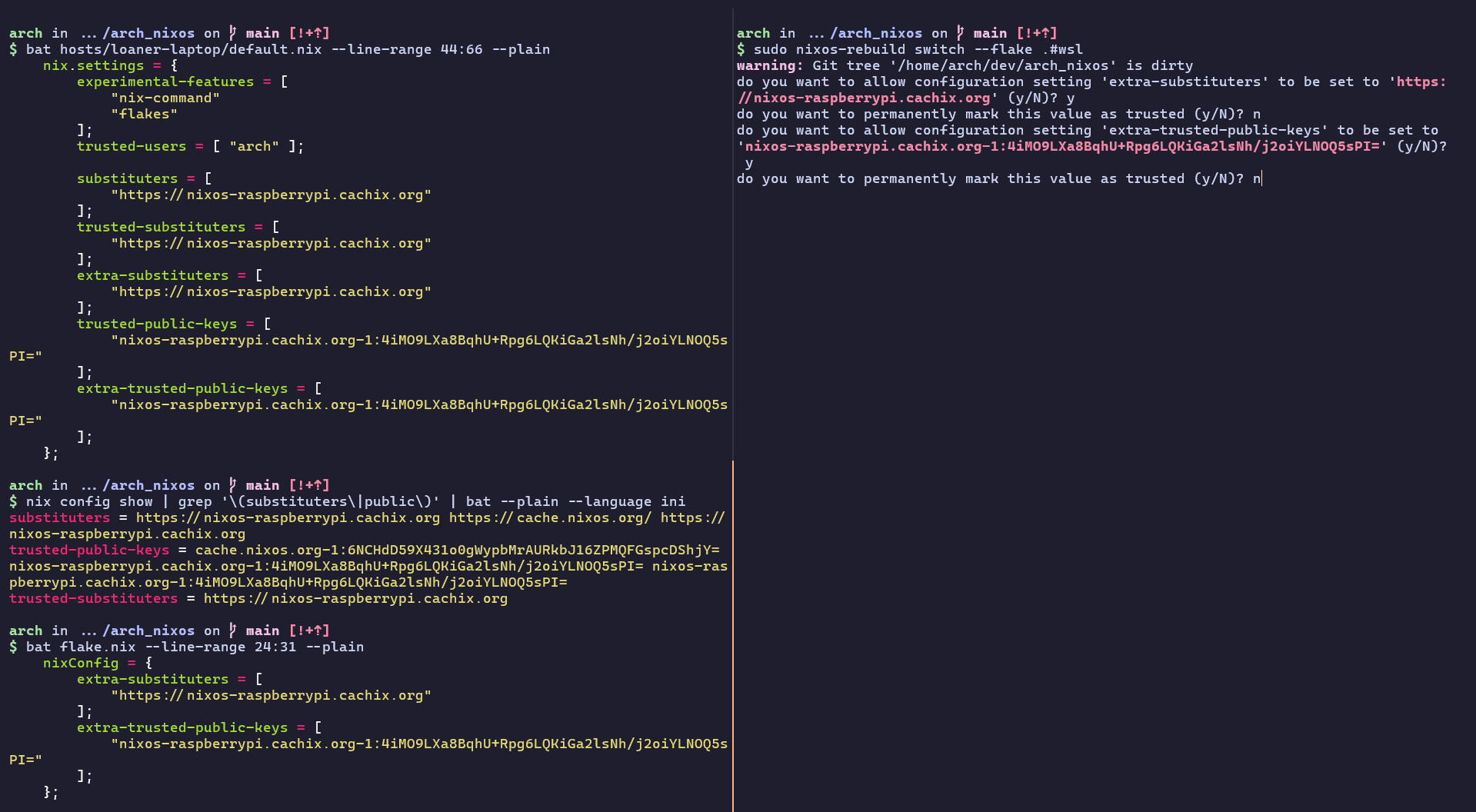
Using equivalent command-line flags instead of nixConfig isn’t great because that would back me into using a shell script instead of just using nix, and I’m not comfortable with using--accept-flake-config. Short of entirely removing `nixConfig` from the flake or just sucking it up and letting Nix permanently trust the values imperatively, I’m not aware of any other solutions. I couldn’t find any relevant discussion online when I searched.
My config is here (locked to time of post: link; I can alternatively provide snippets if that’s better!); the system in question is the wsl host in flake, which is mostly configured in hosts/loaner-laptop/. This is a NixOS-WSL install, I have not yet tested a NixOS install on bare metal or in a VM. Here’s the output of nix-info -m and wsl --info:
- system:
"x86_64-linux" - host os:
Linux 6.6.114.1-microsoft-standard-WSL2, NixOS, 26.05 (Yarara), 26.05.20260427.1c3fe55 - multi-user?:
yes - sandbox:
yes - version:
nix-env (Nix) 2.34.6 - nixpkgs:
/nix/store/l61vfkyy0qrnz9bmgx84fa7z3bjzhyp4-source - WSL version:
2.7.1.0 - Kernel version:
6.6.114.1-1 - WSLg version:
1.0.73 - MSRDC version:
1.2.6676 - Direct3D version:
1.611.1-81528511 - DXCore version:
10.0.26100.1-240331-1435.ge-release - Windows version:
10.0.26200.8037- I am, to be clear, running Win11 25H2 (NixOS soon
 ), not sure why it registers as something that looks like Win10.
- I am, to be clear, running Win11 25H2 (NixOS soon
Happy to answer any clarifying questions. If I’m hitting the X/Y problem here, I’m happy to field opinionated suggestions about different approaches to dismissing the prompts. Thanks!