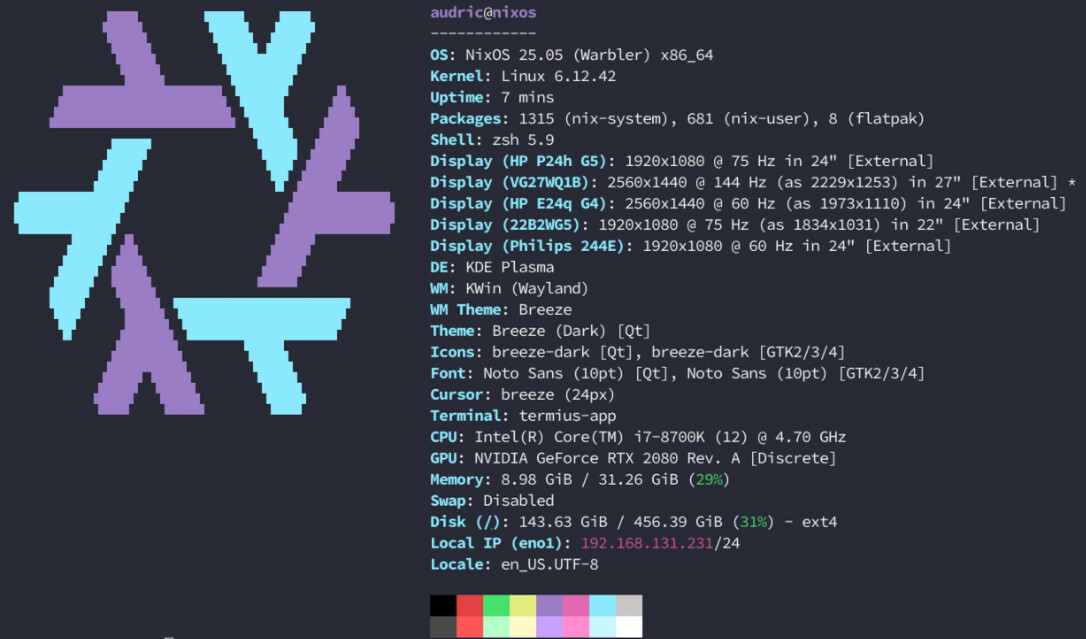
I have not an “unbearable” / unusable behavior / performance, but very frustrating “stuttering”.
Every… 10 - 30 seconds (its random or and I cannot figure out a pattern) I have a micro cut of everything. Sounds cuts for a split second, if at the time I am moving the move or window; it freezes. Its a split second. But very often, and constantly. Its not resources… I have been using this pc for many years, with other distros, and never had this issue before.
Its a fresh install, its now 2 days old. At first, I thought the system was having a hard time synchronizing my emails in thunderbird, and my nextcloud; but they are now over, and the behavior continues.
# Edit this configuration file to define what should be installed on
# your system.  Help is available in the configuration.nix(5) man page
# and in the NixOS manual (accessible by running ‘nixos-help’).

{ config, pkgs, ... }:


{
  imports =
    [ # Include the results of the hardware scan.
      ./hardware-configuration.nix
    ];

  # Bootloader.
  boot.loader.systemd-boot.enable = true;
  boot.loader.efi.canTouchEfiVariables = true;

  networking.hostName = "nixos"; # Define your hostname.
  # networking.wireless.enable = true;  # Enables wireless support via wpa_supplicant.

  # Configure network proxy if necessary
  # networking.proxy.default = "http://user:password@proxy:port/";
  # networking.proxy.noProxy = "127.0.0.1,localhost,internal.domain";

  # Enable networking
  networking.networkmanager.enable = true;

  # Set your time zone.
  time.timeZone = "Europe/Madrid";

  # Select internationalisation properties.
  i18n.defaultLocale = "en_US.UTF-8";

  i18n.extraLocaleSettings = {
    LC_ADDRESS = "es_ES.UTF-8";
    LC_IDENTIFICATION = "es_ES.UTF-8";
    LC_MEASUREMENT = "es_ES.UTF-8";
    LC_MONETARY = "es_ES.UTF-8";
    LC_NAME = "es_ES.UTF-8";
    LC_NUMERIC = "es_ES.UTF-8";
    LC_PAPER = "es_ES.UTF-8";
    LC_TELEPHONE = "es_ES.UTF-8";
    LC_TIME = "es_ES.UTF-8";
  };

  # Enable the X11 windowing system.
  # You can disable this if you're only using the Wayland session.
  services.xserver.enable = false;

  # Enable the KDE Plasma Desktop Environment.
  services.displayManager.sddm.enable = true;
  services.desktopManager.plasma6.enable = true;
  services.xserver.videoDrivers = [ "displaylink" "modesetting" ];
  services.flatpak.enable = true;

  # Configure keymap in X11
  services.xserver.xkb = {
    layout = "es";
    variant = "";
  };

  # Configure console keymap
  console.keyMap = "es";

  # Enable CUPS to print documents.
  services.printing.enable = true;

  # Enable sound with pipewire.
  services.pulseaudio.enable = false;
  security.rtkit.enable = true;
  services.pipewire = {
    enable = true;
    alsa.enable = true;
    alsa.support32Bit = true;
    pulse.enable = true;
    # If you want to use JACK applications, uncomment this
    #jack.enable = true;

    # use the example session manager (no others are packaged yet so this is enabled by default,
    # no need to redefine it in your config for now)
    #media-session.enable = true;
  };

  # Enable touchpad support (enabled default in most desktopManager).
  # services.xserver.libinput.enable = true;

  # Define a user account. Don't forget to set a password with ‘passwd’.
  users.users.audric = {
    isNormalUser = true;
    description = "audric";
    shell = pkgs.zsh;
    extraGroups = [ "networkmanager" "wheel" ];
    packages = with pkgs; [
      kdePackages.kate
    #  thunderbird
    ];
  };

  # Install firefox.
  programs.firefox.enable = true;
  programs.zsh = {
    enable = true;
    enableGlobalCompInit = false;
    ohMyZsh = {
      enable = true;
      theme = "gentoo";
      customPkgs = with pkgs; [
        zsh-git-prompt
        zsh-nix-shell
        zsh-vi-mode
        zsh-completions
        zsh-command-time
        zsh-powerlevel10k
        zsh-fast-syntax-highlighting
        nix-zsh-completions
      ];
    };
  };


  # Allow unfree packages
  nixpkgs.config.allowUnfree = true;

  # List packages installed in system profile. To search, run:
  # $ nix search wget
  environment.systemPackages = with pkgs; [
    displaylink
    (vscode-with-extensions.override {
      vscodeExtensions = with vscode-extensions; [
        bbenoist.nix
      ];
    })
  #  vim # Do not forget to add an editor to edit configuration.nix! The Nano editor is also installed by default.
  #  wget
  ];

  # Some programs need SUID wrappers, can be configured further or are
  # started in user sessions.
  # programs.mtr.enable = true;
  # programs.gnupg.agent = {
  #   enable = true;
  #   enableSSHSupport = true;
  # };

  # List services that you want to enable:

  # Enable the OpenSSH daemon.
  # services.openssh.enable = true;

  # Open ports in the firewall.
  # networking.firewall.allowedTCPPorts = [ ... ];
  # networking.firewall.allowedUDPPorts = [ ... ];
  # Or disable the firewall altogether.
  # networking.firewall.enable = false;

  # Fix for xdg-desktop-portal-kde / Plex Desktop sign-in
  xdg.portal.enable = true;
  xdg.portal.xdgOpenUsePortal = true;
  xdg.portal.extraPortals = [
    pkgs.kdePackages.xdg-desktop-portal-kde
    pkgs.xdg-desktop-portal-gtk
  ];

  # This value determines the NixOS release from which the default
  # settings for stateful data, like file locations and database versions
  # on your system were taken. It‘s perfectly fine and recommended to leave
  # this value at the release version of the first install of this system.
  # Before changing this value read the documentation for this option
  # (e.g. man configuration.nix or on https://nixos.org/nixos/options.html).
  system.stateVersion = "25.05"; # Did you read the comment?

}
This is my first time using NixOS, i dont know if im missing something obvious.
I will try with another desktop session (as soon as I find out how to install one); but still; thatd be a workaround. The idea is to use KDE Plasma.
Hello, thank you for your answer and your welcoming!
ah yes obviously, the gpu drivers.
unfortunately, still not good 100%
this is my new config:
# Edit this configuration file to define what should be installed on
# your system.  Help is available in the configuration.nix(5) man page
# and in the NixOS manual (accessible by running ‘nixos-help’).

{ config, pkgs, ... }:


{
  imports =
    [ # Include the results of the hardware scan.
      ./hardware-configuration.nix
    ];

  # Bootloader.
  boot.loader.systemd-boot.enable = true;
  boot.loader.efi.canTouchEfiVariables = true;

  networking.hostName = "nixos"; # Define your hostname.
  # networking.wireless.enable = true;  # Enables wireless support via wpa_supplicant.

  # Configure network proxy if necessary
  # networking.proxy.default = "http://user:password@proxy:port/";
  # networking.proxy.noProxy = "127.0.0.1,localhost,internal.domain";
    # Enable OpenGL
  hardware.graphics = {
    enable = true;
  };

  # Load nvidia driver for Xorg and Wayland - set below with displaylink
  #services.xserver.videoDrivers = ["nvidia"];

  hardware.nvidia = {

    # Modesetting is required.
    modesetting.enable = true;

    # Nvidia power management. Experimental, and can cause sleep/suspend to fail.
    # Enable this if you have graphical corruption issues or application crashes after waking
    # up from sleep. This fixes it by saving the entire VRAM memory to /tmp/ instead
    # of just the bare essentials.
    powerManagement.enable = false;

    # Fine-grained power management. Turns off GPU when not in use.
    # Experimental and only works on modern Nvidia GPUs (Turing or newer).
    powerManagement.finegrained = false;

    # Use the NVidia open source kernel module (not to be confused with the
    # independent third-party "nouveau" open source driver).
    # Support is limited to the Turing and later architectures. Full list of
    # supported GPUs is at:
    # https://github.com/NVIDIA/open-gpu-kernel-modules#compatible-gpus
    # Only available from driver 515.43.04+
    open = false;

    # Enable the Nvidia settings menu,
	# accessible via `nvidia-settings`.
    nvidiaSettings = true;

    # Optionally, you may need to select the appropriate driver version for your specific GPU.
    package = config.boot.kernelPackages.nvidiaPackages.stable;
  };

  # Enable networking
  networking.networkmanager.enable = true;

  # Set your time zone.
  time.timeZone = "Europe/Madrid";

  # Select internationalisation properties.
  i18n.defaultLocale = "en_US.UTF-8";

  i18n.extraLocaleSettings = {
    LC_ADDRESS = "es_ES.UTF-8";
    LC_IDENTIFICATION = "es_ES.UTF-8";
    LC_MEASUREMENT = "es_ES.UTF-8";
    LC_MONETARY = "es_ES.UTF-8";
    LC_NAME = "es_ES.UTF-8";
    LC_NUMERIC = "es_ES.UTF-8";
    LC_PAPER = "es_ES.UTF-8";
    LC_TELEPHONE = "es_ES.UTF-8";
    LC_TIME = "es_ES.UTF-8";
  };

  # Enable the X11 windowing system.
  # You can disable this if you're only using the Wayland session.
  services.xserver.enable = false;

  # Enable the KDE Plasma Desktop Environment.
  services.displayManager.sddm.enable = true;
  services.desktopManager.plasma6.enable = true;
  services.displayManager.sddm.wayland.enable = true;
  services.xserver.videoDrivers = [ "displaylink" "modesetting" "nvidia"];
  services.flatpak.enable = true;

  # Configure keymap in X11
  services.xserver.xkb = {
    layout = "es";
    variant = "";
  };

  # Configure console keymap
  console.keyMap = "es";

  # Enable CUPS to print documents.
  services.printing.enable = true;

  # Enable sound with pipewire.
  services.pulseaudio.enable = false;
  security.rtkit.enable = true;
  services.pipewire = {
    enable = true;
    alsa.enable = true;
    alsa.support32Bit = true;
    pulse.enable = true;
    # If you want to use JACK applications, uncomment this
    #jack.enable = true;

    # use the example session manager (no others are packaged yet so this is enabled by default,
    # no need to redefine it in your config for now)
    #media-session.enable = true;
  };

  # Enable touchpad support (enabled default in most desktopManager).
  # services.xserver.libinput.enable = true;

  # Define a user account. Don't forget to set a password with ‘passwd’.
  users.users.audric = {
    isNormalUser = true;
    description = "audric";
    shell = pkgs.zsh;
    extraGroups = [ "networkmanager" "wheel" ];
    packages = with pkgs; [
      kdePackages.kate
    #  thunderbird
    ];
  };

  # Install firefox.
  programs.firefox.enable = true;
  programs.zsh = {
    enable = true;
    enableGlobalCompInit = false;
    ohMyZsh = {
      enable = true;
      theme = "gentoo";
      customPkgs = with pkgs; [
        zsh-git-prompt
        zsh-nix-shell
        zsh-vi-mode
        zsh-completions
        zsh-command-time
        zsh-powerlevel10k
        zsh-fast-syntax-highlighting
        nix-zsh-completions
      ];
    };
  };


  # Allow unfree packages
  nixpkgs.config.allowUnfree = true;

  # List packages installed in system profile. To search, run:
  # $ nix search wget
  environment.systemPackages = with pkgs; [
    displaylink
    (vscode-with-extensions.override {
      vscodeExtensions = with vscode-extensions; [
        bbenoist.nix
      ];
    })
  #  vim # Do not forget to add an editor to edit configuration.nix! The Nano editor is also installed by default.
  #  wget
  ];

  # Some programs need SUID wrappers, can be configured further or are
  # started in user sessions.
  # programs.mtr.enable = true;
  # programs.gnupg.agent = {
  #   enable = true;
  #   enableSSHSupport = true;
  # };

  # List services that you want to enable:

  # Enable the OpenSSH daemon.
  # services.openssh.enable = true;

  # Open ports in the firewall.
  # networking.firewall.allowedTCPPorts = [ ... ];
  # networking.firewall.allowedUDPPorts = [ ... ];
  # Or disable the firewall altogether.
  # networking.firewall.enable = false;

  # Fix for xdg-desktop-portal-kde / Plex Desktop sign-in
  xdg.portal.enable = true;
  xdg.portal.xdgOpenUsePortal = true;
  xdg.portal.extraPortals = [
    pkgs.kdePackages.xdg-desktop-portal-kde
    pkgs.xdg-desktop-portal-gtk
  ];

  # This value determines the NixOS release from which the default
  # settings for stateful data, like file locations and database versions
  # on your system were taken. It‘s perfectly fine and recommended to leave
  # this value at the release version of the first install of this system.
  # Before changing this value read the documentation for this option
  # (e.g. man configuration.nix or on https://nixos.org/nixos/options.html).
  system.stateVersion = "25.05"; # Did you read the comment?

}
i do NOT have just
services.xserver.videoDrivers = [“nvidia”];
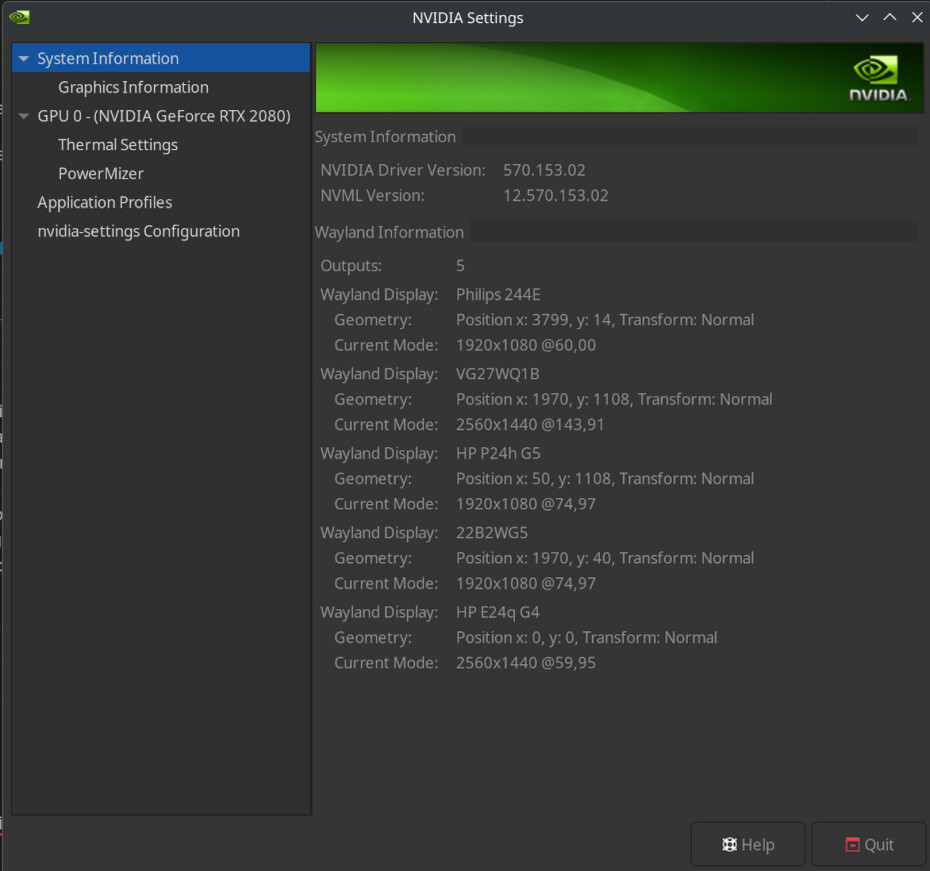
because i must use nvidia in combination of displaylink, because of a hub i use to output to 4 display. so I have:
just like the modification before, i have a feeling (i havent time exactly) it happens less often. i dont know if its blind hope or facts… but whats for sure, it still happens.
i tried to use x11, at least for testing purposes. switching DE is too much of tongue biting, im supposed to enjoy my desktop. and im not in the mood to discover a new one and change habits
as opposed to x11 / wayland, which really, i dont care. i cant even tell the difference to be honest.
buuuut in the process of switching to x11 i broke my system. also i read that kde plasma x11 is deprecated, probably has a lot to do with my system breaking. and yes. i know i can very easily go back; thats the, probably, greatest things of nixos. but at this complication stage, i dont care anymore. i was making too many shots in the dark, trial on error, and i honestly just dont have as much patience as i used to have.
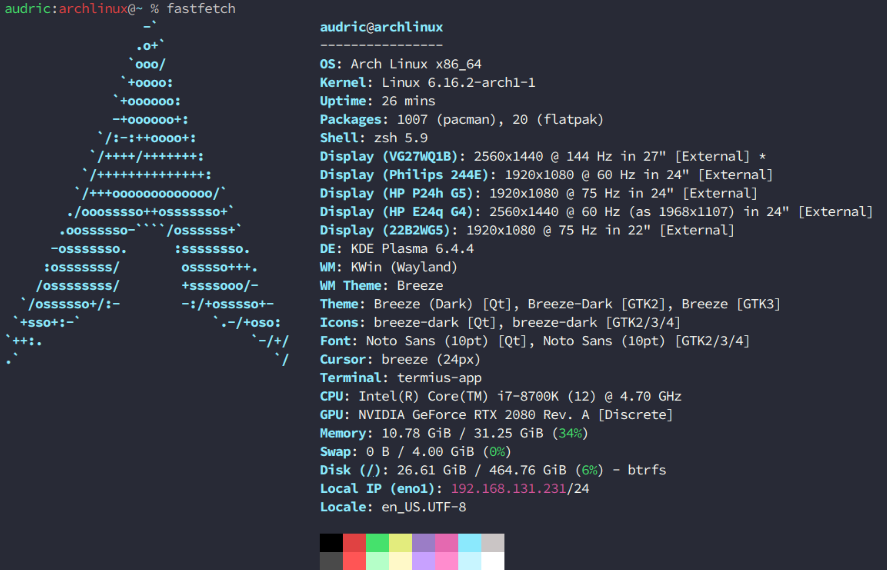
its been three days of learning something completely new. but i dont have the strength of my younger self distro hopper… so i came back to arch
maybe in the future? and ill learn nixos in a safe environment, in a vm… but for now? back to a safe place for me!