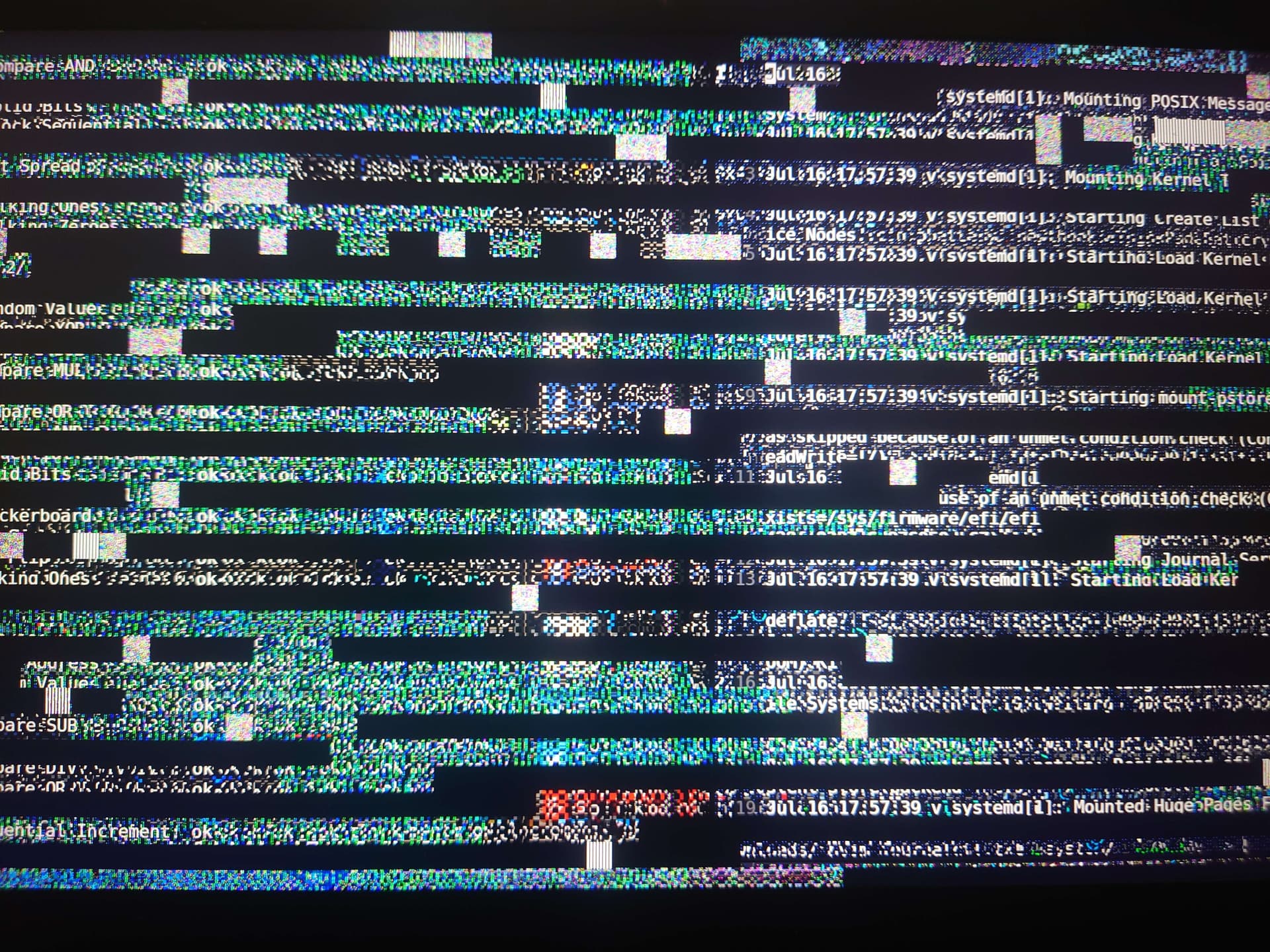
OS seems to freeze too, since nothing happens when I try to use commands (shutdown or reboot).
Computer specs:ThinkPad X1 carbon 7th gen (second hand).
I have 16GB memory with a 16GB swapfile.
I haven’t done anything heavy, like video games or video editing. Just file editing, browsing, torrenting and video display.
I use wayland (hyprland), but like i said, it even happened in TTY (though once).
What i’ve tried: journalctl -b -1: I didn’t find any related error. sudo journalctl -b -1 - Pastebin.com dmesg -T: I didn’t find any related error. sudo dmesg -T - Pastebin.com memtester 2G 10: no error. sensors: temperatures were around 50°. smartctl: I didn’t find any error either.
adding Intel iGPU driver: no change.
I didn’t try on another OS because I instantly installed NixOS, and I’m away from home so I don’t have a USB stick.
I’m not a Linux expert, even less of a NixOS one, so i don’t know if my analysis were correct, or, more importantly, what can I do next.
The only thing that jumps out at me from the journalctl log is this: " 1. Jul 17 15:25:52 v kernel: simple-framebuffer simple-framebuffer.0: [drm] Registered 1 planes with drm panic"
You might try a different memory tester, like Memtest86+.
I think if you can get a chance, you should see what happens if you try a different OS, just to see if you run into the same problems.
It’s hard to say much without seeing your configuration.
The only note I have is that no additional driver should be needed, I’m pretty sure. Modern kernel, modern mesa (i.e. hardware.graphics.enable = true;), and modern wayland should basically be all you need for intel and amd graphics to work pretty well on anything except recently-launched GPUs. Sometimes these external drivers mess things up so definitely remove it if you’ve still got it configured.
If your hardware were a desktop machine, then I’d recommend removing or replacing parts to see if you had a more stable system afterwards. For a laptop, that’s trickier if not impossible, and I’d probably start with looking for external signs of wear, maybe even bulges that could be due to an expanding battery, before even considering attempting taking it apart.
My suggestion to try changing the OS was also an indirect hardware test. If you change from NixOS to, say, Ubuntu and still see problems, that at least narrows it down to a hardware issue rather than a NixOS issue.
Come to think of it, since several Linux OSs are available on LiveCD/LiveISO/LiveUSB, you can try them without getting rid of your current installation and still see if you have problems. That would at least be less invasive. One catch would be that if the problem is your hard drive, that probably wouldn’t help. Still, it could be worth a shot.
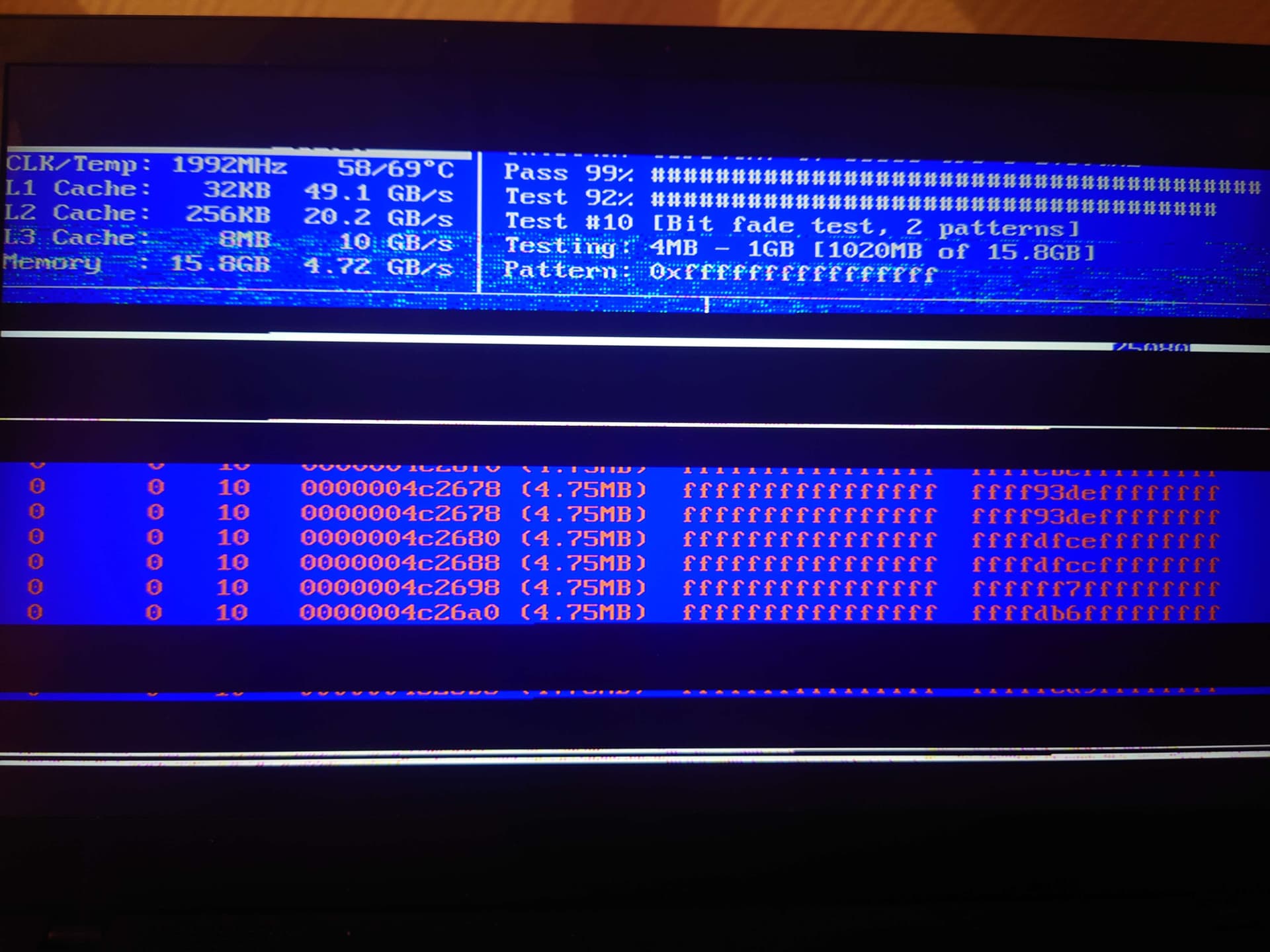
I used nix (boot.loader.systemd-boot.memtest86.enable = true;) to enter memtest86, but i assume that if I crashed there, it’s definitely hardware, right?
I think that’s a pretty safe assumption. Unfortunately, it looks like the RAM for the Thinkpad X1 is soldered in, so you can’t readily replace it. Hope you didn’t pay much for that laptop.
Yes, «crashes in a similar way both for Linux and for Memtest86» is more OS-independence testing than other Linux distros can provide…
Stupid question: have you looked at the temperature and whether the fans should be working and whether they can be heard? I am not sure that just bad RAM can crash Memtest86 like that, and I have seen overheating with a lot of visual similarity…
I paid 200 bucks, which is expensive but alright for me. It was the best deal I found in my area for similar Thinkpads, but seems like there was a catch. and a vicious one, since I couldn’t find it by trying it for 2 minutes…
Though I can still use it, the crashes don’t bother me that much actually. I lose time, momentum and some unsaved stuff eventually. It hasn’t made me lose my mind yet
I have with sensors it was around 50°C, though it wasn’t right before/after a crash. Memtest86’ screenshot seems to report similar temperatures, so I assume it isn’t the issue.
I don’t hear the fan, but i thought it was because it’s a “premium ultraportable blabla” laptop.
edit: I can in fact hear the fans very well, and here is sensors’ result.
Since it happened in Memtest, can I exclude SSD and iGPU? Maybe something else?
The screenshot says 70°C, which shouldn’t be that high unless there is something really messed up with taking the least relevant measurement.
I would be surprised if SSD were relevant to such a crash, yeah. iGPU is a part of the CPU package in any case, and parts of it are needed to drive the screen in any case, so probably not a meaningful distinction.
I would check if there are BIOS updates (but you probably need to be back to somewhere where you have at least a USB drive) and maybe check the microcode updates for your CPU and compare with what our firmware package loads.
I would look in BIOS settings to heck if there are any options looking like risky performance boosts, or any options looking like slight underclocking. Well, I guess you can also try to force a lower ceiling on the power management in Linux (sometimes things look like they are not overheating yet, but taking off a part of the load makes them run in a more stable way).
The temperature in the room was at least 30°C and the PC was directly on fabric, so I don’t think the fans could perform well, maybe that can explain the 70°C.
I’ve already done that (though I’ll double-check), and I just found out that GRUB doesn’t load with secure boot
I would highly recommend putting your laptop on a hard, flat surface formthe reasons that you just gave, and then try memtest86 again, just to be sure.
So, I did a bunch of things, and maybe fixed it, time will tell.
First, I ran fwupd to update my firmware. I don’t think it updated my UEFI directly, but at leas “UEFI CA” and some other firmware.
Second, I did not run Memtest86 again, but I found out that Thinkpads have integrated hardware diagnosis tools in the UEFI.
So I ran them (with the laptop on an appropriate surface this time), including 9 hours of diverse memory tests, and they all passed (CPU, motherboard, everything).
I’ll update if I get more crashes and the results of Memtest86, but seeing it run for 9hrs without crashing tells me that it may have been a temperature issue.
I’ll be more careful and look how to manage fan speed on NixOS.
Looking at some laptop photos online now… I think a soft table cloth is enough to block cooling completely, no amount of fan configuration can overcome such placement of vents under soft-fabric conditions.
I now doubt that fwupd was relevant to this issue (might have made a minor improvement elsewhere).
Hopefully with this external-to-laptop fix in terms of underlying surface you will be able to enjoy your laptop working properly and reliably!
It may be that the memory specifically is overheating, most machines dont know their own memory tempersture, except for servers and my server was definitely more toasty on the memroy than cpu under memtest
If youre feeling brave, open up the laptop, replace all the thermal paste and thermal pads
Update:
-it crashed during Memtest 86. I don’t know the difference between this and Lenovo’s builtin hardware diagnostic tools, but my issue isn’t fixed. Maybe because I ran the test during hot hours?
-I spent the day trying to figure out how to cleanly manage my fans, and I finally did it with services.thinkfan (a fan utility for Thinkpads). Not sure it will fix my issue, but at least I could do it declaratively and I learnt some Nix
I remember when I had a work MacBook that was throttling, and what helped was clearing dust from the air intakes to the fans, using one of those compressed gas dusters with the straw at the nozzle.
Maybe you can try that. It’s at least relatively cheap to do, so if it doesn’t work, you haven’t lost much.