Hello, I’m trying to set up a raspberry pi 4 as a kiosk running Kodi. However, the display is very laggy, doesn’t take up the full horizontal resolution, and has the red and blue channel swapped:
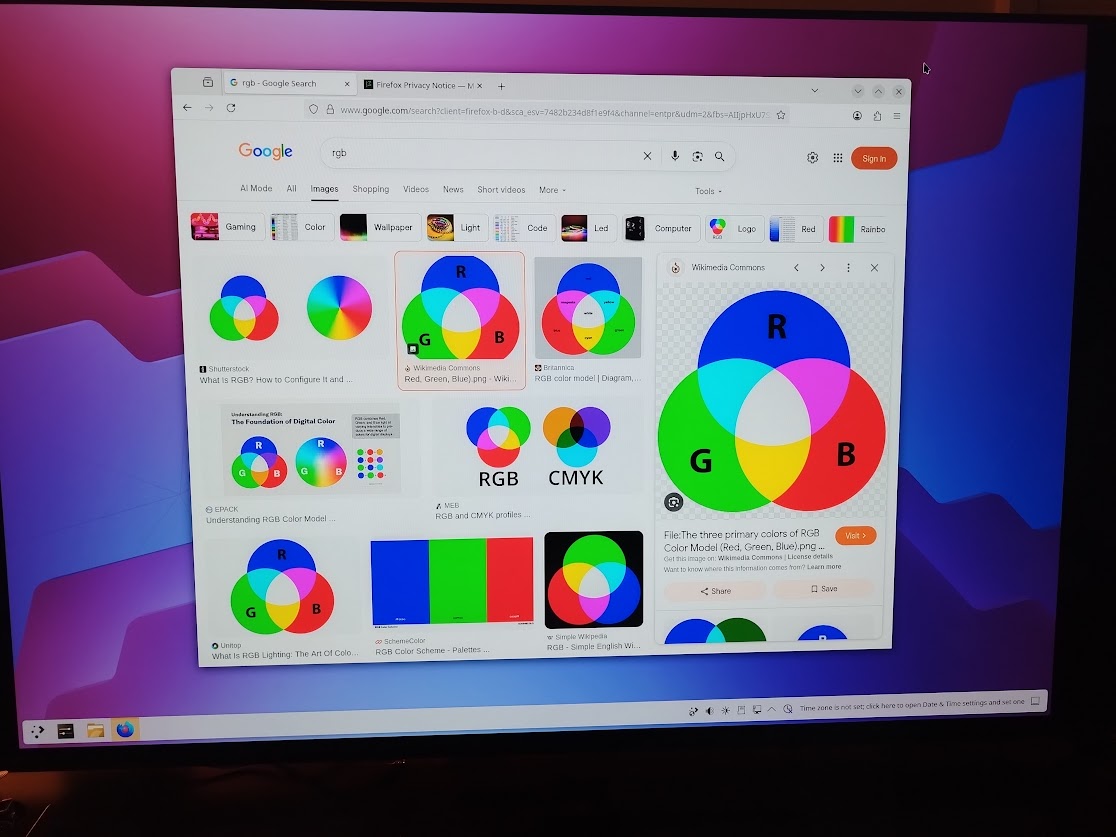
I flashed the same SD card to the stock raspberry pi OS (Debian Bookworm, kernel 6.12) and had none of these problems, so it’s not hardware related.
I also tried using a variety of display manager setups: cage (what i want for my application), Plasma 6, and gnome on both x11 and wayland, and all had the same issues (although gnome x11 was less laggy). If anybody has any suggestions on how to get the graphics looking normal (and ideally at the correct resolution) that would be great!
Here’s the minimal config I had these problems with, it’s just slightly modified from nixos-generate-config. I did try adding hardware.raspberry-pi."4".fkms-3d.enable = true;, as suggested in https://wiki.nixos.org/w/index.php?title=NixOS_on_ARM/Raspberry_Pi_4#With_GPU, but it only resulted in booting to an all black screen with a mouse.
configuration.nix:
{ config, lib, pkgs, ... }:

{
  imports =
    [
      "${builtins.fetchGit { url = "https://github.com/NixOS/nixos-hardware.git"; }}/raspberry-pi/4"
      # Include the results of the hardware scan.
      ./hardware-configuration.nix
    ];

  networking.hostName = "nixos"; # Define your hostname.
  networking.networkmanager.enable = true;  # Easiest to use and most distros use this by default.

  i18n.defaultLocale = "en_US.UTF-8";

  users.extraUsers.kodi.isNormalUser = true;
  services.cage.user = "kodi";
  services.cage.program = "${pkgs.kodi-wayland}/bin/kodi-standalone";
  services.cage.enable = true;

  services.pipewire = {
     enable = true;
     pulse.enable = true;
  };

  users.users.alice = {
     isNormalUser = true;
     password = "somepass";
     extraGroups = [ "wheel" ]; # Enable ‘sudo’ for the user.
     packages = with pkgs; [
       tree
     ];
  };

  environment.systemPackages = with pkgs; [
     vim
     wget
     git
  ];

  services.openssh.enable = true;

  system.stateVersion = "25.05"; # Did you read the comment?
}
hardware-configuration.nix:
{ config, lib, pkgs, modulesPath, ... }:

{
  imports =
    [ (modulesPath + "/installer/scan/not-detected.nix")
    ];

  boot.initrd.availableKernelModules = [ "xhci_pci" "usbhid" ];
  boot.initrd.kernelModules = [ ];
  boot.kernelModules = [ ];
  boot.extraModulePackages = [ ];

  fileSystems."/" =
    { device = "/dev/disk/by-uuid/44444444-4444-4444-8888-888888888888";
      fsType = "ext4";
    };
  swapDevices = [ ];
  nixpkgs.hostPlatform = lib.mkDefault "aarch64-linux";
}