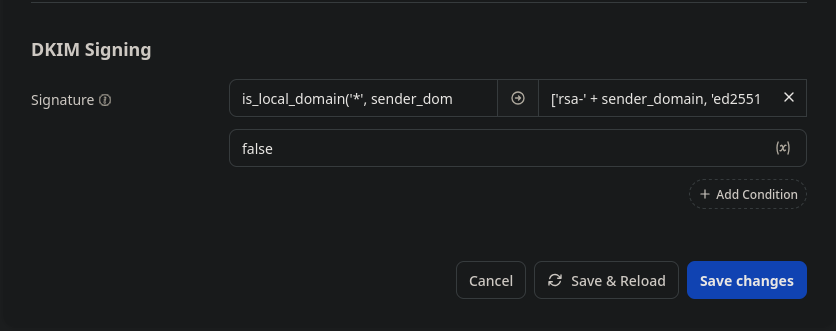
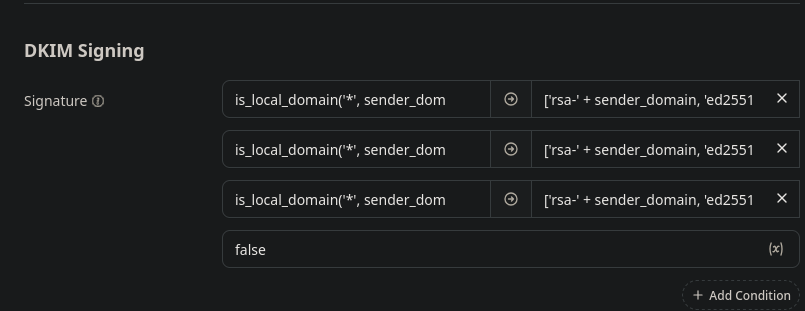
I am quite certain that I just ran into the same issue.
The error:
ERROR Configuration parse error (config.parse-error) details = "Failed to parse setting "auth.dkim.sign": Multiple 'else' found"
The relevant part of my Nix config looks like this:
services.stalwart = let
    ifthen = field: data: {
        "if" = field;
        "then" = data;
    };
    otherwise = value: { "else" = value; };
in {

    # ...

    settings.auth.dkim = {
        verify = "strict";
        strict = true;
        sign = [
            (ifthen "is_local_domain('', sender_domain)" "['rsa-' + sender_domain, 'ed25519-' + sender_domain]")
            (otherwise false)
        ];
    };
};
And the (correctly) generated part of the TOML config file looks like this:
[auth.dkim]
strict = true
verify = "strict"

[[auth.dkim.sign]]
if = "is_local_domain('', sender_domain)"
then = "['rsa-' + sender_domain, 'ed25519-' + sender_domain]"

[[auth.dkim.sign]]
else = false
From what I understand, Stalwart parses the TOML config once at startup, only to copy the settings into a database.
When you make changes in the web interface (which I assume you really, really should not do), Stalwart updates the database but fails to update the config file because it is read-only.
If you then make changes via NixOS to the config file, Stalwart appears to mix things up between the config file and the database. At some point, my if, then, and else statements had magically duplicated themselves in the database entry.
The admittedly somewhat brutal workaround I found was:
- Back up your email using a mail client
- Disable Stalwart in the Nix config and switch to the new configuration
- Remove the entire
/var/lib/stalwart-mail directory
- Re-enable Stalwart via Nix
Stalwart then rebuilds its database using the correct config values.
There must be a better way to resolve this issue, but the moral of the story is:
Never make any changes via Stalwart’s web interface when the configuration is managed by Nix.
 ).
).