Nvidia drivers update?

Hey!

I configured my dGPU by the Nvidia - NixOS Wiki guide, so everything I set up was through my configuration.nix file.

I run $ nvidia-smi, and see that the drivers currently ran on my PC are older than the newest version available according to the Nvidia website. What is the mechanism my drivers are updated by? Does it happen automatically (with me just needing to nixos-rebuild)? Can I update them ahead of the automatic update?

You can see what the current versions are here (that’s on nixos-unstable, change branch according to what you’re using). When a PR is merged updating the versions, you would then update your channel or your flake accordingly, and when you rebuild you’d get the new version of that driver.

The current version of the nvidia driver as packaged by NixOS can be seen using the package search, here for stable and here for unstable. Click the little channel buttons to switch between them, alternatively. The versions are currently 535.86.05-5.15.133 and 535.113.01-5.15.133 respectively.

They are downloaded, built and installed with nix, using the package definition from nixpkgs to figure out which version to install. In short, you’re not downloading something directly from nvidia, but a NixOS package that is set up to actually work on NixOS.

I don’t recommend trying to install nvidia’s package. If you use a Linux distro, use their packages whenever possible. This is doubly true for NixOS.

Yes (no, you need to nix-channel --update and sudo nix-channel --update beforehand).

Well, yeah, but which versions you can update to depends on how much effort you want to put in. NixOS offers stable (currently 23.05, soon 23.11) and unstable, the stable version will usually lag behind in package updates.

This is especially true for the nvidia drivers, because they don’t do stable version increments, so any update is a breaking change and therefore rare on NixOS stable (sometimes happens when nvidia doesn’t work with the kernel anymore for one reason or another).

Note that while unstable is much more recent, it is not necessarily be the most recent nvidia driver. This is because the nixpkgs maintainers will check that the driver actually works before updating it. In general I’d recommend taking their decision, but in theory you can even use versions beyond that with overrides.

I’m assuming you’re on stable currently. Ultimately if you want to update to the driver offered by NixOS unstable you have two options:

  1. Switch your whole system to unstable
  2. Grab just the kernel from unstable with its associated nvidia package

The former will mean that you’re potentially exposed to breaking changes everywhere. It’s more like running Arch Linux. The latter is not usually a good idea on other release distros like Debian, but quite feasible on NixOS.

Since we’re talking about the Linux kernel, which goes to great lengths to never break userspace, I think it’s quite ok to do the latter if you want more recent nvidia drivers. For this, you need to get a reference to the unstable channel on your system, and then do something like:

# configuration.nix, or a file `imports`-ed from it
let
  nixpkgs-unstable = import <nixpkgs-unstable> { };
in {
  boot.kernelPackages = nixpkgs-unstable.linuxPackages;
}

Since third party kernel modules like the nvidia driver and zfs are tied to the specific kernel they are built for, this will also grab the nvidia driver from unstable, without forcing any rebuilds on you. This also takes the LTS kernel release, which IME breaks the nvidia drivers much less frequently, so I would recommend it.

In theory you could also use the nvidia package from unstable with the stable kernel, but that gets more messy (not 100% sure this is even correct):

{config, ... }: let
  nixpkgs-unstable = import <nixpkgs-unstable> { };
in {
  hardware.nvidia.package = (nixpkgs-unstable.linuxPackagesFor config.boot.kernelPackages.kernel).nvidiaPackages.stable;
}

Either of these approaches should give you nearly the most recent nvidia driver (trying to update beyond that is usually just not worth the effort, just wait a week or two for the package maintainers to do the work for you).
here for stable

I only followed the Nix Wiki before, and it is outdated, so the option from your link

environment.systemPackages = [
    pkgs.linuxKernel.packages.linux_5_15.nvidia_x11
  ];

is new to me. The Wiki instructs to use hardware.nvidia.package = config.boot.kernelPackages.nvidiaPackages.stable, which I did. $ nvidia-smi shows my driver version being 530.41.03 which is (I think) much older than 535.86.05-5.15.133. Should I remove the option from the Wiki and apply the option you linked? If so, do I have to change anything else in my setup done by the Wiki?

you need to nix-channel --update and sudo nix-channel --update beforehand

To clarify: does this command actually do different things when used with & without privileges?

Thank you again for taking the time to help. The answer is very detailed, and expands my understanding of this interesting system. I’ll save some things to my personal notes.

Oh wow, that could not be more misleading. No, don’t do that. https://search.nixos.org shouldn’t be telling people to do this with packages that need to be managed via an option, but it just lists that for every package in the repository. Don’t know how to fix it, but this needs to be reported upstream.

Edit: Known bug: Installation suggestion of service packages is completely wrong · Issue #506 · NixOS/nixos-search · GitHub

Yes, which is why I’m always very explicit about stating it with both sudo and without.

You see, all users on a NixOS system have their own set of channels. Each user can independently use nix to install whatever software they want, from wherever they want. When you use nix-channel, you modify the set of channels for the user executing it.

If you never run nix-channel with sudo, you will never change the root users’ channels - and these are used for building your system, so that means your system will never be updated.

And that’s exactly why I pointed this out, I suspect your case is just this.

Nix flakes avoid this problem, sadly that’s likely still years off.

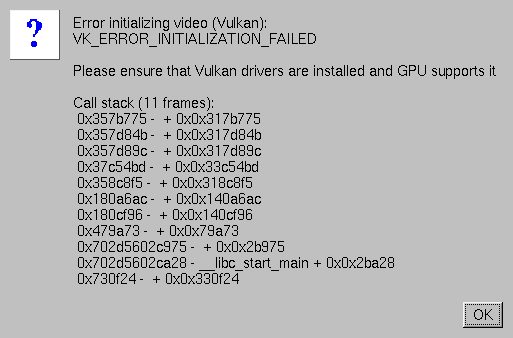
This thread came up in a discussion regarding staying on an older Nvidia driver version while updating the rest of your system. For instance, in my case, #514481 linuxPackages.nvidiaPackages.production: 595.58.03 → 595.71.05 caused one of my games (War Thunder) to get Vulcan errors when launching.

To pin your Nvidia driver version, find the commit that broke your system and then visit https://api.github.com/repos/NixOS/nixpkgs/commits/<rev>, replacing <rev> with the breaking commit, and copy the first index of parents to get the last commit before the breaking change.

Then, in flakes.nix, you can add the following to your inputs, replacing <parent rev> with the parent commit hash you copied:

nixpkgs-nvidia.url = "github:nixos/nixpkgs/<parent rev>";

And then use it in your config:

pkgs-nvidia = import nixpkgs-nvidia {
  inherit system;
  config.allowUnfree = true;
};
{ pkgs-nvidia, ... }:

{
  hardware.nvidia = {
    package = (pkgs-nvidia.linuxPackagesFor config.boot.kernelPackages.kernel).nvidiaPackages.stable;
  };
}

Rebuild, reboot, and then run nvidia-smi to confirm your driver version.

Hope this helps somebody.

Instead of doing that, I would recommend just overriding the nvidia package. It’ll build faster, use less disk space, and leave you less vulnerable to weaknesses in the supply chain. You’d do that like so:

{ config, lib, ... }: {
  hardware.nvidia.package = config.boot.kernelPackages.nvidiaPackages.mkDriver {
    version = "580.142"; # Or any other version

    # Make sure to set these to `lib.fakeHash`
    # every time you change the version - nix
    # will trust them, and not redownload the driver.
    sha256_64bit = lib.fakeHash;
    openSha256 = lib.fakeHash;
    settingsSha256 = lib.fakeHash;

    # headless servers only feature, disabling at
    # the package level because that's one less
    # hash to define.
    usePersistenced = false;
  };
}

Just replace the hashes when nix complains, and you have yourself a perfectly cromulent nvidia driver built with the latest gcc.

Thank you so much! That’s much better. Got it to build 595.58.03 without any issues.

hardware.nvidia.package = config.boot.kernelPackages.nvidiaPackages.mkDriver {
  version = "595.58.03";
  sha256_64bit = "sha256-jA1Plnt5MsSrVxQnKu6BAzkrCnAskq+lVRdtNiBYKfk=";
  openSha256 = lib.fakeHash;
  settingsSha256 = "sha256-2vLF5Evl2D6tRQJo0uUyY3tpWqjvJQ0/Rpxan3NOD3c=";

  # headless servers only feature, disabling at
  # the package level because that's one less
  # hash to define.
  usePersistenced = false;
};

For whatever reason while it would fail without openSha256 (“This version of NVIDIA driver does not provide a GSP firmware.”), it never complained about the placeholder hash, which is kind of odd.

That’s likely because you have set hardware.nvidia.open = false; - in that case, the open driver is never actually built, so nothing checks the hash. You can probably disable the hash requirement by setting open = false in the mkDriver args or something, have a look at the source code to see what arguments it takes.

I would recommend using the open variant though, assuming your GPU is not ancient, the non-open variant is practically obsolete. Switching to open might even fix your issue with the latest driver.

Edit:

Right, if you don’t want to build the open driver, you have to set its hash explicitly to null, or fully omit it.

Got it, thanks. Even with the open variant I get the crash on 595.71.05 though; I originally switched to open = false; because it anecdotally seemed like I was getting a fewer graphical bugs on it, especially on suspend. With the open version i3wm was very often frozen on a black screen after suspending and I have yet to have the same happen with non-open drivers