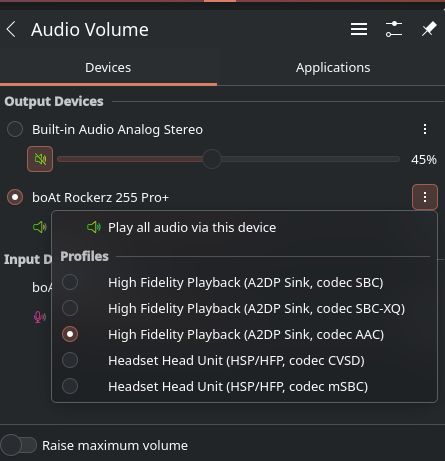
I wanted to listen to music today via my Fiio BTR13, but the quality wasnt acceptable. Going to blueman I saw that I could only choose the codecs mSBC or CVSD. I already tried to fix the problem by adding ldac, aac and so on as codecs in the config, but I cant get it working
Here is the part of my config refering to bluetooth and Audio
 # Enable Bluetooth
  hardware.bluetooth = {
  enable = true;
  powerOnBoot = true;
  settings = {
    General = {
      Enable = "Source,Sink,Media,Socket";
      ControllerMode = "dual";
      # Shows battery charge of connected devices on supported
      # Bluetooth adapters. Defaults to 'false'.
      Experimental = true;
      # When enabled other devices can connect faster to us, however
      # the tradeoff is increased power consumption. Defaults to
      # 'false'.
      FastConnectable = true;
    };
    Policy = {
      # Enable all controllers when they are found. This includes
      # adapters present on start as well as adapters that are plugged
      # in later on. Defaults to 'true'.
      AutoEnable = true;
    };
  };
};
  services.blueman.enable = true;
  # hardware.pulseaudio = {
  # services.pulseaudio = {
  #   enable = true;
  #   package = pkgs.pulseaudioFull;
  # };

  # Enable sound with pipewire.
  services.pulseaudio.enable = false;
  security.rtkit.enable = true;
  services.pipewire = {
    enable = true;
    alsa.enable = true;
    alsa.support32Bit = true;
    pulse.enable = true;
    # If you want to use JACK applications, uncomment this
    jack.enable = true;
    wireplumber.extraConfig.bluetoothEnhancements = {
      "monitor.bluez.properties" = {
        "bluez5.enable-sbc-xq" = true;
        "bluez5.enable-msbc" = true;
        "bluez5.enable-hw-volume" = true;
        "bluez5.roles" = "[ hsp_hs hsp_ag hfp_hf hfp_ag ]";
        "bluez5.codecs" = "[ sbc sbc_xq aac ldac aptx aptx_hd aptx_ll aptx_ll_duplex ]";
        "bluez5.a2dp.ldac.quality" = "auto";
      };
    };

    # use the example session manager (no others are packaged yet so this is enabled by default,
    # no need to redefine it in your config for now)
    #media-session.enable = true;
  };
When you connect it, run pactl list or pavucontrol. There you should be able to list all codecs. If a2dp-sink is not available there, you won’t have high quality sound. I don’t know that device, but maybe you need to change mode to BT or PC. It seems to be problem more on remote device side.
That is bluetooth for you. There is not enough bandwidth for high quality sound AND recording, so you can have either this or that. Usually meeting program will switch to headset profile, but sometimes you have to switch it manually.
You should be able to use mSBC, which is slightly better than CSVD. If your device and Bluetooth chip are modern enough, you can also try using LE Audio / LC3, but the support for it is still experimental.
EDIT: The former should be relatively easy to turn on (e.g. the config snippet in the OP enables mSBC among other things), for the latter check your devices and refer to LE Audio + LC3 support (you would have to adapt this to NixOS).
@nightuser@morr
Maybe I didn’t mention it clearly. It was very very bad when I used the CVSD. I wanna do basic meetings with my earphones in decent quality atleast. The earphones record super clearly in mobile though.
Image: Only when I switch to that CVSD mic works, but listening and recording quality is crappy.
When given any other codec there, mic stops working, but can listen in good quality.
So mSBC doesn’t work (that’s what Android usually uses)? It should be a bit better than CVSD. When using Bluetooth, you can only use HSP/HFP profiles if you require a mic; A2DP is for playback only.
This is a general problem in the desktop sphere; I’ve been trying to figure this out for a good decade now myself. It’s no better on Windows to my knowledge (though this is only from a ~20 minute experience trying to help an ex get her earphones to work well on a surface tablet, so YMMV).
I don’t know what Android does to get high-quality audio with bluetooth headsets, but it’s definitely not just the codec; Android also uses mSBC for HFP. Tweaking various codec-specific settings doesn’t change anything IME. Maybe phone bluetooth controllers are just generally better? Laptop/desktop ones tend to be integrated with the wifi chip…
My solution is to use my headset purely as an output and to use a separate microphone for calls. If you want to use your headset for this because you want to move around with it, you’re SOOL.
It varies chip to chip, and it is possible to get something passable with mSBC on Linux. It also works sufficiently okay for me on MacOS.
There’s a lot of ‘gaming’ headphones/tws that use 2.4G with a dongle, which eliminates the latency and doesn’t sacrifice the audio quality when using a mic.
The BTR13 has a switch to chose between PC, Bluetooth and Phone but bluetooth and phone are just options to use it via the usb-port as a usb-DAC. here is a link to the device https://www.fiio.com/btr13.
 I have bluetooth earphones connected.
 , do meetings etc online.
 Usually meeting program will switch to headset profile, but sometimes you have to switch it manually.