@ibizaman this is so cool! I hope this idea can make its way into nixpkgs some day 
2 Likes
Very new to NixOS here😅, Also the first post here I’m replying to. I would love to know whether this project can or have aspirations like setting up a self hosted service with a single command via flake.
I wanted to know because, imagine people setting up and running a piped instance in minutes. Also with a pool of such instances downtime will be reduced. So setting up instances with a single command will be useful for various projects.
That’s a dream of course and there are many part needed to get it.
I’m not sure how this project would help in that because for what you describe to work in one command, you need a very opinionated configuration. Like you should let no choice to the user on how things are implemented, what services goes together, etc.
This project’s goal is pretty much the opposite. Its goal is to avoid coupling in nixpkgs and move the responsibility of choosing what services should go together to later. To let the final user be more free to choose what goes together.
I can see this project helping in a very indirect way. By avoiding service maintainers the burden of figuring out how to couple services together by providing them with contracts, I can see those maintainers have less work to do on that front. Maybe that will help them get more free time and do other work.
Also, by relying on contracts instead of implementing something themselves, maintainers would increase their velocity. So you could get more things packaged faster with more features.
But anyway if you want something like this, projects like the following are what you should be looking at now:
- GitHub - nix-community/nixos-anywhere: install nixos everywhere via ssh [maintainer=@numtide]
- GitHub - elitak/nixos-infect: [GPLv3+] install nixos over the existing OS in a DigitalOcean droplet (and others with minor modifications) and - GitHub - fort-nix/nix-bitcoin: A collection of Nix packages and NixOS modules for easily installing full-featured Bitcoin nodes with an emphasis on security.
3 Likes
Thanks for the elaborate reply. I get the gist of this project somewhat. And yes , if once such a large single command deployment thing is organised, users have to adjust the configuration files as to couple what and what. This is a really Great initiative. 
2 Likes
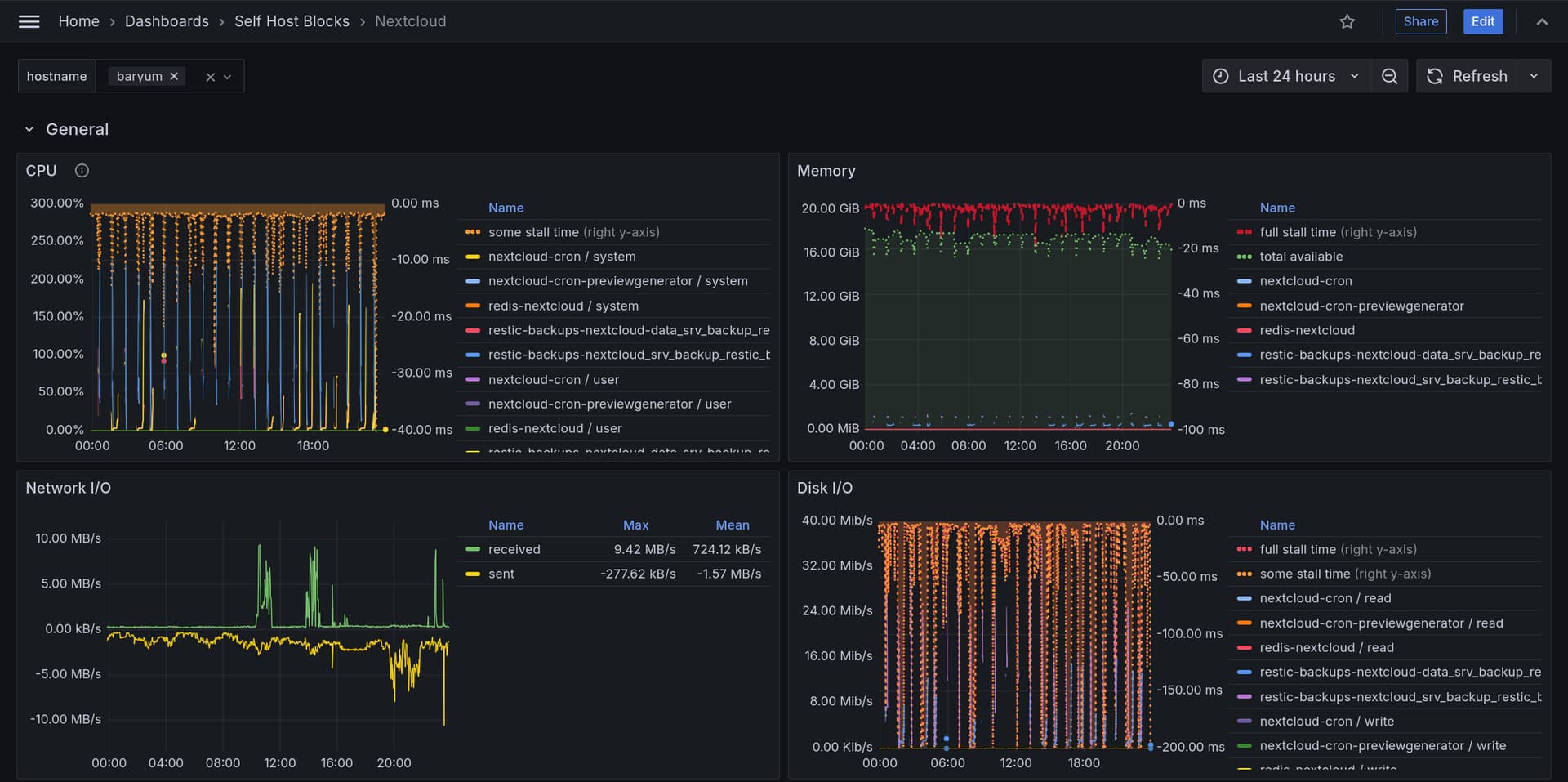
Added a dashboard for Nextcloud. It’s super useful to understand if performance is an issue and what’s causing it in the first place. I’m sure improvements can be done but it’s already a good starting dashboard.
The full explanation is in the manual but here are some pictures of it already.
It shows the ubiquitous CPU, memory, network I/O and disk I/O but also stall time which is IMO an often overlooked metric to know if a process is actually stuck waiting on a resource.
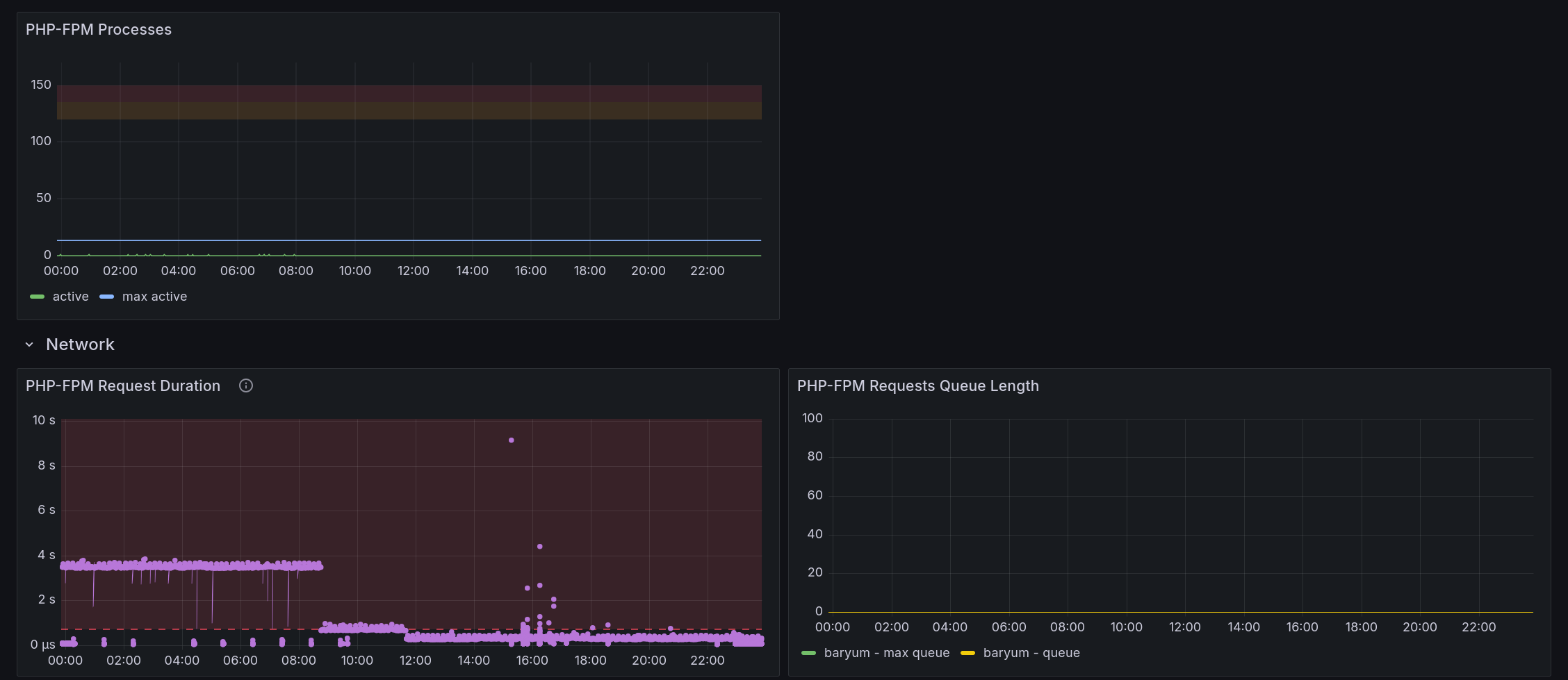
It shows PHP-FPM related metrics. The Nextcloud module adds the php-fpm exporter for the Nextcloud pool to get those.
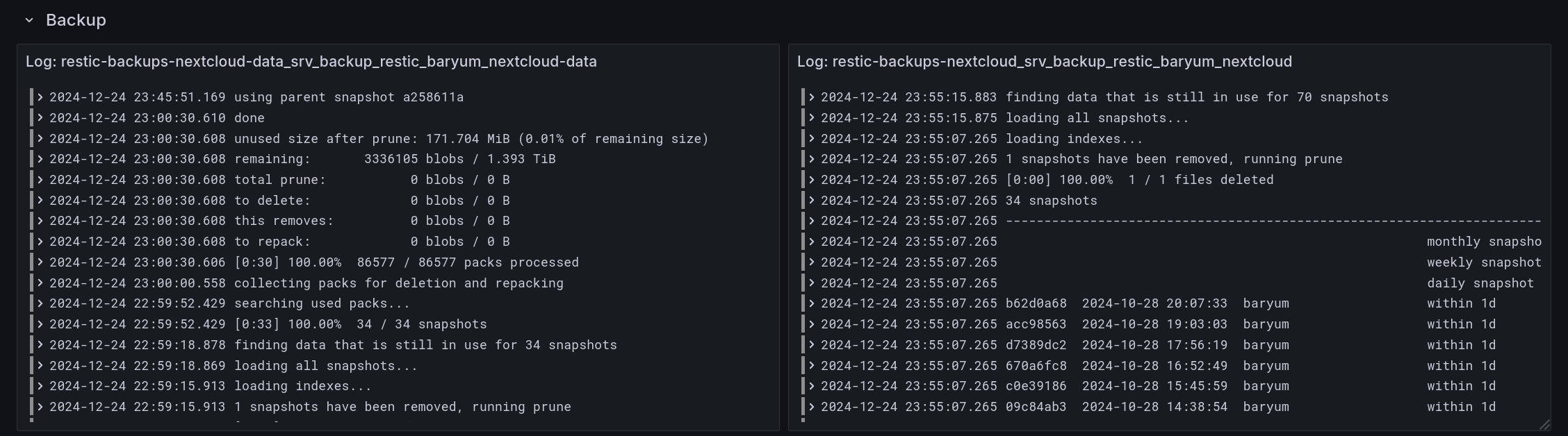
Logs from backup jobs are shown. There can be one or multiple backups (to different locations, for example) and the dashboard will adapt.
The dashboard shows each request passing through Nginx and going to the Nextcloud backend with a handful of important headers and timing metrics.
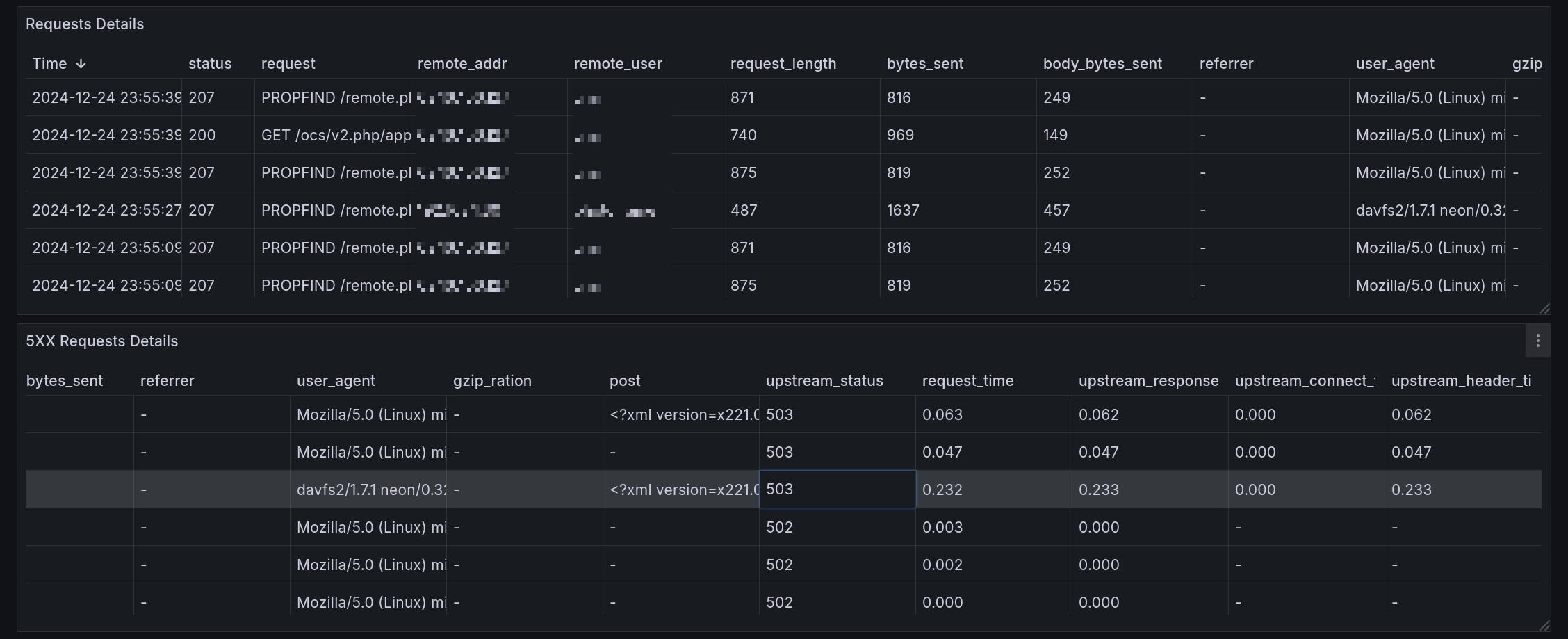
Finally, the dashboard parses log output to figure out if there is a JSON error in it that should be parsed to extract the essential information. In the screenshot, top line is the original error and bottom is what is shown in the dashboard:

There’s more but I couldn’t post more than 5 pictures, the rest is in the manual 
This dashboard added to the previously available tracing option makes for a pretty complete
The commit adding this release is on version v0.2.7. Get that release with:
nix flake lock --override-input selfhostblocks github:ibizaman/selfhostblocks/v0.2.7
4 Likes
I added a new dashboard and alert to catch certificates that did not renew.
The new dashboard shows expiry time:
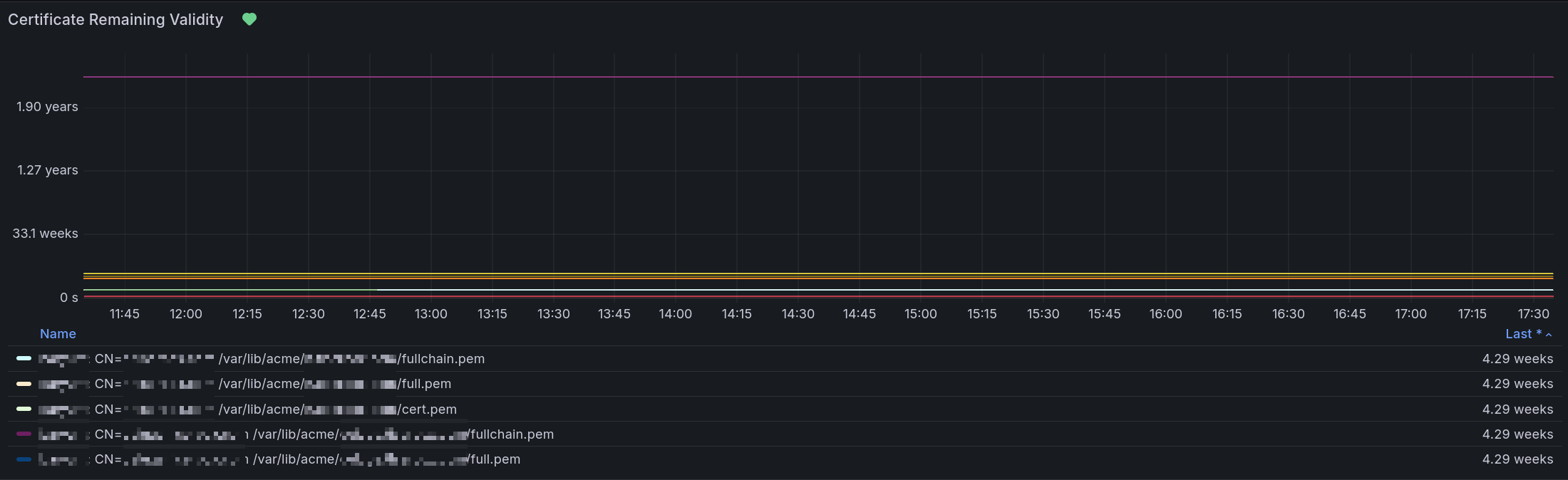
Legend is
$hostname - CN: $fqdn: $path_to_certificate
And the alert fires when the expiry time is in less than a week. This alert should usually never fire but in case it does, it means the certificate renewal process had an issue. I don’t like to add alerts but I deemed this one necessary because if the certificates ever expire, pretty much everything breaks.
2 Likes
It was long overdue but I created a pre-RFC to upstream contracts into nixpkgs Pre-RFC: Decouple services using structured typing
4 Likes

7 Likes
It’s been a while I didn’t give an update so here it is
First, an awesome guide has been written on how to create a new service by @ak2k 
They also wrote a tool to update the redirects.json file of the manual which is just so convenient to use.
I’ve been trying to mature the project more by being better at explaining how to contribute and by being more consistent with the releases, semantic versioning and the changelog.
Other recent changes I’m happy about include:
- A lot of playwright tests were added which help fix issue before they pop up, which actually helped already. I’ll be adding playwright tests for LDAP and SSO integration too.
- Declarative Jellyfin setup using a new CLI tool I wrote that is actually in C# and embedded in the Jellyfin project. The biggest advantage compared to existing solutions is that we can tap into the Jellyfin libraries directly instead of trying to reverse engineer what the Jellyfin server wants. The CLI can be found here, and SelfHostBlocks already uses it. I’ll be upstreaming that soon.
- I packaged the LLDAP bootstrap script to make management of users and groups declarative in Nix. For this one I directly upstreamed the work on LLDAP here and here and nixpkgs and made SelfHostBlocks rely on it.
I’ll start working mor this way: directly upstream on nixpkgs and make SelfHostBlocks use it.
I’m working now on creating a LDAP group contract but this time using module interfaces.
For more details you can check the releases page starting from 0.2.8 which corresponds to my last post here Releases · ibizaman/selfhostblocks · GitHub
12 Likes
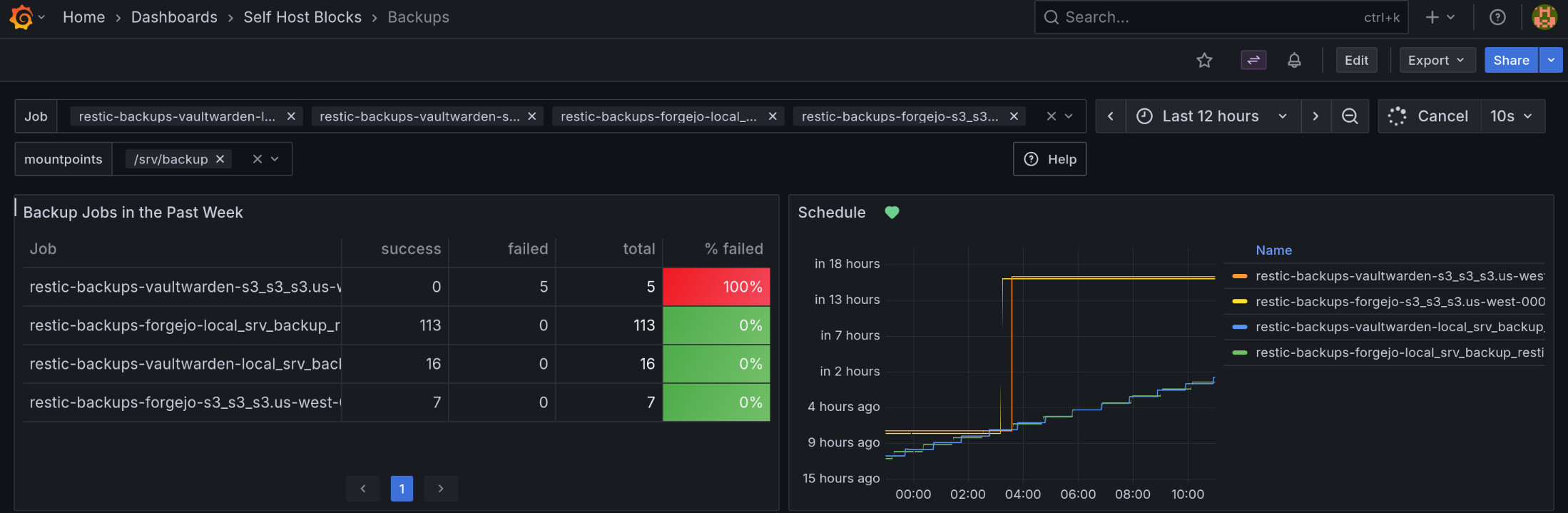
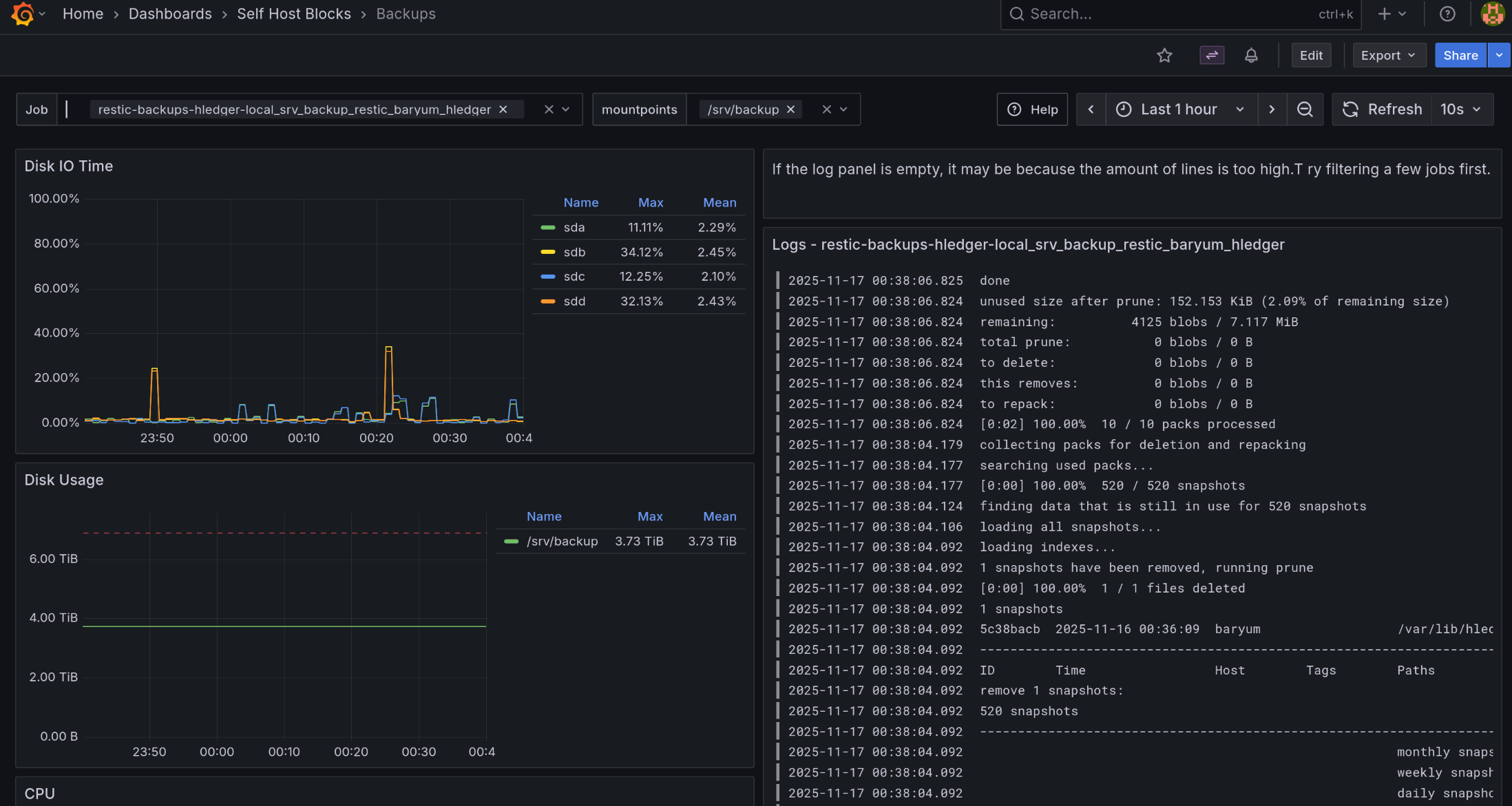
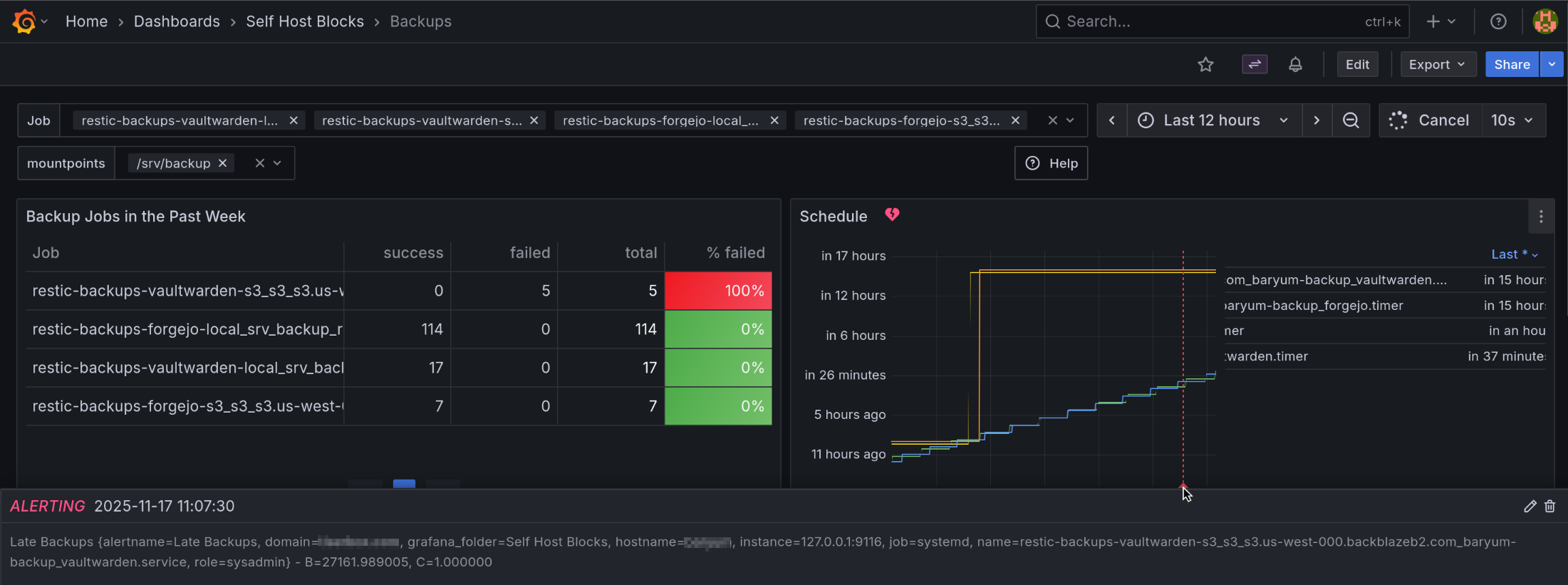
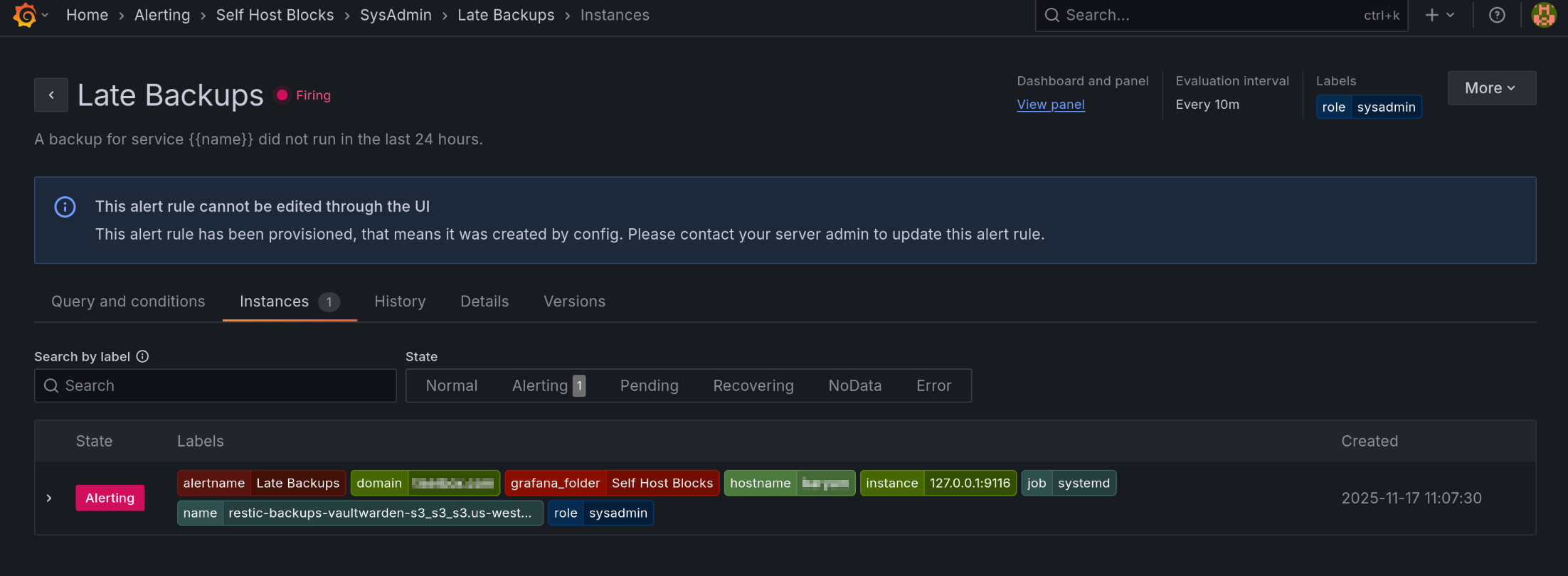
There has been a few updates since last post. The latest is a new dashboard showing backup jobs. There’s also an alert when no backup job ran in the last 24 hours or all job failed.
This dashboard was quite hard to set up. I needed to patch the upstream systemd prometheus exporter and correctly handle the difference between monotonic and realtime timers. I first started with an ad-hoc bash script to parse but that became way too hairy.
More info can be found in the manual and in the PR. Here’s a few screenshots:
6 Likes
I wanted to highlight the testing infrastructure on SelfHostBlocks. Like usual, I didn’t invent anything, but everything now falls down into place for a very nice test writing and debugging experience.
I’ll take the new SSO integration feature for Grafana as an example. This requires to write some quite tricky to get right code, where Authelia config must match Grafana config quite precisely. To test this, I’m using a Playwright which essentially tests the full SSO login flow. It tests a normal user that logs in, an admin user that logs in and a user that should not have access. Each case times 2 for the case where the user’s password is right and wrong for a total of 6 cases.
Running the tests is done with:
nix build .#checks.x86_64-linux.vm_monitoring_sso -L
Debugging this is quite hard. A lot of things could fail. Assuming evaluation evaluates and all systemd service are running, what could still go wrong is for one the playwright selectors which could be wrong. We can directly see this in the test output:
vm-test-run-monitoring_sso> client # playwright._impl._errors.TimeoutError: Locator.click: Timeout 30000ms exceeded.
vm-test-run-monitoring_sso> client # Call log:
vm-test-run-monitoring_sso> client #   - waiting for get_by_role("button", name="single sign-on")

...

vm-test-run-monitoring_sso> Running test on firefox
vm-test-run-monitoring_sso> Testing for user alice and password NotAlicePassword
vm-test-run-monitoring_sso> Going to https://g.example.com
vm-test-run-monitoring_sso> Saving trace at trace/0.zip
And we can then use the playwright trace output to see exactly what’s going on:
nix run .#playwright --offline -- show-trace -b firefox $(nix eval .#checks.x86_64-linux.vm_monitoring_sso --raw)/trace/0.zip
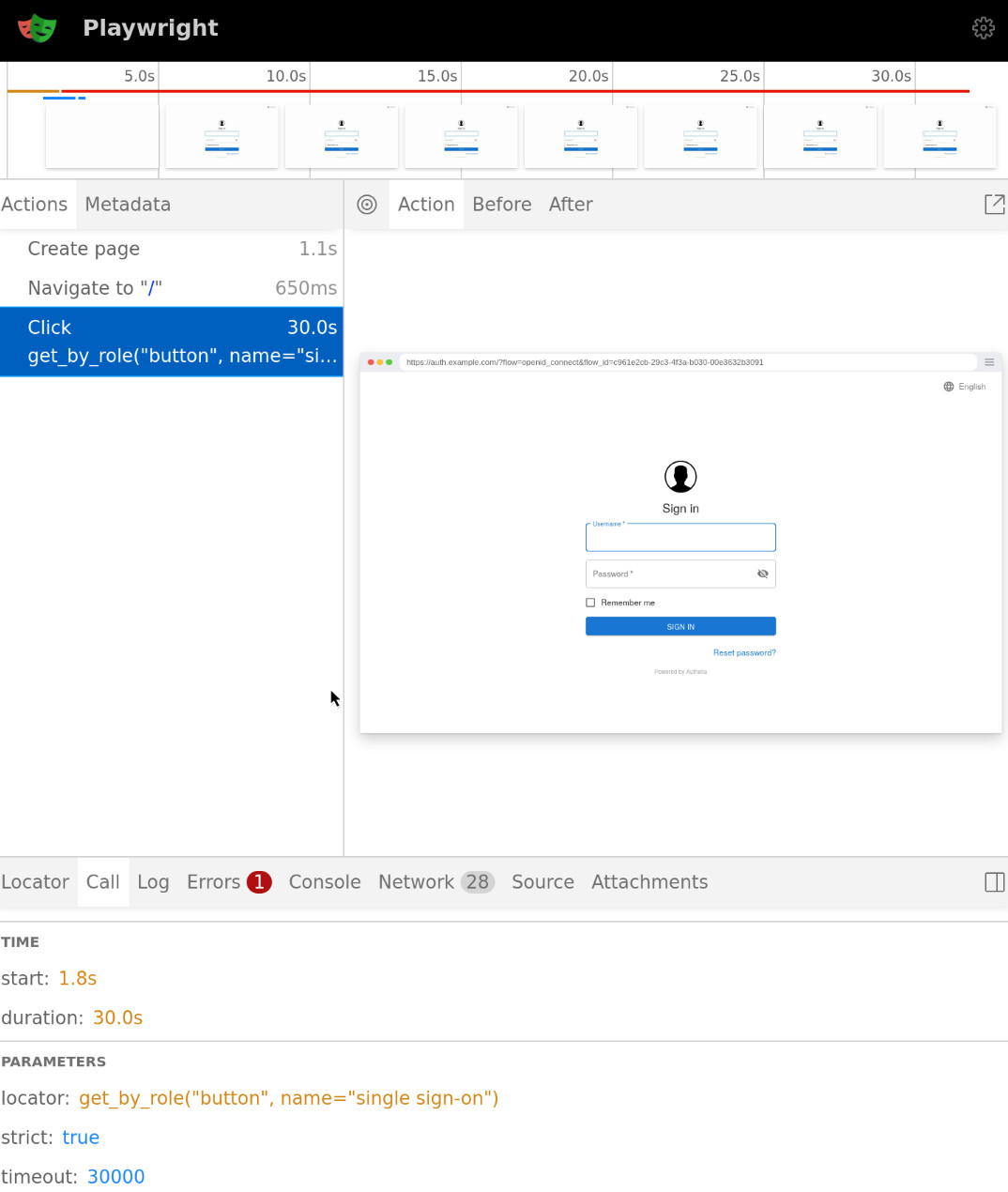
Indeed, there are no “single sign-on” button here. I had just copied over the test code from Open WebUI which required this.
Something else that could fail is the interaction between Authelia and Grafana. Here, the Playwright debug output is not useful anymore:
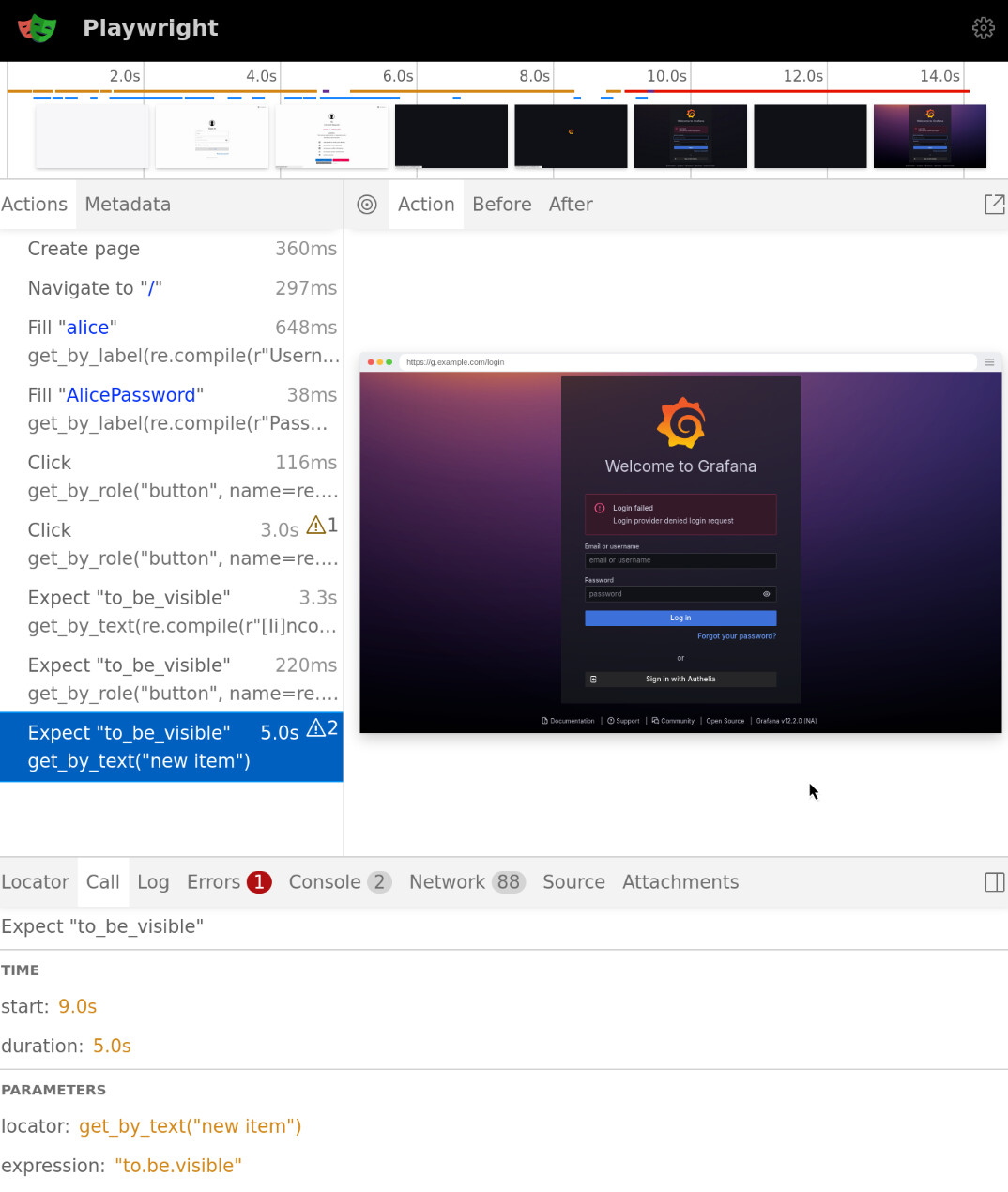
Yeah, login failed, but why?
The Grafana logs are more helpful:
vm-test-run-monitoring_sso> server # [   64.664200] authelia[1887]:
{... ,"msg":"
  Authorization Response for Request with id 'f2262c10-95d2-40a8-9f24-6d34bf7575fb'
  on client with id 'grafana' using policy 'one_factor' could not be created:
  The request is missing a required parameter, includes an invalid parameter value,
  includes a parameter more than once, or is otherwise malformed.
  Clients must include a 'code_challenge' when performing the authorize code flow,
  but it is missing. The client with id 'grafana' is registered in a way that enforces PKCE.", ...}
So it has something to do with PKCE. Let’s check the config. Do you see the issue?
services.grafana.settings."auth.generic_oauth" = {
  user_pkce = true;
};

shb.authelia.oidcClients = [
  {
    require_pkce = true;
  }
];
Yeah, the option should be use_pkce, not user_pkce.
After a few other misconfigurations fixed, I get passed the login form:

After fixing the get_by_text("new item") to be get_by_text("Welcome to Grafana"), I got to the last issue. I want that users not part of the grafana_user or grafana_admin group not be logged in. But actually the users was logged in! So what happened? I’d like to at least see the payload Authelia returned to Grafana.
That’s where the mitmdump block comes into play. Essentially, if you set shb.authelia.debug = true; you get this mitmdump systemd service that’s added in front of Authelia and dumps all network communication. Later, when I finally get to a reverse proxy contract, the mitmdump service will not be hardcoded in the Authelia service, but that’s further down the line. Anyway, for tests, it’s really helpful. This is the output I had from the run above:
RequestHeaders:
    Host: 127.0.0.1:9090
    X-Real-IP: 127.0.0.1
    X-Forwarded-For: 127.0.0.1
    X-Forwarded-Proto: https
    X-Forwarded-Host: auth.example.com
    X-Forwarded-Uri: /api/oidc/userinfo
    Connection: upgrade
    User-Agent: Go-http-client/1.1
    Authorization: Bearer authelia_at_onSP9F10GbkC9eNNf55qd8b5haPUiFGGKSS2a2dQKp8.eFkMQffxg8E0QiqhI77zAn9shTPlmBALV0l1xAT2XzA
    Accept-Encoding: gzip
RequestBody:
Status:          200
ResponseHeaders:
    Date: Thu, 20 Nov 2025 22:51:42 GMT
    Content-Type: application/json; charset=utf-8
    Content-Length: 220
    X-Content-Type-Options: nosniff
    Referrer-Policy: strict-origin-when-cross-origin
    Permissions-Policy: accelerometer=(), autoplay=(), camera=(), display-capture=(), geolocation=(), gyroscope=(), keyboard-map=(), magnetometer=(), microphone=(), midi=(), payment=(), picture-in-picture=(), screen-wake-lock=(), sync-xhr=(), xr-spatial-tracking=(), interest-cohort=()
    X-Frame-Options: DENY
    X-Dns-Prefetch-Control: off
    Pragma: no-cache
    Cache-Control: no-store
    Content-Security-Policy: default-src 'none'
ResponseBody:    {"email":"charlie@example.com","email_verified":true,"grafana_groups":"None","groups":["other_group"],"preferred_username":"charlie","rat":1763679094,"sub":"5d6d76cc-dce0-4d5e-8c47-7f585916bd04","updated_at":1763679103}
127.0.0.1:56640: GET http://127.0.0.1:9090/api/oidc/userinfo
              << 200 OK 220b
At the bottom we can see the ResponseBody includes "grafana_groups":"None". After reading the Grafana documentation, it appears I need to set role_attribute_strict = true and return an invalid role.
With that, the Grafana log shows that login failed:
msg="Failed to extract role" err="[oauth.role_attribute_strict_violation] idP did not return a role attribute, but role_attribute_strict is set"
After the test pass, I additionally test the code on my server to make sure I didn’t forget anything.
This test ensures no regression can occur in the login flow when using the SSO integration
The PR related to all this is Add SSO integration to Grafana by ibizaman · Pull Request #591 · ibizaman/selfhostblocks · GitHub
11 Likes
After some fiddling around, I realized one of the graphs in the new dashboard was empty. Some investigation later, the issue boiled down to the overlay not being correctly applied downstream.
Solving this was one of the hardest refactoring I undertook in this project. Mostly due to I didn’t know what I needed to do to get it right. Also, changing one thing somewhere led to errors in another part of the codebase. Add to that I needed to make it work also with the sibling Skarabox project and my own nix config, testing was tedious.
Anyway, now, I’m finally done and really happy with the result. The PR is huge but in essence:
- To propagate overlays, I use
nixpkgs.overlaysoption in each module that require one. - To propagate shb library functions, I use a module argument set with
_module.args.shb. I was piggybacking on thelibargument before and that was a bad idea. Setting the option is done in an option provided by SHB so no wiring needs to be done by users. - To propagate patches, I still need to provide my own
nixosSystemfunction as before because it is not possible to . That’s a bummer.
It’s not anything novel but I tried a lot of other things. I really like what it looks like now because it is really customizable. For example, each module can now be imported individually and will set their own overlays if needed. Or one can only import the lib module to get the SHB functions under the shb module argument. The result can be seen in the revamped usage section of the manual. Copied here:
{
  inputs.selfhostblocks.url = "github:ibizaman/selfhostblocks";

  outputs = { selfhostblocks, ... }: let
    system = "x86_64-linux";
    nixpkgs' = selfhostblocks.lib.${system}.patchedNixpkgs;
  in
    nixosConfigurations = {
      myserver = nixpkgs'.nixosSystem {
        inherit system;
        modules = [
          selfhostblocks.nixosModules.default
          ./configuration.nix
        ];
      };
    };
}
5 Likes
NixOS Simple Mailserver is now integrated into SHB. Of course it has LDAP support, but most importantly, it allows a pretty cool use case IMO. I’m copying the PR description:
In short, it allows one to use an external email provider as a proxy to receive and send emails while having all their clients point to the server which additionally keeps a backup of the emails.
Why would you do this? To avoid being marked as a spammer if you don’t keep a great IP hygiene. Let the external provider deal with this. But keep your independence with a local copy of your emails.
If you also use your own domain name in front of the email provider, you can actually switch email providers very easily. Just modify your DNS records to point to your new email provider and update this module config. No one needs to be notified about this change and you don’t need to change your email clients.
4 Likes
The reception proxy part is in case the provider wants to be used in both directions? If they use garbage RBLs (or they use good RBLs that turn garbage later), having them in the reception path at all can hurt incoming reliability…
I must say I naively thought having the provider receiving the emails would make it safer for such issues. Is that not the case?
If anything using the provided options you can initiate a sync to get all your emails locally then you can redirect your DNS records and stop the sync.
GMail and the like are happy to send spam anywhere (although some rare servers might dislike your domain), they just don’t want to receive spam.
So having the provider receive does not meaningfully increase the chances that the sending server will agree to connect, but allows provider to botch up spam-filtering. Especially if they decide that silent drops are a good idea.
(Possibly receiving email can even earn your IP a positive reputation… but nobody admits what they are doing)
1 Like
Well the option is there but one can just not use it  This way is easier to incrementally switch over at least.
1 Like
That’s true, and it also works nicely if you have a multiuser domain where some users prefer the upstream UI but agree with the need of a systematic backup.
(I myself don’t use NixOS mainline, and my email-running VPS uses Nixpkgs Postfix/Dovecot/OpenDKIM but I just template the configs myself)
1 Like
I finally came back to contracts with an alternative implementation much close to what I have in SelfHostBlocks, which does not lead to infinite recursion and with working documentation Contracts rfc functions by ibizaman · Pull Request #485453 · NixOS/nixpkgs · GitHub
7 Likes
I finally finished the homepage-dashboard service Homepage Service which integrates with other services like Nextcloud Nextcloud Server Service . It uses a new contract named “dashboard” for this Dashboard Contract . This became a huge PR homepage: init with dashboard contract by ibizaman · Pull Request #659 · ibizaman/selfhostblocks · GitHub in the end.
4 Likes