Problem
I am setting up a VPS with NixOS using nixos-anywhere and enabling disk encryption with LUKS. The goal here is to unlock disk via ssh rather than host VNC.
The sshd daemon is enabled via the following settings:
  boot = {
    initrd = {
      enable = true;
      secrets = { };
      network = {
        enable = true;
        ssh = {
          enable = true;
          port = 2121;
          hostKeys = [
            # ssh-keygen -t ed25519 -N "" -f ./ssh_host_ed25519_key
            "/etc/secrets/initrd/ssh_host_ed25519_key"
            # ssh-keygen -t rsa -N "" -f ./ssh_host_rsa_key
            "/etc/secrets/initrd/ssh_host_rsa_key"
          ];
          authorizedKeys = [
            ''command="systemctl default" <public_key>''
          ];
        };
      };
...
After nixos-anywhere ... runs and deploys configuration to VPS, I am not able to ssh -p 2121 -i ... root@host.
# ssh -i ~/.ssh/key_file -p 2121 root@host
ssh: connect to host 1xx.xxx.xxx.xxx port 2121: Connection refused
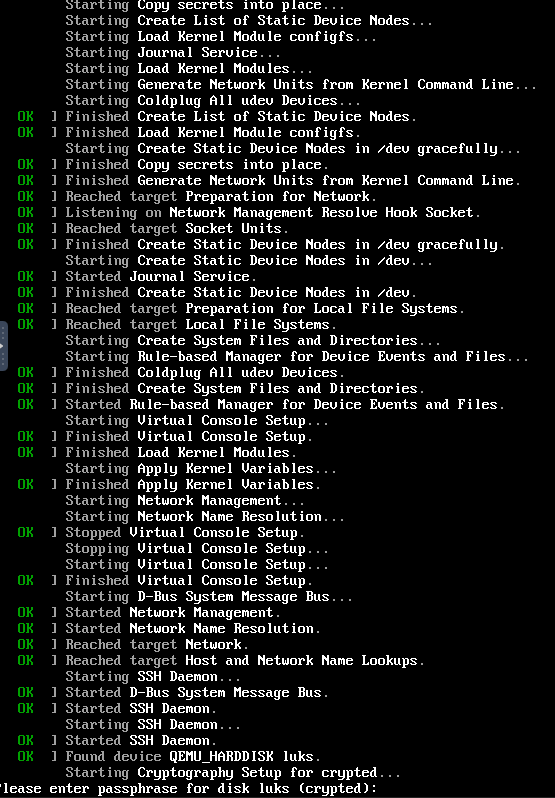
I logged into VNC and confirm sshd does start up and system is waiting for unlock phrase:
I input the unlock phrase manually via VNC interface and then I am able to login remotely:
# ssh -i ~/.ssh/key_file -p 2121 root@host
The authenticity of host '[host]:2121 ([xxxx:xxxx:xxxx:xxx::xx]:2121)' can't be established.
ED25519 key fingerprint is: SHA256:...
This host key is known by the following other names/addresses:
    ~/.ssh/known_hosts:123: [xxx.xxx.xxx.xxx]:2121
Are you sure you want to continue connecting (yes/no/[fingerprint])? yes
Warning: Permanently added '[host]:2121' (ED25519) to the list of known hosts.

[root@host:~]#
So multiple problems here:
- since I was using a non-default ssh port, the VPS provider had a network firewall rule applied to machine which prevented access on that port. That was resolved via their web interface.
- After unlocking disk to allow boot to proceed, I did some digging around the server and discovered:
- sshd logs seem to be preserved in stage 1, so you can inspect with:
journalctl -u sshd. This revealed the following:
Jul 14 20:57:18 ... systemd[1]: Starting SSH Daemon...
Jul 14 20:57:18 ... systemd[1]: Started SSH Daemon.
Jul 14 20:57:18 ... sshd[158]: Unable to load host key "/etc/secrets/initrd/ssh_host_ed25519_key": error in libcrypto: unsupported
Jul 14 20:57:18 ... sshd[158]: Unable to load host key: /etc/secrets/initrd/ssh_host_ed25519_key
Jul 14 20:57:18 ... sshd[158]: Unable to load host key "/etc/secrets/initrd/ssh_host_rsa_key": error in libcrypto: unsupported
Jul 14 20:57:18 ... sshd[158]: Unable to load host key: /etc/secrets/initrd/ssh_host_rsa_key
Jul 14 20:57:18 ... sshd[158]: sshd: no hostkeys available -- exiting.
Jul 14 20:57:18 ... systemd[1]: sshd.service: Main process exited, code=exited, status=1/FAILURE
Jul 14 20:57:18 ... systemd[1]: sshd.service: Failed with result 'exit-code'.
Jul 14 20:57:18 ... systemd[1]: sshd.service: Scheduled restart job, restart counter is at 1.
Notable events here are:
Jul 14 20:57:18 ... sshd[158]: Unable to load host key "/etc/secrets/initrd/ssh_host_ed25519_key": error in libcrypto: unsupported
Jul 14 20:57:18 ... sshd[158]: Unable to load host key "/etc/secrets/initrd/ssh_host_rsa_key": error in libcrypto: unsupported
...
Jul 14 20:57:18 ... sshd[158]: sshd: no hostkeys available -- exiting.
So did further digging with the host keys with ssh-keygen -y -f /etc/secrets/initrd/ssh_host_rsa_key and it reproduced the error.
Inspecting the files further, discovered the keys did not have new line after -----END OPENSSH PRIVATE KEY-----
Manually fixing the keys and rebooting fixed issue
2 Likes