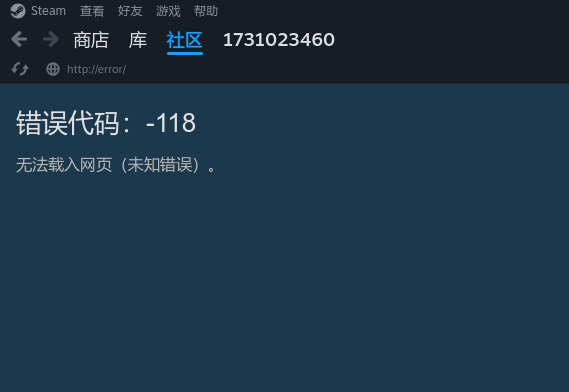
Steam cant display asian fonts

Steam cannot display Asian fonts

I’m certain that I checked the relevant issues on GitHub, but the problem has not been resolved.

My configuration is:

# configuration.nix

  i18n.defaultLocale = "zh_CN.UTF-8";

  i18n.inputMethod = {
    type   = "fcitx5";
    enable = true;
    fcitx5 = {
      waylandFrontend = true;
      addons = with pkgs; [
        qt6Packages.fcitx5-chinese-addons
      ];
    };
  };
  
  
  fonts = {
    packages = with pkgs; [
      noto-fonts-color-emoji
      noto-fonts-cjk-sans
      noto-fonts-cjk-serif
      wqy_zenhei
    ];
    
    fontconfig.cache32Bit = true;
    
    fontconfig.defaultFonts = {
      emoji     = [ "Noto Color Emoji" ];
      monospace = [
        "Noto Sans Mono CJK SC"
        "Sarasa Mono SC"
        "DejaVu Sans Mono"
      ];
      sansSerif = [
        "Noto Sans CJK SC"
        "Source Han Sans SC"
        "DejaVu Sans"
      ];
      serif     = [
        "Noto Serif CJK SC"
        "Source Han Serif SC"
        "DejaVu Serif"
      ];
    };
  };
  
  environment.systemPackages = with pkgs; [
    git
    home-manager
    vim
    firefox
  ];
  
  programs.steam = {
    enable = true;
    remotePlay.openFirewall = true;
    dedicatedServer.openFirewall = true;
    fontPackages  = with pkgs; [ noto-fonts-cjk-sans ];
    extraPackages = with pkgs; [ noto-fonts-cjk-sans ];
  };

Then I installed Steam in the “home.nix”.

  home.packages = with pkgs; [
    steam
    steam-run
  ];

However, Asian fonts still cannot be displayed, like this:

Have I done something wrong? What should I do now?

i think you forgot to add them to your steam and/or system..?

  programs.steam.fontPackages = with pkgs; [
    noto-fonts-cjk-sans
    noto-fonts-cjk-serif
    wqy_zenhei
  ];

and i usually reboot if im changing fonts, because they need to update their cache (also try using fc-cache?)…

but if you want wqy_zenhei to be used (or seen) on your system (in other apps),

look up font’s name via fc-list | grep -i "fontname", like "zenhei" (you can also use GUI font viewer apps, because font packages usually come with multiple typefaces / font families…)

/nix/store/.../share/fonts/wqy-zenhei.ttc: WenQuanYi Zen Hei Mono,文泉驛等寬正黑,文泉驿等宽正黑:style=Regular
/nix/store/.../share/fonts/wqy-zenhei.ttc: WenQuanYi Zen Hei Sharp,文泉驛點陣正黑,文泉驿点阵正黑:style=Regular
/nix/store/.../share/fonts/wqy-zenhei.ttc: WenQuanYi Zen Hei,文泉驛正黑,文泉驿正黑:style=Regular

you only need the middle part (but you can also specify "WenQuanYi Zen Hei Mono" if you want it to be monospaced) - add it as a “string”

  fonts.fontDir.enable = true; # optional X11 paths for steam
  fonts.defaultFonts.serif = [
    "Noto Serif CJK SC"
    "Source Han Serif SC"
    "DejaVu Serif"
    "WenQuanYi Zen Hei" # this
  ];
  fonts.defaultFonts.sansSerif = [
    "Noto Sans CJK SC"
    "Source Han Sans SC"
    "DejaVu Sans"
    "WenQuanYi Zen Hei" # this
  ];

(afaik) this makes apps try to find fonts from top to bottom, in descending order, so the first one has the highest priority!

for example, i use a zpix-pixel-font pixelated bitmap CJK font and its name is just "Zpix", but it only has chinese and japanese characters, no latin, so make sure you have other fallback fonts, otherwise they will be rendered as empty squares..! but i think noto and han fonts should cover them all, including latin ones..? and yeah, steam comes preinstalled with some font families that you cant easily change (especially latin typefaces), so i dont know if its actually a more tricky situation here or not… like, i can change their hinting and aliasing, but not actual font families, yeah…

…also, isnt "SC" small CAPS? i wonder if steam supports this font variant..? you could try without the "SC" part, maybe..? edit: ohh. stupid brain. its not what i thought it is… sorry :sob: its just that i was messing with CSS recently and many fonts didnt support small-caps, so everything was broken and stuff…

1 Like

No, it’s not. “Simplified Chinese”.

No, because the default value already includes those…

2 Likes

根据你的配置,我假设你在用中文,所以我直接说中文了。

简短说明:
直接删掉这一段

  home.packages = with pkgs; [
    steam
    steam-run
  ];

nixos模块已经自动安装steam和steam-run了,重复在home-manager里面安装这两个包只会导致正确的包被不含字体的包覆盖。

详细一点的解释是这样的:
这是steam模块的其中一段:

        steam.override (
          prev:
          {
            extraEnv =
              (lib.optionalAttrs (cfg.extraCompatPackages != [ ]) {
                STEAM_EXTRA_COMPAT_TOOLS_PATHS = extraCompatPaths;
              })
              // (lib.optionalAttrs cfg.extest.enable {
                LD_PRELOAD = "${pkgs.pkgsi686Linux.extest}/lib/libextest.so";
              })
              // (prev.extraEnv or { });
            extraLibraries =
              pkgs:
              let
                prevLibs = if prev ? extraLibraries then prev.extraLibraries pkgs else [ ];
                additionalLibs =
                  with config.hardware.graphics;
                  if pkgs.stdenv.hostPlatform.is64bit then
                    [ package ] ++ extraPackages
                  else
                    [ package32 ] ++ extraPackages32;
              in
              prevLibs ++ additionalLibs;
            extraPkgs = p: (cfg.extraPackages ++ lib.optionals (prev ? extraPkgs) (prev.extraPkgs p));
          }
          // lib.optionalAttrs (cfg.gamescopeSession.enable && gamescopeCfg.capSysNice) {
            buildFHSEnv = pkgs.buildFHSEnv.override {
              # use the setuid wrapped bubblewrap
              bubblewrap = "${config.security.wrapperDir}/..";
            };
          }

看不懂没关系,这一段的意思就是把programs.steam.选项里面的定义的选项通过override添加到steam包里面,也就是说实际上就是安装了一个修改过的steam包。

# 实际上起作用的只有这个
    environment.systemPackages = [
      cfg.package
      cfg.package.run
    ]

这种情况下你再安装一个没有添加字体的steam包,那么正确的包就被覆盖了。

2 Likes

原来是这样子。

抱歉,我没有理解清楚 configuration.nix 和 home manager 的关系,home.nix 里安装好后,发现没有字体,我就到 configuration.nix 里捣鼓了。

谢谢你,问题解决了,是我的问题!

1 Like

It’s okay. Thank you for your effort!

1 Like