Strange Font Rendering Issues

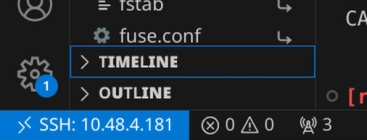
I’m running a Wayland-only Plasma setup on Nixpkgs unstable, and all has been working well for the past few months, until suddenly I started getting really strange font rendering issues on electron-based applications. Here’s a good view of the type of thing I’m seeing (notice the uneven rendering on the “TIMELINE” and “OUTLINE” accordions):

My font config adds font packages, but doesn’t attempt to force any settings. I do use NIXOS_OZONE_WL = "1" and ELECTRON_OZONE_PLATFORM_HINT = "wayland"; to force wayland on all Chrome and Electron instances. My Plasma config does use hidpi scaling on some diplays, but I get the same results on all displays, regardless of hidpi. Changing the anti-aliasing settings in the Plasma config doesn’t seem to have any effect one way or another on this particular issue.

Any ideas on what I might try to resolve this?

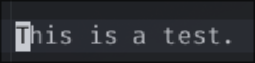
Same problem here running Hyprland on NixOS. I also tried a bunch of different things like changing fonts and settings. My monitor is 4k 60hz from lg. This problem only occurs in PHP storm and nowhere else. If I terminal besides it with the same font it works just fine.
2025-10-08T12:21:34,722472334+02:00

I have similar problems in VS Code.
In my case, it was due to my Nvidia card. There were no font rendering issues on AMD or Intel.

perchance it could be…

fonts.fontconfig.antialias = false; # default = true

Enable font antialiasing. At high resolution (> 200 DPI), antialiasing has no visible effect; users of such displays may want to disable this option.

but you should also check out these little guys:

fonts.fontconfig.cache32Bit = true; # default = false

fonts.fontconfig.allowBitmaps
fonts.fontconfig.hinting.*
fonts.fontconfig.subpixel.*

EDIT: oh… you are using wayland, nevermind! i cant read, again! :sweat_smile:

I fixed it with changing my monitor scale back to 1,

From:

monitor = DP-1, 3800x2160@60, 0x1080,  1,5

To:

monitor = DP-1, 3800x2160@60, 0x1080, 1

This fixed the issue for me. And since i used it for a day i think scale 1 is better too.

This is a bug in the vscode. See Enable FontationsLinuxSystemFonts feature · Issue #261605 · microsoft/vscode · GitHub
patch it:

pkgs.vscode.overrideAttrs ({
      postPatch = ''
        substituteInPlace resources/app/out/main.js \
          --replace 'CalculateNativeWinOcclusion,FontationsLinuxSystemFonts,''${Ne.commandLine.getSwitchValue("disable-features")}' \
          'CalculateNativeWinOcclusion,''${Ne.commandLine.getSwitchValue("disable-features")}'
      '';
    })

Wow, that’s brilliant. Thanks so much!

BTW, that worked one time and then stopped working. This simpler/broader patch is working at the moment:

vscode = pkgs.vscode.overrideAttrs ({
  postPatch = ''
    substituteInPlace resources/app/out/main.js \
      --replace 'FontationsLinuxSystemFonts,' '''
  '';
});