If all NixOS admins handle /etc/nixos/configuration.nix differently - - and no two approaches are the same as you say - - where each individual user approaches administering their configurations like a unique (snow) ‘flake’ - - then I want to learn from as many as possible because the problematic default way that I outlined in my OP above is clearly broken. If everyone is different then that is even a better reason to solicit best practices from others. I don’t intend to copy exactly what someone else does. I just want to explore what options are out there.
I got a symlink arrangement to work with my new GitHub repo.
Here are the steps I used (for my future reference and to help any else out there who may be as curious as I was when I started this thread):
-
Move
/etc/nixos/configuration.nixto the locally cloned GitHub repo in the user’s home directory.- If you run
$ ls -lathen you’ll notice the owner and group permission for this file is still set to root.
- If you run
-
To resolve this, change ownership. In my case in my VBox demo appliance, the user is
demoand the group isusers. Here is the required command:$ sudo chown demo:users configuration.nix. In prod when I make the leap-of-faith and commit to migrating from my native Manjaro installation to NixOS, the user name will not be ‘demo’. So change accordingly.- This is also required:
$ chmod +w configuration.nix
- This is also required:
-
In
/etc/nixos/, run:
$ sudo ln -s ~/<your-github-repo-name>/configuration.nix .
- To emphasize: take note of the trailing “
.” at the end. - Additional point of clarification: The recommended command #3 here will only work inside
/etc/nixos/as working directory. If you try to complete the symbolic link by invoking theln -scommand from within the repo directory, it won’t work. So be careful with this too.
The end product should look like this:
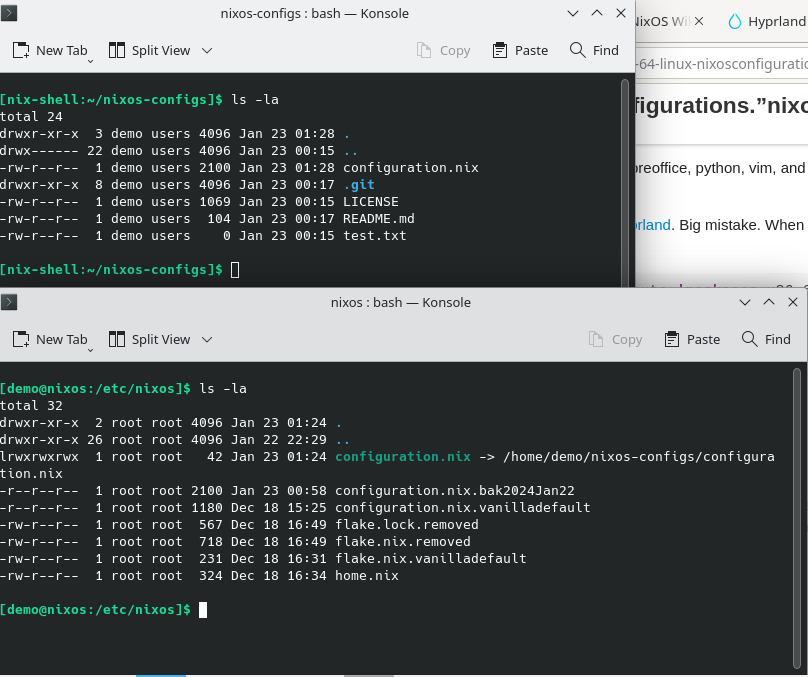
Now I have userland version control of configuration.nix using git. The advantage is that now when I track every change I make, if I bork the configuration with a syntax error or some other hard to diagnose, I can very easily revert back to the last known working state. Excellent! I am stoked.
If I ever start a fresh install and I clone my repo with, I just need to change directory into /etc/nixos, remove configuration.nix, and then issue the symbolic link command above. All that is left to do is run $ nixos-rebuild switch and it will swap to the config and start building.