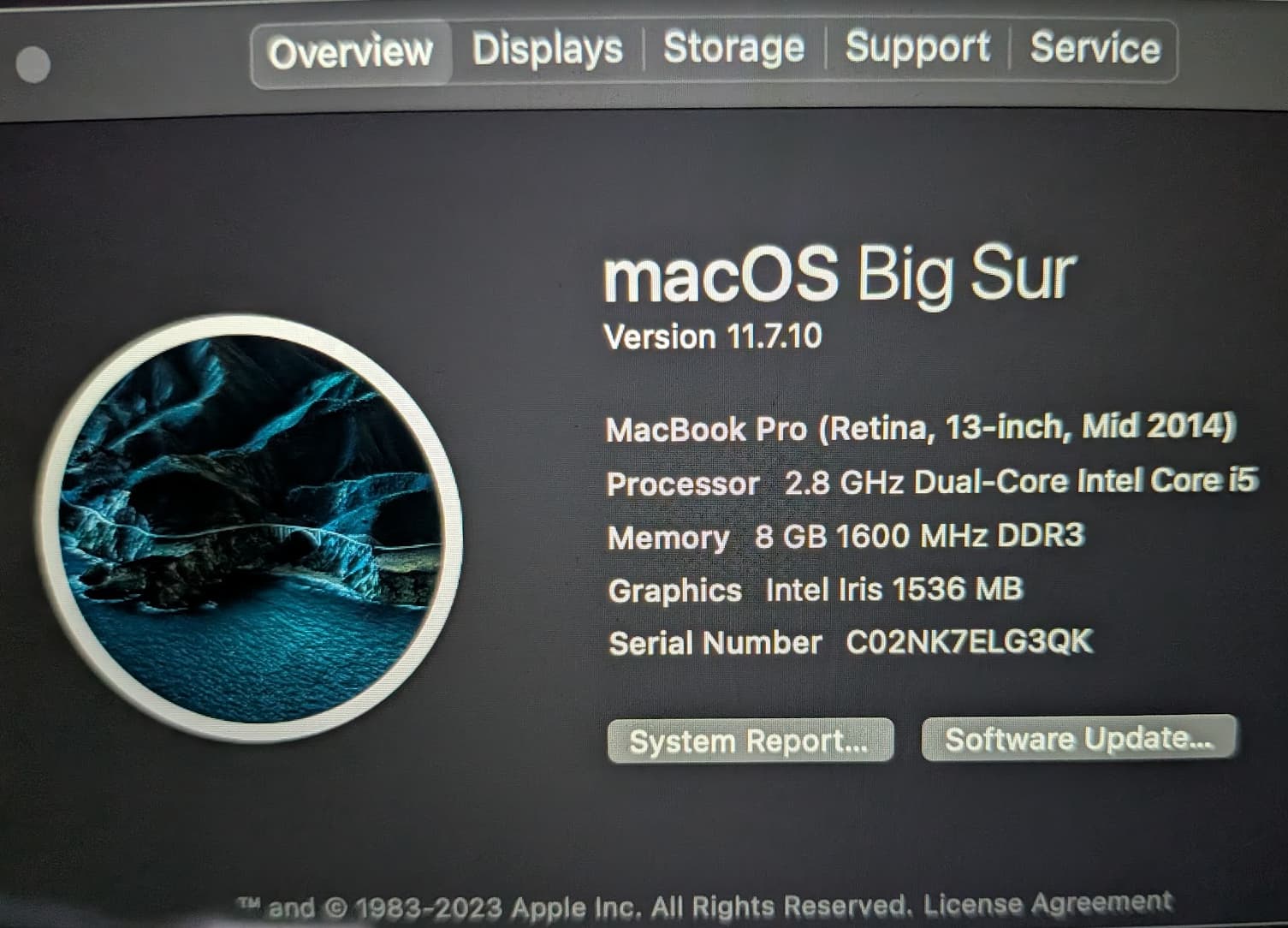
I have a really old MacBook Pro mid 2014. It runs “Big Sur”. I tried installing Nix on it, following these instructions: Download | Nix & NixOS
However, it gets all sorts of nasty looking errors, so I guess “Big Sur” is too old?
[das@l:~]$ ssh 172.16.50.133
(das@172.16.50.133) Password:
Last login: Tue Nov 25 15:56:47 2025 from 172.16.50.219
das@dass-MBP ~ % nix-shell -p neofetch

[nix-shell:~]$ neofetch
dyld: Symbol not found: _mkfifoat
  Referenced from: /nix/store/f8q9yh6ry4pz5z1hf8sw0ah3gznqs8sr-coreutils-9.8/bin/uname (which was built for Mac OS X 14.0)
  Expected in: /usr/lib/libSystem.B.dylib

Unknown OS detected: '', aborting...
Open an issue on GitHub to add support for your OS.

[nix-shell:~]$ bash --version
GNU bash, version 5.3.3(1)-release (x86_64-apple-darwin24.6.0)
Copyright (C) 2025 Free Software Foundation, Inc.
License GPLv3+: GNU GPL version 3 or later <http://gnu.org/licenses/gpl.html>

This is free software; you are free to change and redistribute it.
There is NO WARRANTY, to the extent permitted by law.

[nix-shell:~]$ ls
dyld: Symbol not found: _mkfifoat
  Referenced from: /nix/store/f8q9yh6ry4pz5z1hf8sw0ah3gznqs8sr-coreutils-9.8/bin/ls (which was built for Mac OS X 14.0)
  Expected in: /usr/lib/libSystem.B.dylib

Abort trap: 6              ls

[nix-shell:~]$ nix --version
nix (Nix) 2.32.4

das@dass-MBP ~ % nix-shell -p iperf2

[nix-shell:~]$ iperf2 --version
iperf version 2.2.1 (4 Nov 2024) pthreads
That’s why I said nixpkgs not nix. They’re separate projects.
I have no idea what MacOS versions nix supports, and the nixpkgs MSV (NixOS is in the same repo as nixpkgs) is mentioned in said release notes already.
Actually, about a decade ago, when this generation of laptop was new, I was running Linux on it. It was ok, and obviously a lot faster than MacOS, but it was missing key features like the camera.
I was mostly hoping to make a small video about how to use nix on Apples
That sounds like a good idea to me. While it is technically possible to use the Nix package manager without using Nixpkgs, a new user is very unlikely to want to do that. New users will probably want to use both the Nix package manager and Nixpkgs at the same time even if they don’t understand the difference between the Nix package manager and Nixpkgs yet.
This system requirement is already mentioned in the release notes for Nixpkgs, but I don’t think that most users would look at the release notes for Nixpkgs when installing the Nix package manager for the first time.
I don’t per-se disagree with that assessment, but I think there’s risk in starting to conflate nix and nixpkgs in upstream documentation.
Yep; that’s more appropriate in the nixpkgs manual, which mentions it as well: Nixpkgs Reference Manual
That said, making that mention more prominent (and fixing it, looks like the update was only applied to the table of possible versions, not that little section about the default) would definitely be sensible, though.
I agree. If we’re going to add a notice that talks about Nixpkgs to the part of the page that is about downloading the Nix package manager, then we should be very careful about how we word that notice.
Maybe another option would be for nix/nixpkgs install process to check MacOS version, and then warn the user when it’s being run on [prehistoric] unsupported MacOS?
Your language is still a bit off. Just to try and clear up the confusion (though I appreciate it takes time to figure this out):
nixpkgs is kind of like an unofficial extension library for nix; the lines between nix and nixpkgs are kept quite strict, to the point that NixOS has inscrutable errors because nix doesn’t support its use case directly (though there are some default values that shepherd you to using nixpkgs, and some nixpkgs standards have made their way into what flakes assume your derivations contain).
When you start using nix, here’s what happens:
You use some kind of installer to install nix, the build tool
You typically run some kind of nix command that requires nix to evaluate files from something you call nixpkgs
Most likely, but not certainly, your nix command either refers to the channels set by your installer, or to the built-in flake registry, to figure out what nixpkgs means
This probably, but not certainly, refers to github:NixOS/nixpkgs, or the equivalent channel tarball
You can however configure this to point to anything, including old versions of nixpkgs; In fact, if you configure this to point to nixpkgs stable today, things will actually still work for you (but current stable will be deprecated early next week)
Nix goes and downloads whatever nixpkgs refers to, and, depending on what command you ran, goes and builds some software based on the definitions
Your installer does not know what you’re going to do with nix. Nix supports more architectures than nixpkgs does, and in fact will let you build software (and non-software) that doesn’t even target MacOS at all, so doesn’t care in the slightest about the version of your SDK. Building software without nixpkgs is entirely possible, and nix can do stuff that doesn’t involve building software at all, too.
The installer never “installs” nixpkgs, nixpkgs itself is completely inert and the word “installation” doesn’t make sense when talking about it. nixpkgs is just a bunch of build instruction files that tell nix how various pieces of software can be built; starting with 25.11 those instructions no longer contain instructions for ancient MacOS SDKs. You will forever be able to make nix build whatever you like if you make it use nixpkgs 25.05’s instructions, though (at the cost of significant security risks since nobody will update the versions of software that nixpkgs version ends up building).
That said, yeah, the various nix installers could probably warn about it if you’re using MacOS versions for which there is no sdk support in nixpkgs. They are responsible for picking the default nixpkgs version, after all.
This is not quite correct. It’s possible to use a newer SDK while targeting an older release. We have chosen not to do that because we want to align the minimum supported version with the oldest major version receiving support from Apple. In the future, we may only use the latest SDK (e.g., 27.0) with a lower minimum version (e.g., 15.0), but that has not been decided for sure yet.
However, there is one exception to this support rule. We plan to drop x86_64-darwin support for 26.11. This is included in the 25.11 release notes, but it bears repeating here. Intel is a dead platform. Apple is dropping all hardware support next year. It is likely that support in the ecosystem will bitrot. Continuing to support it in nixpkgs has a cost both in terms of builder capacity (which currently use Rosetta 2) but in maintenance.