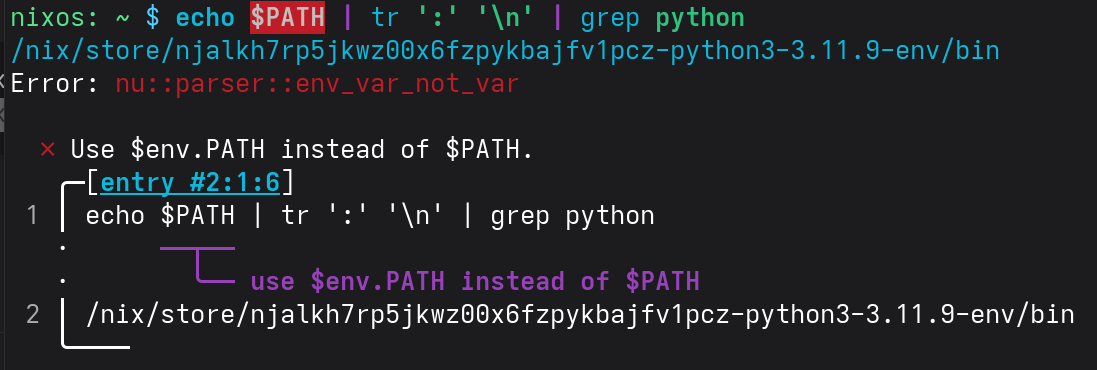
# shell.nix
let
  # We pin to a specific nixpkgs commit for reproducibility.
  # Last updated: 2024-04-29. Check for new commits at https://status.nixos.org.
  pkgs = import (fetchTarball "https://github.com/NixOS/nixpkgs/archive/cf8cc1201be8bc71b7cbbbdaf349b22f4f99c7ae.tar.gz") {};
in pkgs.mkShell {
  packages = [
    (pkgs.python3.withPackages (python-pkgs: with python-pkgs; [
      # select Python packages here
      numpy
      matplotlib
      requests
    ]))
  ];
}
Works for me too, though I use dash as my login shell and hence the default shell for nix-shell doesn’t change. I don’t see how bashInteractive would clear your environment before entering nu just because you’re exec-ing it, though.
nixos: ~ $ cat python-shell.nix
# shell.nix
let
  # We pin to a specific nixpkgs commit for reproducibility.
  # Last updated: 2024-04-29. Check for new commits at https://status.nixos.org.
  pkgs = import (fetchTarball "https://github.com/NixOS/nixpkgs/archive/cf8cc1201be8bc71b7cbbbdaf349b22f4f99c7ae.tar.gz") {};
in pkgs.mkShell {
  packages = [
    (pkgs.python3.withPackages (python-pkgs: with python-pkgs; [
      # select Python packages here
      numpy
      matplotlib
      requests
    ]))
  ];
}
nixos: ~ $ nix-shell python-shell.nix
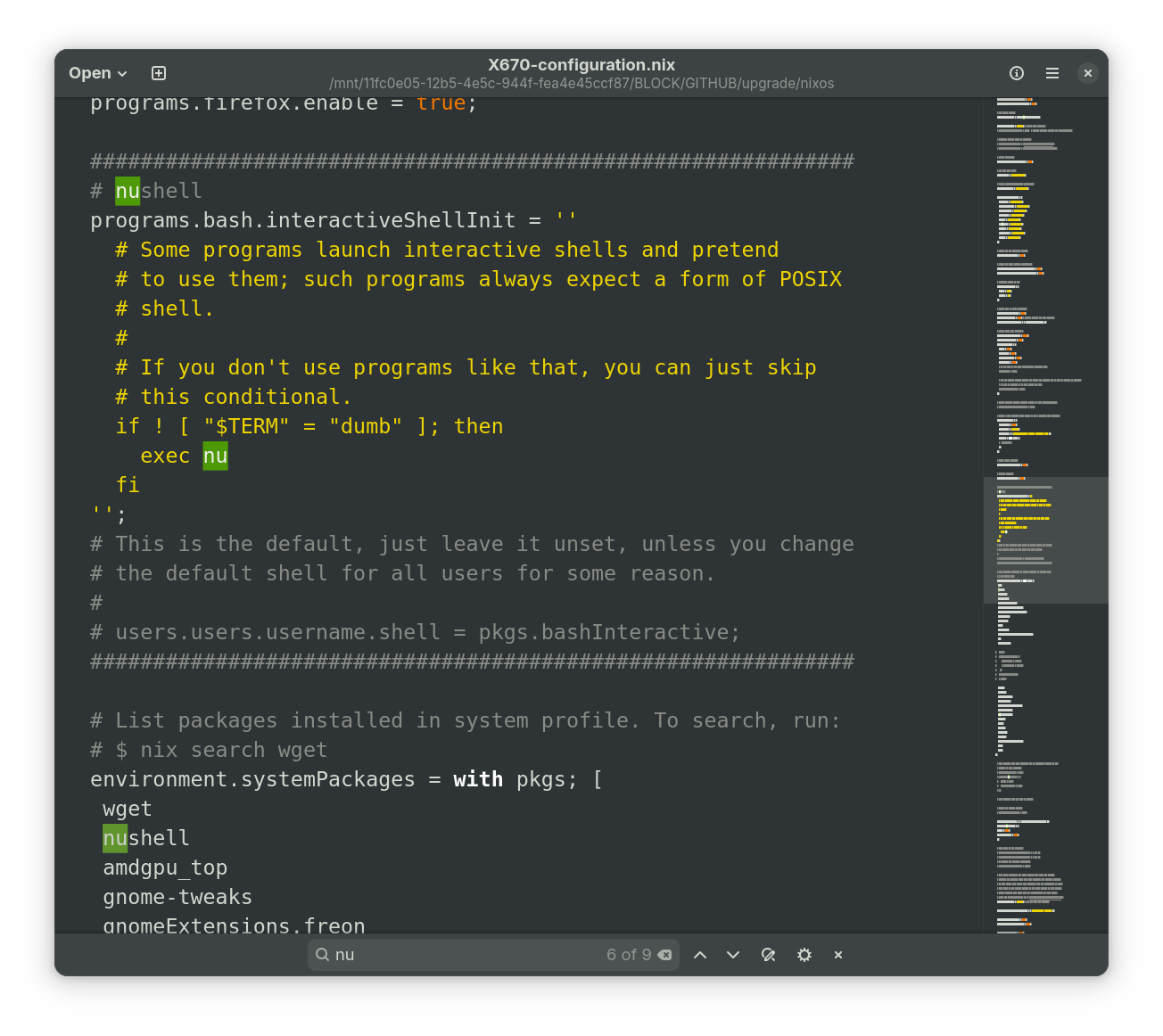
Ok, at this point I guess we need your whole config, or at least the contents of everything bash/nu is sourcing because that’s weird, it’s as if the shell never ran.
# Edit this configuration file to define what should be installed on
# your system.  Help is available in the configuration.nix(5) man page
# and in the NixOS manual (accessible by running ‘nixos-help’).

{ config, pkgs, ... }:

{

  boot.initrd.kernelModules = [ "amdgpu" ];
  hardware.graphics = {
    enable = true;
    enable32Bit = true;
  };

  imports =
    [ # Include the results of the hardware scan.
      ./hardware-configuration.nix
    ];

  # Bootloader.
  boot.loader.systemd-boot.enable = true;
  boot.loader.efi.canTouchEfiVariables = true;

  # Use latest kernel.
  boot.kernelPackages = pkgs.linuxPackages_latest;

  networking.hostName = "nixos"; # Define your hostname.
  # networking.wireless.enable = true;  # Enables wireless support via wpa_supplicant.

  # Configure network proxy if necessary
  # networking.proxy.default = "http://user:password@proxy:port/";
  # networking.proxy.noProxy = "127.0.0.1,localhost,internal.domain";

  # Enable networking
  networking.networkmanager.enable = true;

  # Set your time zone.
  time.timeZone = "Europe/Berlin";

  # Select internationalisation properties.
  i18n.defaultLocale = "en_US.UTF-8";

  i18n.extraLocaleSettings = {
    LC_ADDRESS = "de_DE.UTF-8";
    LC_IDENTIFICATION = "de_DE.UTF-8";
    LC_MEASUREMENT = "de_DE.UTF-8";
    LC_MONETARY = "de_DE.UTF-8";
    LC_NAME = "de_DE.UTF-8";
    LC_NUMERIC = "de_DE.UTF-8";
    LC_PAPER = "de_DE.UTF-8";
    LC_TELEPHONE = "de_DE.UTF-8";
    LC_TIME = "de_DE.UTF-8";
  };

  # Enable the X11 windowing system.
  services.xserver.enable = true;

  # Enable the GNOME Desktop Environment.
  services.xserver.displayManager.gdm.enable = true;
  services.xserver.desktopManager.gnome.enable = true;

  # Configure keymap in X11
  services.xserver.xkb = {
    layout = "us";
    variant = "";
  };

  # Enable CUPS to print documents.
  services.printing.enable = true;
  hardware.sane.enable = true; # enables support for SANE scanners
  hardware.sane.extraBackends = [ pkgs.hplipWithPlugin ];

  # Enable sound with pipewire.
  services.pulseaudio.enable = false;
  security.rtkit.enable = true;
  services.pipewire = {
    enable = true;
    alsa.enable = true;
    alsa.support32Bit = true;
    pulse.enable = true;
    # If you want to use JACK applications, uncomment this
    #jack.enable = true;

    # use the example session manager (no others are packaged yet so this is enabled by default,
    # no need to redefine it in your config for now)
    #media-session.enable = true;
  };

  # Enable touchpad support (enabled default in most desktopManager).
  # services.xserver.libinput.enable = true;

  # Define a user account. Don't forget to set a password with ‘passwd’.
  users.users.someone = {
    isNormalUser = true;
    description = "Thomas";
    extraGroups = [ "networkmanager" "wheel" "scanner" "lp" ];
    packages = with pkgs; [
    #  thunderbird
    ];
  };

  # Allow unfree packages
  nixpkgs.config.allowUnfree = true;

  # Install firefox.
  programs.firefox.enable = true;

  #############################################################
  # nushell
  programs.bash.interactiveShellInit = ''
    # Some programs launch interactive shells and pretend
    # to use them; such programs always expect a form of POSIX
    # shell.
    #
    # If you don't use programs like that, you can just skip
    # this conditional.
    if ! [ "$TERM" = "dumb" ]; then
      exec nu
    fi
  '';
  # This is the default, just leave it unset, unless you change
  # the default shell for all users for some reason.
  #
  # users.users.username.shell = pkgs.bashInteractive;
  #############################################################

  # List packages installed in system profile. To search, run:
  # $ nix search wget
  environment.systemPackages = with pkgs; [
   wget
   nushell
   amdgpu_top
   gnome-tweaks
   gnomeExtensions.freon
   gnomeExtensions.appindicator
   gnomeExtensions.tiling-assistant
   google-chrome
   tor-browser
   gedit
   vscodium-fhs
   gnomeExtensions.vscode-workspaces-gnome
   git
   github-desktop

#   ollama
#   (pkgs.ollama.override {
#      acceleration = "rocm";
#      # acceleration = "cuda";
#    })
#   rocmPackages.rocminfo
#   # clinfo

   gparted
   bitwarden
   telegram-desktop
   signal-desktop
   yubikey-personalization-gui
   yubioath-flutter
   gnupg-pkcs11-scd
   shotwell
   xxdiff
   wxmaxima
   stellarium
   evolution
   texlive.combined.scheme-full
   xsane
   ksnip
];

  # Some programs need SUID wrappers, can be configured further or are
  # started in user sessions.
  # programs.mtr.enable = true;
  # programs.gnupg.agent = {
  #   enable = true;
  #   enableSSHSupport = true;
  # };

  # List services that you want to enable:

  # Enable the OpenSSH daemon.
  # services.openssh.enable = true;

  services.udev.packages = [ pkgs.yubikey-personalization ];
  programs.gnupg.agent = {
  enable = true;
  enableSSHSupport = true;
  };

  # Open ports in the firewall.
  # networking.firewall.allowedTCPPorts = [ ... ];
  # networking.firewall.allowedUDPPorts = [ ... ];
  # Or disable the firewall altogether.
  # networking.firewall.enable = false;

  # This value determines the NixOS release from which the default
  # settings for stateful data, like file locations and database versions
  # on your system were taken. It‘s perfectly fine and recommended to leave
  # this value at the release version of the first install of this system.
  # Before changing this value read the documentation for this option
  # (e.g. man configuration.nix or on https://nixos.org/nixos/options.html).
  system.stateVersion = "25.05"; # Did you read the comment?

  nix.settings.experimental-features = [ "nix-command" "flakes" ];

  system.autoUpgrade.enable = true;
  system.autoUpgrade.allowReboot = true;

  services.locate.enable = true;
  services.locate.package = pkgs.mlocate;

  services.ollama = {
    enable = true;
    loadModels = [ "gpt-oss"];
    acceleration = "rocm";
    # acceleration = "cuda";
    ##host = "0.0.0.0";
    ##openFirewall = true;
    ##home = "~/.ollama";
    ##models = "~/.ollama/models";
  };

nix.gc = {
    automatic = true;
    dates = "daily";
    options = "--delete-older-than 1d";
  };

nix.settings.auto-optimise-store = true;

}
Can you include your ~/.config/nushell/{config.nu,env.nu} and ~/{.bashrc,.bash_login,.bash_profile,.profile} as well? nu might refuse to start if your configuration is broken.
You can also remove the exec from your bash init to maybe get some debug output.
Have you attempted this? I still suspect that nu starts and immediately exits for some reason, likely not being able to read a configuration file or such.
It has turned out that unfortunately my implementation of the recommended setup, see Nushell as default shell, has not worked. Rather successfully, just run nushell by typing nu from the command prompt and you are good to run python.