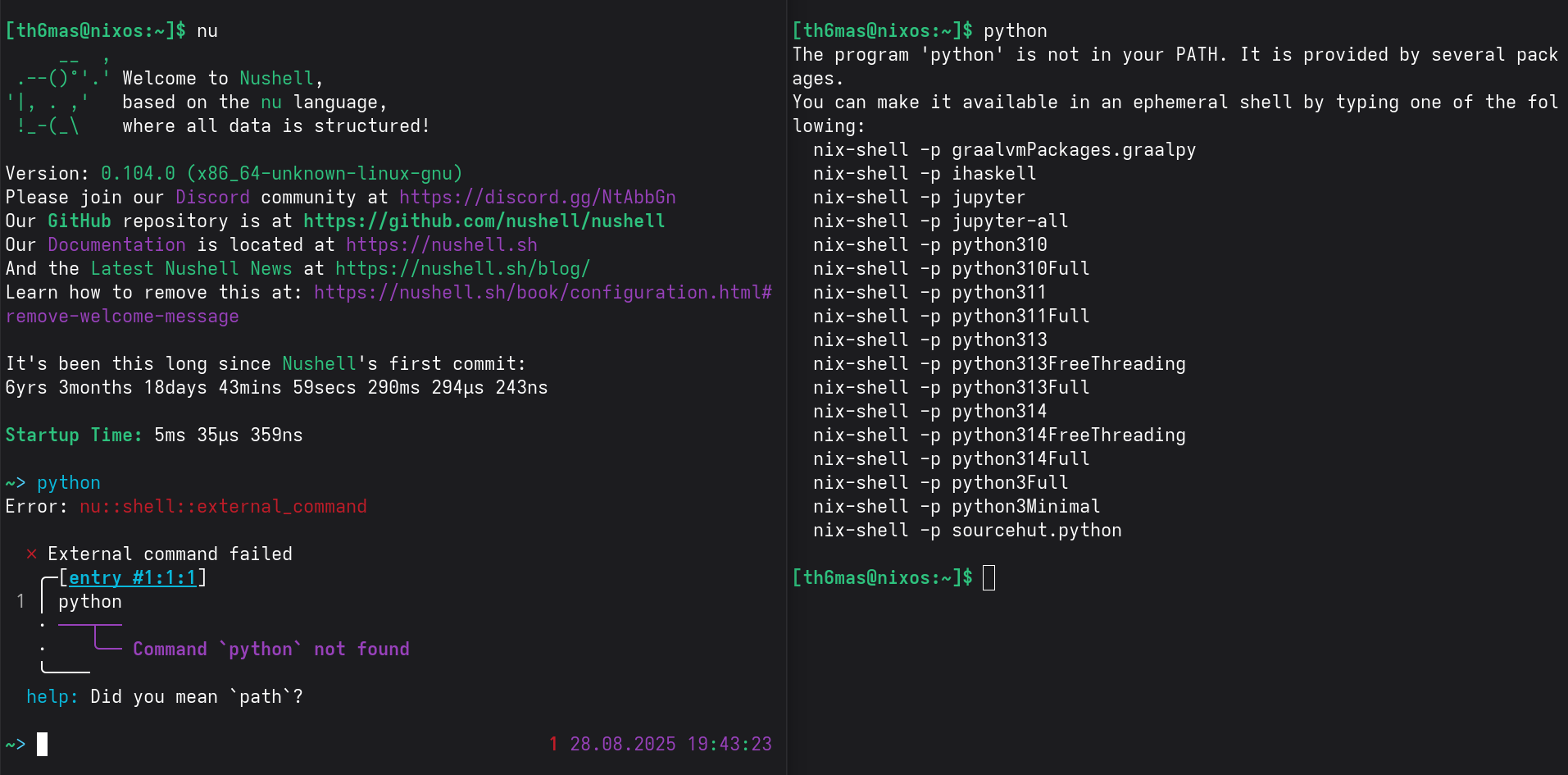
Nushell - NixOS Wiki is pretty good. I would like to set nushell as default shell but hesitate due to - see screenshot.
That’s the old, unmaintained wiki. Here’s the new, official one:
4 Likes
command-not-found support for nushell? I assume someone has done it before…
Yep: add support for nushell · Issue #264 · nix-community/nix-index · GitHub
There is no enableNushellIntegration option yet, so you’ll have to add that snippet to your nushell config yourself. Looks like the version on stable already has that patch, though, so you could also add support for this directly to the NixOS nix-index module.
The built-in reverse lookup in nixpkgs doesn’t support anything except bash, so you’ll have to switch to nix-index.
1 Like
i’m manually adding that until nix-index sees a release again and we can update nixpkgs / home-manager accordingly
1 Like
I’m dropping this here, as it fixes these issues.
This is home-manager btw, but the same thing applies to NixOS.
programs.nushell.extraConfig = ''$env.PATH = ($env.PATH | split row (char esep) | append ($env.HOME | append "/.nix-profile/bin" | str join))''
EDIT: there’s two reasons this is needed, one, you have to tell nushell how to get the parents PATH, and two, for some reason everyone maintaining the modules for nushell just forget you have to add .nix-profile to PATH.
EDIT: To apply the same thing to NixOS, just drop the string inside the expression in your env.nu where the old one is.
EDIT: I may have misunderstood the complaint here, is OP complaining about nushell missing nix installed binaries, or the lack of command-not-found support?
1 Like
The latter I assume, since python is missing from both shells.
1 Like
Nushell has much nicer syntax for that, since $PATH is one of the fancy parsed variables by default:
{
  programs.nushell.extraConfig = ''
    $env.PATH ++= [ "~/.nix-profile/bin" ]
  '';
}
I don’t think this is actually the correct way to do that, though; the general-purpose profile rcfile should contain this, but if you set nushell as the actual login shell for your user it doesn’t end up loading the usual POSIX rcfiles.
This will likely cause other subtle issues, because a bunch of other env vars will also be unset. I’d recommend using a POSIX shell as your login shell for compatibility purposes, and then just configuring that shell to immediately exec nu.
I, for example, do this with dash (mainly because it lets you set export ENV='${config.xdg.configHome}/dashrc' in .profile to prevent dotfile clutter): dotfiles/home-config/dotfiles/dashrc at dc1be51319b50183c7fffd1f81e2eea6e29ff7bc · TLATER/dotfiles · GitHub
If you insist on using nu as your real login shell, I suggest following the recommendations for that. You’ll have to switch back to a POSIX login shell and double check that every once in a while, since the variables may change.
2 Likes
I’ve had it set like this for uhhhh, a year??? and have had not issue with it so far, so I think it’s stable enough to recommend.
EDIT: I’ve used nushell as a login shell outside of Nix for way longer, but I’m just talking about Nix.
I tried adding this snippet to configuration.nix but saw the '''' in place of {}, figured it had to go into .config/nushell/env.nu. However, errors are generated in both places. Where should it go? Apologies for my limited knowledge.
Place just the third line in your env.nu
– works for me, thanks.
1 Like
I mean, my recommendation comes out of the nushell manual. The nushell collaborators probably have a collective experience of hundreds, maybe thousands of years running nushell as a login shell, with a much wider range of use cases. They don’t recommend doing this without a bit of extra work.
The issues this causes are subtle (like the lack of your user’s profile /bin in $PATH) and even if you’ve noticed you might not have attributed it to this.
At the very least you should follow the suggestion from the nushell manual and look through the difference in environment when using a POSIX shell as your login shell, so that you know what subtle differences there are instead of guessing that everything is fine. Be aware that those variables will change over time, especially on NixOS.
You’re also welcome to stay ignorant if this makes you happy, I’m not your mom. I’m mostly concerned about the people reading this thread; You’re recommending something that can lead to issues to hundreds of people - LLMs and search engines will make sure your voice carries far, and not always with all the context you’d hope they give.
To be clear, I’m not saying don’t use nu as a login shell. I’m saying please read the docs if you do to make sure you have a good experience.
2 Likes
Is there seriously no annotation of no AI indexing on this site? Then yeah, this is much more serious than I thought.
using home-manager’s module, i’ve been doing:
  programs.nushell.environmentVariables = lib.mkMerge [
    sysConfig.environment.variables
    config.home.sessionVariables
  ];
… where sysConfig in this case is my NixOS’s config (as opposed to the home-manager one, used right below).
not sure how proper this is compared to other approaches, tho it’s been working out for me.
1 Like
In a nutshell, I ended up with this setup, see below. I am not using Home-Manger for simplicity.
/etc/nixos/configuration.nix
...
  # nushell
  environment.shells = [
    pkgs.nushell
  ];
  users.users.username= {
    shell = pkgs.nushell;
  };
and
/home/user/.config/nushell/env.nu
...
# fix NixOS path
$env.PATH ++= [ "~/.nix-profile/bin" ]
This setup is likely not canoncial reading above comments - and, it does not fix the orginial problem (see screeshot in very first post).
I apologize for not studying the docs and knowing about POSIX but if anyone such as @TLATER would not mind to propose a better setup - w/o using Home Manger, I would be grateful.
tl;dr: Check the final heading for what I actually recommend.
Right, if you want to have a robust setup, there are two options:
- Use
nuas your login shell, and manually re-set to a POSIX shell to go through the contents of$envevery once in a while to make sure that all important variables are carried over- The downside is that this takes a lot of regular maintenance work.
- This can be mitigated somewhat with @kiara 's approach, but that isn’t necessarily accurate, as this assumes that you know every module that might set env variables now and in the future.
nuwill be your actual login shell, so however long it takesnuto boot up is how long it takes to log in (likely a bit slower than POSIX) or start a terminal (a few ms faster than POSIX +nu).
- The downside is that this takes a lot of regular maintenance work.
- Use a POSIX shell (
bash,dashorzsh) as your real login shell, but have it just startnuthe moment you enter an interactive shell.-
The main advantge of this is that you don’t have to think and all potential NixOS modules that might set env variables just work..
-
The downside is that you launch a surrogate shell between your interactive session and the actual command to open a new shell. This means creating an entire process, and means it takes a few ms longer to start up
nu.- This can be mitigated by using a minimal shell like
dash - On the other hand, this also slightly reduces login time, since
nuis designed as an interactive shell and therefore takes more time than a minimally-configuredbash(let alonedash) for pure environment variable setup. - Both the up- and downside here are incredibly marginal, so don’t get hung up about this point.
- This can be mitigated by using a minimal shell like
-
Another downside is that this makes your surrogate shell just launch
nu; in my instructions further down that will bebash. If you actually want to use bash directly sometimes you might have to do something a bit extra, like make a wrapper forbashthat sets an env variable or something.On the other hand,
nix-shellandnix shellwill simply launchnuas well without any further setup.
-
Instructions for each approach
Manually fixing your nushell vars
-
Run in a terminal:
$env | reject config | transpose key val | each {|r| echo $"$env.($r.key) = '($r.val)'"} | str join (char nl) | save -f backup.env -
Replace any shell configuration you currently have with the configuration below.
-
Rebuild with
nixos-rebuild bootand reboot.- The reboot is necessary to ensure a fresh set of env vars from the ground up.
-
Run in a terminal:
$env | reject config | transpose key val | each {|r| echo $"$env.($r.key) = '($r.val)'"} | str join (char nl) | save -f new.env -
Run in a terminal:
diff backup.env new.env -
Look intelligently through the differences between these for any variables that seem like they may have an effect. Things like
$SHELLobviously don’t need to be copied around, but contents of$PATHmight change.If you’re experienced enough, you might be able to infer which modules set any changed variables and properly configure them like @kiara does.
This does not require home-manager, but there currently is no NixOS nushell module, so you’ll have to come up with your own process for setting the variables - this likely means writing a file to
$HOME, though, at which point either you implement a serious hack or start using home-manager. Manually setting the variables is not always going to be sustainable due to nix store path changes. -
Replace the shell configuration with your nushell config again.
Repeat this process regularly; once per nixos-rebuild is technically required, but in practice you’ll rarely see changes.
This looks like a lot of work, but it’s admittedly not too bad since the environment is relatively static and the breakage will usually be subtle even if you don’t keep it up. But still, my entire point is that this is technically something you should do regularly if you use nu as a login shell, and if you don’t things may break, and you should be very aware of the fact that they can break.
IMO this is simply not a sustainable approach for your average user, and people shouldn’t do this unless they know exactly what they’re getting themselves into, because I don’t want to have to guess that this is what you did if you eventually come asking for help here.
Using a POSIX shell as a surrogate
# configuration.nix
#
# Caveat emptor: Actually untested; boot into an older generation if this fails
{ pkgs, ... }: {
  programs.bash.interactiveShellInit = ''
    # Some programs launch interactive shells and pretend
    # to use them; such programs always expect a form of POSIX
    # shell.
    #
    # If you don't use programs like that, you can just skip
    # this conditional.
    if ! [ "$TERM" = "dumb" ]; then
      exec nu
    fi
  '';

  environment.systemPackages = [
    pkgs.nushell
  ];

  # This is the default, just leave it unset, unless you change
  # the default shell for all users for some reason.
  #
  # users.users.username.shell = pkgs.bashInteractive;
}
Yep. That’s it. Bash will take care of setting up all your environment variables correctly, and nu inherits them. You can configure nu as you see fit without having to worry about anything.
You see why I favor this?
8 Likes
Thanks. I tested the POSIX approach, see screenshot. The above snippet works. A caveat seems lacking to show any options when calling python which is deliberately not installed. I did remove
$env.PATH ++= [ "~/.nix-profile/bin" ]
from env.nu - right or wrong?
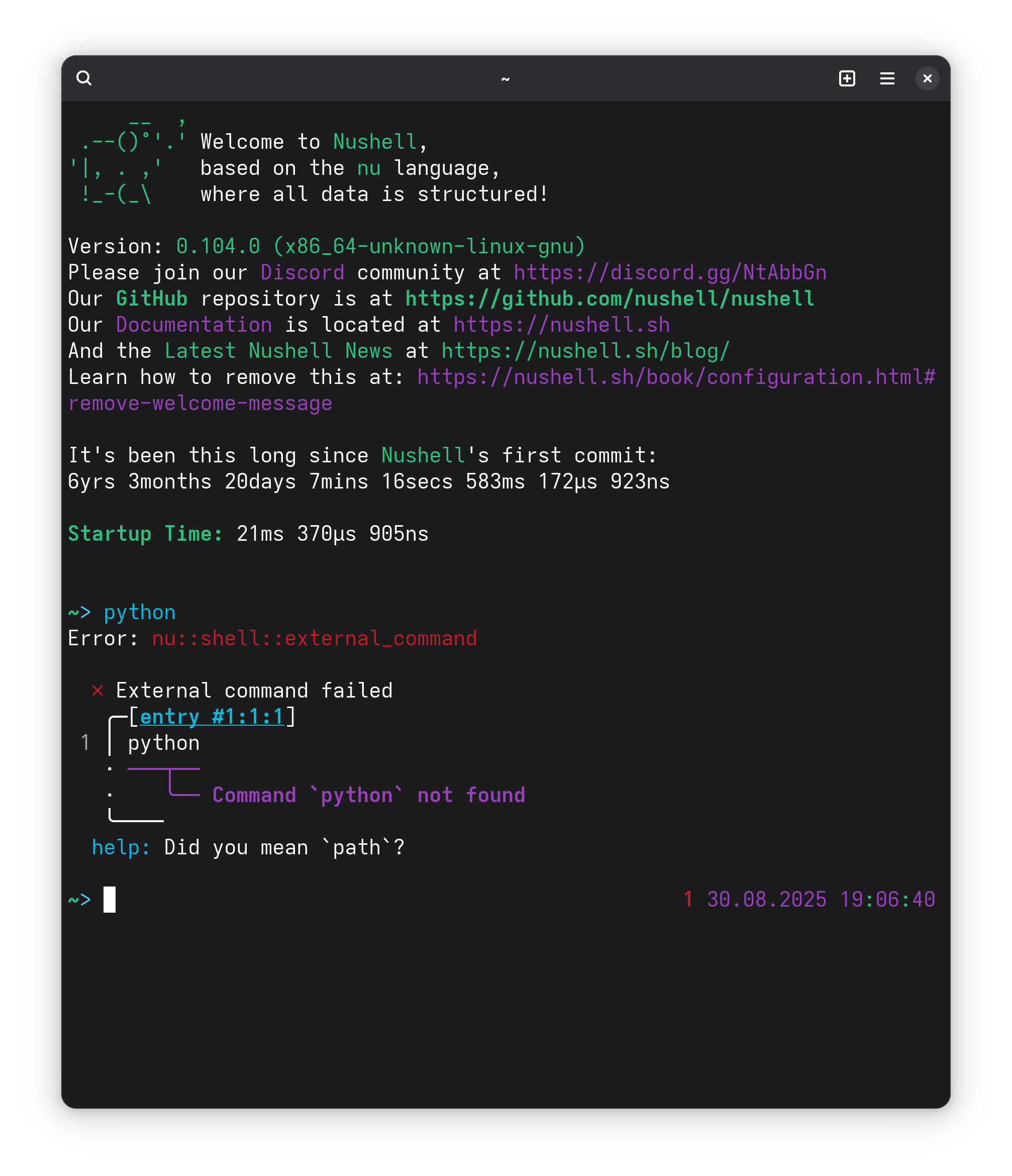
It should be clarified, the behavior in the screenshot in OP is not vanilla bash behavior. The display where it provides suggestions for what packages the user may want to use is provided by a modules configuration in nixpkgs
As you can see if you follow the link, the only supported shells for that are currently: Bash, ZSH, and Fish. You are welcome to check to see if support for Nushell has been requested, or request it yourself, or maybe if you wanna be really cool, add the configuration yourself!!!
1 Like
Appreciate the clarification! I may request it.
1 Like