I did import the nixos-hardware.nixosModules.lenovo-thinkpad-x1-yoga module which, among other things, enabled the hardware.sensor.iio.enable. And I’m on latest nixpkgs unstable running kernel 6.16.2.
Running monitor-sensor hangs with “Waiting for iio-sensor-proxy to appear” message.
From Making sure you're not a bot! I got some extra debugging commands:
$ udevadm info --export-db | grep iio
(empty response)

$ gdbus introspect --system --dest net.hadess.SensorProxy --object-path /net/hadess/SensorProxy
Error: GDBus.Error:org.freedesktop.DBus.Error.ServiceUnknown: The name net.hadess.SensorProxy was not provided by any .service files

$ sudo /nix/store/3w49y26v45ni0hy8jcdhy2mf4jp7gnvd-iio-sensor-proxy-3.8/libexec/iio-sensor-proxy -v -r
Place your finger on the fingerprint reader
** (iio-sensor-proxy:7505): DEBUG: 13:58:51.493: Starting iio-sensor-proxy version 3.8
** (iio-sensor-proxy:7505): WARNING **: 13:58:51.530: Not a switch [/sys/devices/LNXSYSTM:00/LNXSYBUS:00/PNP0A08:00/LNXVIDEO:00/input/input22/../capabilities/sw]
** (iio-sensor-proxy:7505): WARNING **: 13:58:51.530: Invalid bitmask entry for /sys/devices/LNXSYSTM:00/LNXSYBUS:00/PNP0A08:00/LNXVIDEO:00/input/input22/event11
** (iio-sensor-proxy:7505): DEBUG: 13:58:51.531: No sensors or missing kernel drivers for the sensors
On my researches I stumbled upon a very similar issue with the new Framework12 laptop and tried to adapt the solution myself, but without success (What are the Linux system requirements for tablet mode? - #50 by Istvan_Donko - Linux - Framework Community).
I did end up writing my own script to toggle tablet mode on KDE and deactivate keyboard and touchpad. dotfiles/scripts/plasma-toggle-tablet-mode at ef11e4713d9ee8323e8d9fac0a8e4d7631f1761e · DiogoDoreto/dotfiles · GitHub arguably overengineered but great learning experience 
Does anyone have any extra guidance on what else I can do to investigate the lack of support to recognizing when the screen has been flipped and auto-rotation?
Hi, I can confirm that this also happens to me with a Kubuntu 25.10 and iio-sensor-proxy 3.7. Looks like something’s wrong with either the code or something’s changed by the hardware. I wonder if there’s anyone who can take this note to the developers. As a result, tablet mode can never be turned on and no screen autorotation works.
Also worth to note that the only other thing that doesn’t work is the Intel MIPI Camera using ipu7 drivers (may also include the vision module which may be in charge of the facial recognition and human presence sensor?), which doesn’t have sufficient software support yet. With these two issues fixed, this laptop would be the historically best one ever for a long time.
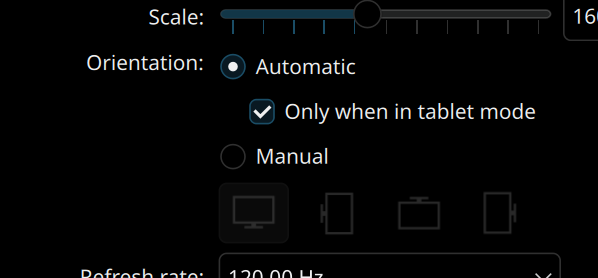
I have to say that, since I posted this message, the autorotation started working for me. Granted I’m on nixos-unstable and on latest kernel and KDE versions. Not sure exactly when it became available, but at some point the automatic orientation option appeared for me on system settings page:
The tablet mode indeed does not activate automatically when flipping the screen, but I keep my toggle tablet mode script on the taskbar and that is not too bad for me.
Now the camera is a problem for me too. I even had a go at adapting the ipu6 scripts to ipu7, but no luck, just way beyond my knowledge. I have described what I’ve done and shared my code here: IPU7 webcam support
Good to see your post - for the camera please check my post here just done: https://askubuntu.com/questions/1559262/kubuntu-25-10-intel-mipi-camera-ipu7-not-working-on-thinkpad-x1-2-in-1-gen-1
Maybe this will provide some good idea of how to do it. By the way, does your script work in Ubuntu too or do I have to make some conversions?
Thanks for your post too, I’m following it now in case you get an answer there 
does your script work in Ubuntu too or do I have to make some conversions?
I would assume that it should just work, as I’m interacting with KDE through dbus to disable the keyboard and touchpad and with KDE’s own config scripts to toggle the tablet mode status. But the only test I did was on my own NixOS system.
I am using the latest linux kernel from release-25.11 (6.18.2), and the iio-sensor-proxy.service is running smoothly.
@pseudocc yes, as the kernel was being updated things started to work by itself. Now autorotation works and even the keyboard and the trackpad get disabled automatically when flipping the screen. I just need to find a way to connect the KDE’s tablet mode with the screen flipping action.
Just to add something… Ubuntu still has 6.17 as its mainline now and installing 6.18 doesn’t work unless Secure Boot is disabled, which subsequently jeopardizes Windows authentication. Bummer. but will try when the 26.04 LTS is out during which 6.18 will definitely be shipped with it.
Update. Last night I upgraded to Kubuntu 26.04 LTS with the new 7.0 kernel, IIO sensor becomes automatically working without any problem, but the ipu7 camera group still has the same problem. I guess this stated problem in the subject is solved. Will keep an eye on the camera solutions later because they have got different versions for every LTS distribution, this time should not be an exception.