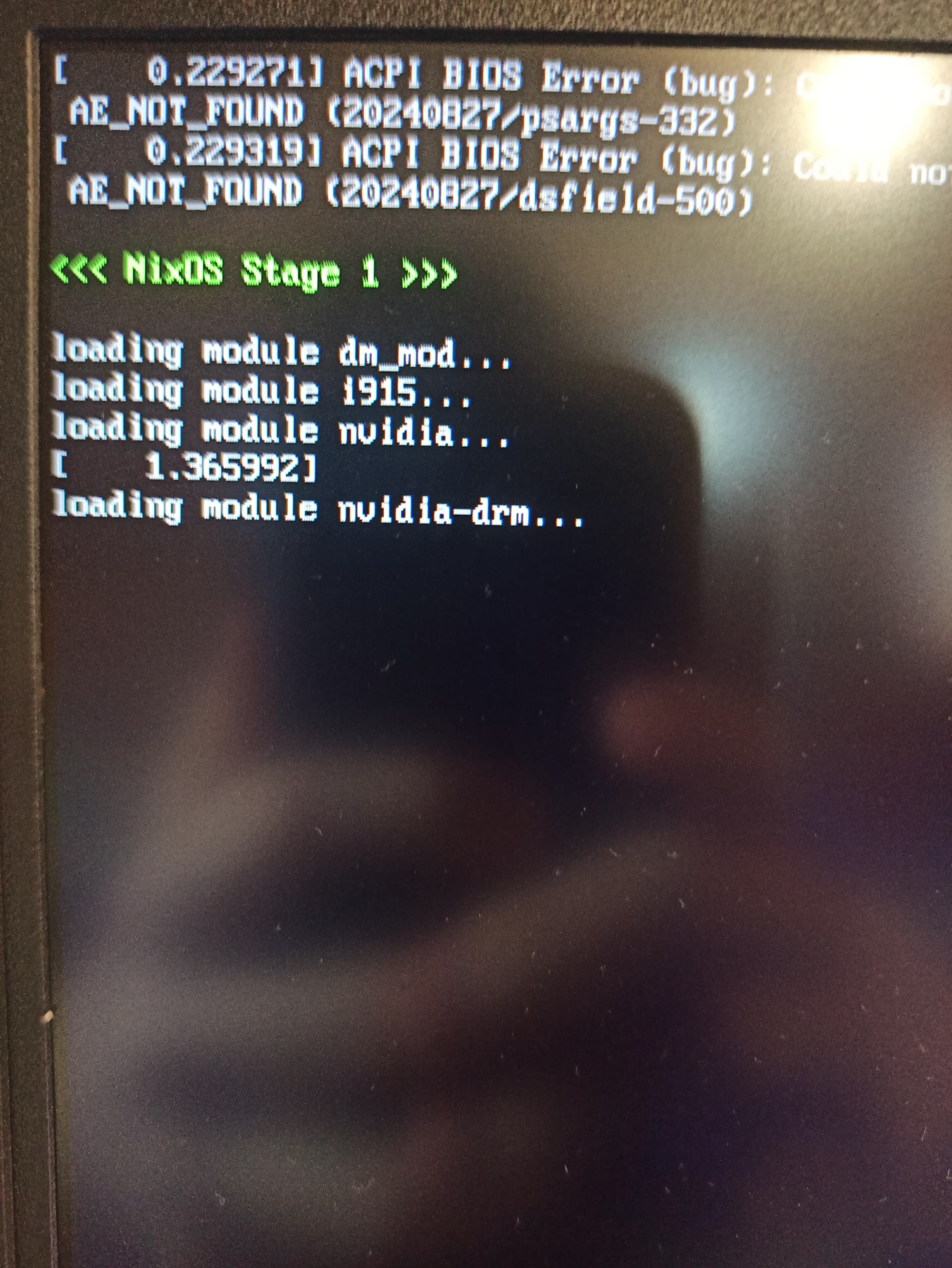
after this thing on the image it just fails with time-limit. that happens every time i try to enable my config with nvidia proprietary drivers support.
Right, let’s simplify and get the nvidia module to work first. Let’s worry about prime later.
Replace the entire config you shared with just this (i.e., delete all the nvidia settings, kernel settings etc., practically all of your config is either likely wrong or redundant with the defaults):
{
  hardware = {
    graphics.enable = true;

    # If your GPU is Turing or newer, i.e. 20xx or newer, delete
    # this too!!!!!
    nvidia.open = false;
  };

  services.xserver.videoDrivers = [ "nvidia" ];
}
The note about nvidia.open is important, it doesn’t mean you’ll be using nouveau, it means you’ll use nvidia’s open driver, which replaces the proprietary driver completely and is recommended to be used instead of it. Very modern cards aren’t even supported by the proprietaty driver anymore, see the nvidia docs.
Try to rebuild and boot with that; if it still fails, boot without the nvidia driver, and get a copy of the last boot’s logs with journalctl --boot -1 (or a bigger number of the nvidia boot is longer ago), and share the rest of your config. It’d be helpful to know what GPU you have as well.
https://pastebin.com/H7TKrr3v: logs from journalctl
so, from last lines i thought that i should check systemd-modules-load.service status after rebuild, and turns out it had problem loading kernel modules related to nvidia
сен 21 17:00:23 nixos systemd-modules-load[9598]: Failed to find module 'nvidia' сен 21 17:00:23 nixos systemd-modules-load[9598]: Failed to find module 'nvidia_drm' сен 21 17:00:23 nixos systemd-modules-load[9598]: Failed to find module 'nvidia_modeset'
tried to search for related issues, but found nothing at all. any ideas?
(As a sidenote, you probably don’t want to be putting your nvidia drivers in the initrd; the nvidia firmware files increase the initrd size by like 140M which is really bad for the free space on /boot. The only benefits of having graphics drivers in initrd are 1) earlier modesetting, but it’s better to fix that at the EFI level, and 2) for some systems, during kexec booting you need the graphics driver in initrd to have video output in initrd, but frankly kexec is an unreliable reboot method to begin with)
i tried to fix systemd-modules-load error by putting modules to initrd… yeah, i know that’s stupid, but i was trying every possible solution. anyway, thanks for letting me know!
Hmm, that’s quite weird. Could you share the rest of your system config?
yep, here’s the rest: nixos – Google Drive
also tried to modprobe all those modules, and what i got was:
[po1nt@nixos:~]$ modprobe nvidia
modprobe: FATAL: Module nvidia not found in directory /run/booted-system/kernel-modules/lib/modules/6.12.47
sorry,i don’t mean to rush you,but have you checked my system config yet? (honestly i hate nouveau,it’s completely useless)
Sorry, hadn’t gotten around to it. I do 99% of my replying to stuff from public transport, and browsing code from google drive on my phone is less than ideal 
boot.kernelPackages = pkgs.linuxPackages; # (this is the default) some amdgpu issues on 6.10
That’s most likely not going to cause these issues, but what’s that comment re amdgpu about? Aren’t you using nvidia? What hardware are you actually using?
I don’t spot anything that could cause failures to load modules here, you’re running a bog-standard kernel. This is an incredibly weird issue. My best guess is that your driver build is corrupted or something. Can you attempt a nix store verify --recursive /run/current-system?
Also, just to make sure your GPU is in fact ancient, can you flip the open = true? The non-open driver should largely not be used anymore.
that’s fine, i really appreciate your help!! 
so, the comment about amdgpu most likely comes from copypasting from nixos wiki (must’ve been setting up steam)
tried to nix store verify --recursive /run/current-system after rebuilding with my nvidia-simple.nix module included - no errors at all
my gpu is rtx 3050 mobile 6gb, so it shouldn’t be older than turing architecture, but i tried to switch this option to false - nothing changed. kernel modules (nvidia ones probably) fail to load
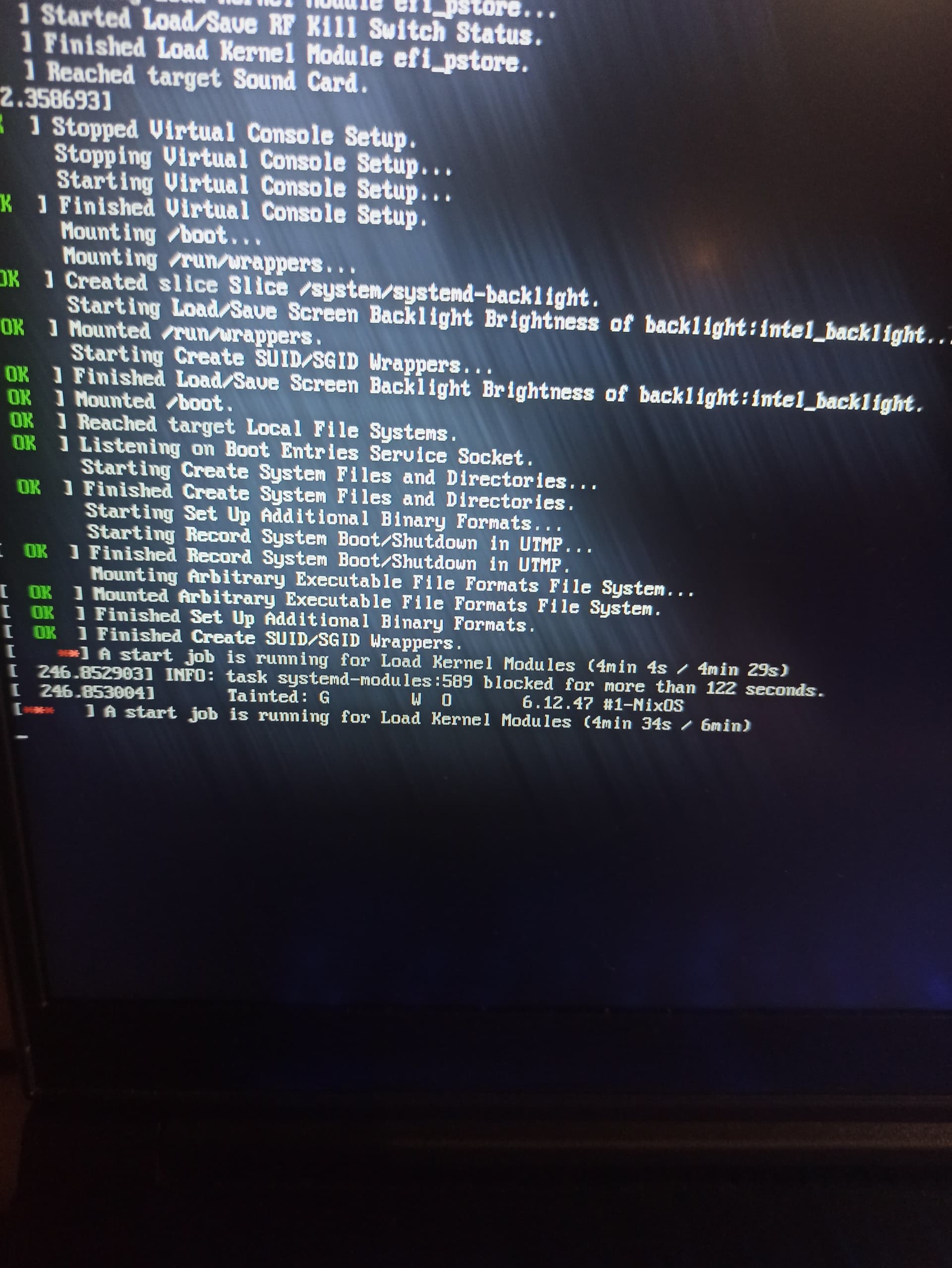
(there’s also smth like “failed to load kernel modules” message after this stuff on the photo)
then system tries to enter display manager, which obviously fails too. in case of sddm, it’s just black screen with underscore, in case of ly - smth like “systemd-modules: failed to load” and then nothing.
also note about google drive: i guess i’ll make the git repo with my configs so that browsing it would be less tedious. didn’t actually thought about that earlier, so thanks for letting me know!
UPD: also i don’t think it’s gpu issue, because everything works fine in windows 11
You mean to true? In your current config it is false. It should be true; that’s anyway the default. So your nvidia config should be exactly:
{
  hardware.graphics.enable = true;
  services.xserver.videoDrivers = [ "nvidia" ];
}
Everything else should be left at the default value (until we get around to configuring prime), which NixOS will automatically do if you don’t specify the options.
That said, this is almost certainly not the issue. Given your configuration, I can only imagine two potential ways you’d end up here:
- Something about your grub config borks the kernel’s module loading.
- Your grub config is pretty standard, I don’t think this is the case.
- I’ll say that using grub is generally not recommended on EFI systems. It’s quite complex and has a lot of legacy features which you don’t need. KISS philosophy says this is bad.
- The only reason to use it over systemd-boot is if you desperately want:
- To be able to boot your NixOS system both via traditional BIOS and EFI.
- You don’t seem to want that, since you explicitly disable this.
- A background image in your boot selection screen, which most people want to hide unless a certain key is pressed anyway.
- To be able to boot your NixOS system both via traditional BIOS and EFI.
- Your kernel module is corrupted somehow.
- In theory this can happen, since the build is done downstream, and while nix is pretty close to giving you perfect build reproducibility I can imagine nvidia’s proprietary build producing garbage in some unusual scenarios. Nix assumes produced artifacts are correct (there’s no way to check), so if this happened you’d have a poisoned cache; nix would not attempt to rebuild this module until either the kernel or nvidia update something.
- I think it’s pretty likely that by now this has happened, a
nix flake updatemight just do the trick. - Otherwise, you’d have to manually get rid of the built driver module and rebuild it. To accomplish that I’d recommend booting your config with
nouveau, and then asudo nix-collect-garbage -das well as anix-collect-garbage -d, making sure you don’t have anyresultsymlinks of your system lying around. If you then build your system again it should rebuild the module.- Alternatively you could explicitly remove the nvidia driver store paths, but this is tricky and I’m too lazy to figure out all the details to give you exact instructions.
This makes me especially suspicious of your driver build; there should be a symlink to the nvidia driver module in:
/run/booted-system/kernel-modules/lib/modules/6.12.47/kernel/drivers/video/nvidia.ko.xz
If that file does not exist, something is quite wrong. You can double check what the nvidia build produced by looking in the directory this command returns:
nix eval --raw .#nixosConfigurations.nixos.config.hardware.nvidia.package.bin
- swtiched to systemd-boot - no effect
- executed
nix flake update- no effect - tried to collect garbage exactly like you told - it reinstalled drivers but guess what? nothing works

now that you mentioned it - checked /run/booted-system/kernel-modules/lib/modules/6.12.47/kernel/drivers/video and there’s no symlink to nvidia.ko.xz. then i ran nix eval --raw .#nixosConfigurations.nixos.config.hardware.nvidia.package.bin, checked this directory (/nix/store/bwk10av8lwhfrpcm2sjm7c2lczhk0nkz-nvidia-x11-580.82.09-6.12.49-bin) and nothing seems to be off (maybe because i don’t really know how it should look like), there are some binaries in /bin, and spooky-scary files shown on screenshot in /lib/modules/6.12.49/misc
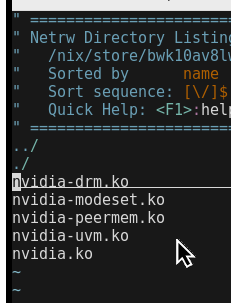
those files seem to be those exact modules that should be symlinked in /run/booted-system stuff, but i’m not really sure and honestly i’m completely lost and don’t know what to do, the arch-user part of me is really scared to do anything that could break the system 
There’s not much you can do to accomplish that, the nix store is read-only and everything else is recreated on boot. Worst you can do is delete data.
That said, this also means there is not much you can do through anything but editing your configuration.nix, so we’re stuck having to figure out why your kernel directory isn’t set up correctly. Much better than blindly moving around files and hoping it works anyway, you shouldn’t do that on Arch either, the fact that people do is why we need NixOS to begin with ;p
Yep, and since you confirmed that it’s clear the module is working (though, technically the open module apparently is the .open attribute rather than .bin, my bad, maybe double check the open driver as well). This means the driver isn’t actually bundled into the kernel.
The bundling works as follows:
- The nvidia module adds its driver (kernel) module to
boot.extraModulePackages boot.extraModulePackagesis passed tosystem.modulesTree- The modules in
system.modulesTreeare merged together withpkgs.aggregateModules aggregateModulesusesbuildEnvinternally- The aggregate is linked to the directory that eventually becomes
/run/booted-system/
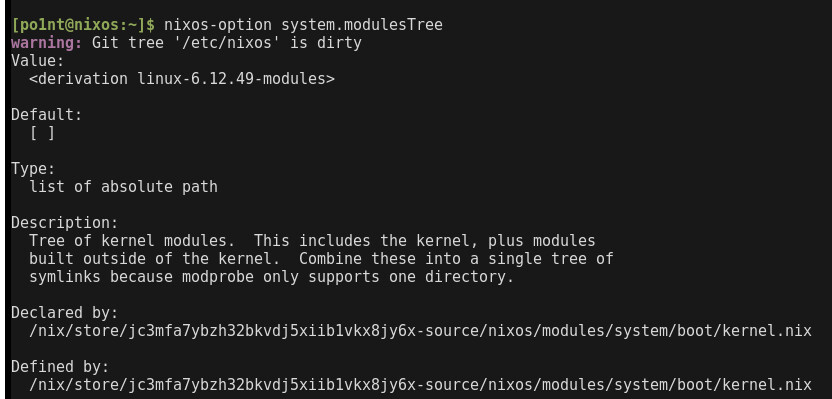
I don’t see anything in your configuration that would cause this to fail. It’d be interesting to see what nixos-option thinks the value of each of those options is after evaluation (i.e., system.modulesTree and boot.extraModulePackages).
My best guess at this point is that you’re not sharing your whole configuration somehow and that somewhere you’re doing something that overrides system.modulesTree somehow, but I haven’t a clue how you would even accomplish that.
checked it, the one thing that concerns me is that the only path it has is /lib/modules/6.12.49/kernel/drivers/video and the same files as i mentioned before, but with .ko.xz. honestly i don’t really know if it should be like that, so i leave it on you
also forgor to mention that i finally made the git repo with my config so it would be more easy to check it! GitHub - dieline/nixos-config
Yeah, that’s correct, have you managed to get nixos-option to tell you what’s wrong?
everything seems to be normal, i guess…?
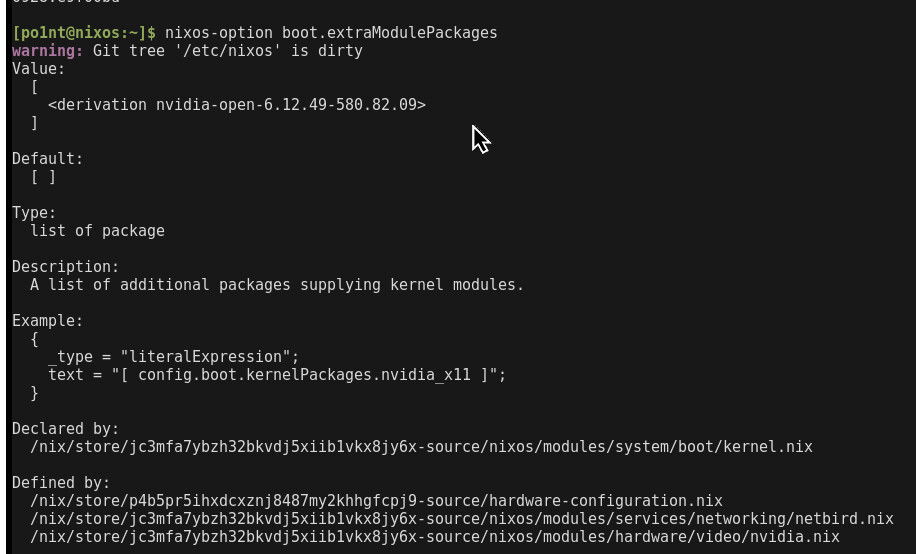
also very strange but important detail: i was working in windows 11 as my second system, then i noticed your reply and decided to check nixos-option outputs again. suddenly, after reboot i somehow booted up in my presumably last built generation. honestly i didn’t see anything while system was booting, but when it happened, first thing i did was lshw -c display and it showed that… system is using nvidia drivers. modprobe nvidia also didn’t show any errors. now the thing that got me completely lost - when i decided to reboot (yes i’m really stupid), everything broke again, the very same endless “load kernel modules”. tried to reproduce the same steps: loaded in my windows 11, rebooted and… nothing works. i have no idea what is going on
i think that dual-boot somehow causes issues with kernel or maybe bootloader itself (both systemd-boot and grub). don’t have enough time to reinstall everything again (yep, i tried reinstalling both OS back then), so… any thoughts? can this even be possible?
Windows has a weird feature that is supposed to make boot speed up by not fully turning off. This causes issues when booting other operating systems. I don’t know much about this, haven’t touched Windows in well over a decade personally.
yep, fast boot was turned on. disabled it, shutted down my laptop, loaded in my nouveau nixos generation, ran sudo nix-collect-garbage -d and nix-collect-garbage -d, then sudo nixos-rebuild switch and i’m still left with the same problem. no nvidia symlinks in /run/booted-system/kernel-modules/lib/modules/6.12.49/kernel/drivers/video. honestly, i have no idea what may be causing the problem