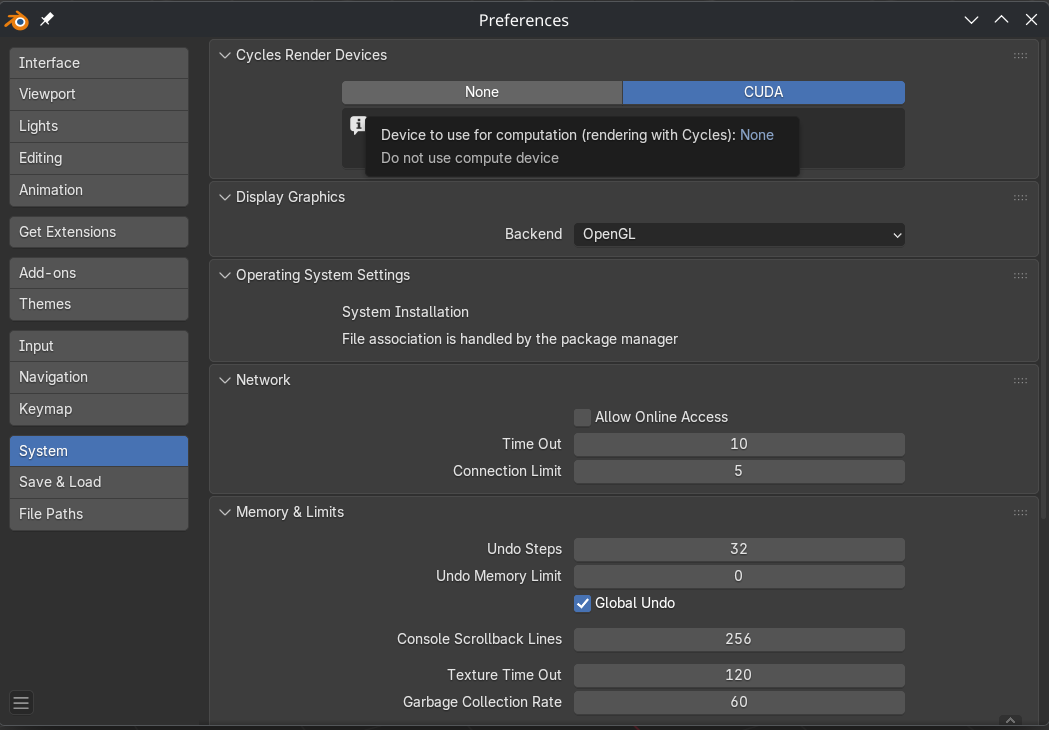
well i must set somthing wrong when i set
# Allow unfree packages (Needed for Nvidia, Steam, etc.)
  nixpkgs.config = {
    allowUnfree = true; # Required for proprietary drivers/CUDA
    cudaSupport = true; # Enables CUDA in packages like Blender
  };
on configuration.nix and it build and compiled all long time… well then updating home.nix it offcourse said i need to have allowunfree true there too since i have steam there and blender so i did same to home.nix and now compiling and building again same stuff…
best practise on this situation since i just need cuda for now on blender and videoediting and darktable detects it already blender no without cudaSupport true.
should i just remove cudaSupport and use override or what
You’ve enabled cudaSupport = true globally in both configuration.nix and home.nix, which forces many packages to rebuild with CUDA support, even those that don’t need it. This is causing long compilation times. Remove cudaSupport = true; from both configuration.nix and home.nix to avoid global rebuilds. Just use per-package overrides for only the applications that need CUDA.
# In configuration.nix or home.nix
{
  nixpkgs.config.allowUnfree = true; # Keep this for Steam, etc.

  environment.systemPackages = with pkgs; [
    (blender.override { cudaSupport = true; })
  ];
}
thank you i saw and new i made mistake when it started to compile so much and cancelled and now added this to home.nix, but cant see cuda still or compile still even i used home-manager switch
# Allow unfree packages (Needed for Nvidia, Steam, etc.)
  nixpkgs.config = {
    allowUnfree = true;
    environment.systemPackages = with pkgs; [
    (blender.override { cudaSupport = true; })
  ];
  };
it says compute capability 5.0 not sure does my nvidia has it RTX 3050 TI need to do more research
The RTX 3050 Ti has a Compute Capability of 8.6, not 5.0.
Try do this:
# configuration.nix

{ config, pkgs, ... }:

{
  nixpkgs.config.allowUnfree = true;
  nixpkgs.config.cudaSupport = true;
  services.xserver.videoDrivers = [ "nvidia" ];

  hardware.graphics = {
    enable = true;
    enable32Bit = true;
  };

  environment.systemPackages = with pkgs; [
    cudaPackages.cudnn
    cudaPackages.cuda_cccl
  ];
}
This is what I found. I don’t have RTX 3050 Ti, but still you can try this.
will test this i might have limtations since i have blender on home.nix files it might need to be on configuration.nix need to test both options tho i prefer home.nix
Yeah, you can use home.nix, it’s just me preferring configuration.nix.
1 Like
i see this only when running on terminal
❯ blender
00:06.172  cycles           | WARNING CUEW initialization failed: Error opening the library
00:13.153  blend            | Saved session recovery to "/tmp/quit.blend"
00:13.154  blend            | Writing user preferences: "/home/phatle/.config/blender/5.0/config/userpref.blend"
00:13.154  reports          | Preferences saved
Yeah, you just need this, as I said before:
# configuration.nix

{ config, pkgs, ... }:

{
  environment.systemPackages = with pkgs; [
    cudaPackages.cuda_cudart
    cudaPackages.cudnn
  ];
}
1 Like
does this need to be on configuration or home? i am still pretty noob on this
That code must go in your configuration.nix file.
put it there no cuda still i might need to move blender to system file since i guess it needs some system depencies to get cuda
While using Home Manager with useGlobalPkgs should work, sometimes complex runtime dependencies like CUDA are handled more reliably when the application itself is declared at the system level.
yeah i might have something missing on home-manager file could you help and check the files i might have missing useGlobalPkgs on somewhere…. since i had to use even useUnfree on both files so there might be something root cause
home.nix
{ config, pkgs, ... }:

let
  ## =============================================================
  ## PACKAGE SETS FOR ORGANIZATION
  ## =============================================================

  kdeApps = with pkgs.kdePackages; [
    kate
    audiotube
    plasmatube
    kdenlive
    #neochat
  ];

  mediaAndDev = with pkgs; [
    blender
    darktable
    gimp
    inkscape
  ];

  otherApps = with pkgs; [
    thunderbird
    libreoffice
    signal-desktop
    steam
  ];

  securityApps = with pkgs; [
    protonvpn-gui
    protonmail-bridge-gui
    proton-pass
  ];

  userPackages = with pkgs; [
    zsh-powerlevel10k
  ]
  ++ kdeApps
  ++ mediaAndDev
  ++ otherApps
  ++ securityApps;

in
{
  ## -------------------------------------------------------------
  ## 1. HOME MANAGER BASICS
  ## -------------------------------------------------------------
  home.username = "phatle";
  home.homeDirectory = "/home/phatle";
  home.stateVersion = "25.11";

  ## -------------------------------------------------------------
  ## 2. USER PACKAGES
  ## -------------------------------------------------------------
  home.packages = userPackages;

  ## -------------------------------------------------------------
  ## 3. PROGRAM CONFIGURATION
  ## -------------------------------------------------------------

  ### Fastfetch (Reverted to Defaults)
  programs.fastfetch = {
    enable = true;
    # No 'settings' block means the default Fastfetch configuration is used.
  };

  ### Zsh
  programs.zsh = {
    enable = true;
    enableCompletion = true;

    history = {
      path = "${config.home.homeDirectory}/.zsh_history";
      size = 10000;
      save = 10000;
    };

    oh-my-zsh = {
      enable = true;
      theme = "robbyrussell";
      plugins = [ "git" "sudo" ];
    };

    initContent = ''
      source ${pkgs.zsh-powerlevel10k}/share/zsh-powerlevel10k/powerlevel10k.zsh-theme
      [[ -f ~/.p10k.zsh ]] && source ~/.p10k.zsh
    '';
  };

  # Allow unfree packages (Needed for Nvidia, Steam, etc.)
  nixpkgs.config = {
    allowUnfree = true;
    environment.systemPackages = with pkgs; [
    (blender.override { cudaSupport = true; })
  ];
  };

  programs.firefox.enable = true;

  home.sessionVariables = {
    EDITOR = "kate";
  };
}
configuration.nix
{ config, pkgs, ... }:

{
  # -------------------------------------------------------------------
  # 1. SYSTEM-LEVEL IMPORTS (MODULES)
  # -------------------------------------------------------------------
  imports =
    [ # Include the results of the hardware scan.
      ./hardware-configuration.nix
      # IMPORTANT: Keep the home-manager/nixos module here to integrate
      # Home Manager into the NixOS system.
      <home-manager/nixos>
    ];

  # Bootloader, Kernel, and Luks
  boot.loader.systemd-boot.enable = true;
  boot.loader.efi.canTouchEfiVariables = true;
  boot.kernelPackages = pkgs.linuxPackages_latest;
  boot.initrd.luks.devices."luks-8edb1b27-5162-4113-8d34-8b440a45ef52".device = "/dev/disk/by-uuid/8edb1b27-5162-4113-8d34-8b440a45ef52";

  # Networking
  networking.hostName = "nixos";
  networking.networkmanager.enable = true;

  # Firewall Configuration
  networking.firewall.enable = true;
  # Log refused connections is a good system-wide security setting
  networking.firewall.logRefusedConnections = true;
  # networking.firewall.allowedTCPPorts = [ 22 ]; # Uncomment if you enable SSH service

  # Localization and Time
  time.timeZone = "Europe/Helsinki";
  i18n.defaultLocale = "en_US.UTF-8";
  i18n.extraLocaleSettings = {
    LC_ADDRESS = "fi_FI.UTF-8";
    LC_IDENTIFICATION = "fi_FI.UTF-8";
    LC_MEASUREMENT = "fi_FI.UTF-8";
    LC_MONETARY = "fi_FI.UTF-8";
    LC_NAME = "fi_FI.UTF-8";
    LC_NUMERIC = "fi_FI.UTF-8";
    LC_PAPER = "fi_FI.UTF-8";
    LC_TELEPHONE = "fi_FI.UTF-8";
    LC_TIME = "fi_FI.UTF-8";
  };

  # Console Keymap (System-level console/TTY setting)
  console.keyMap = "fi";


  # Display Server and Desktop Environment (System-wide services)
  services.xserver.enable = true;
  services.displayManager.sddm.enable = true;
  services.desktopManager.plasma6.enable = true;

  # X11 Keymap Configuration (System-level X server setting)
  services.xserver.xkb = {
    layout = "fi";
    variant = "nodeadkeys";
  };

  # Printing
  services.printing.enable = true;

  # Audio (Pipewire is the recommended modern audio system)
  services.pulseaudio.enable = false; # Disabled as you are using Pipewire
  security.rtkit.enable = true;
  services.pipewire = {
    enable = true;
    alsa.enable = true;
    alsa.support32Bit = true;
    pulse.enable = true;
    # jack.enable = true; # Uncomment if needed
  };

  # Graphics Hardware and Drivers (System-level hardware configuration)
  hardware.graphics.enable = true;
  services.xserver.videoDrivers = [ "modesetting" "nvidia" ];
  hardware.nvidia = {
    open = false;
    modesetting.enable = true;
    powerManagement.enable = true;
    prime = {
      offload.enable = true;
      # Use the correct Bus IDs for your system!
      intelBusId = "PCI:0:2:0";
      nvidiaBusId = "PCI:1:0:0";
    };
  };

  # User Definition
  # The user definition MUST remain here, but the user's packages and zsh config are MOVED.
  users.users.phatle = {
    isNormalUser = true;
    description = "Marko Jokinen";
    extraGroups = [ "networkmanager" "wheel" ];
    # REMOVED: packages = with pkgs; [ ... ]; -> MOVED to home.nix
  };

  # Shell Configuration (System-level availability and default)
  environment.shells = with pkgs; [ zsh ];
  users.defaultUserShell = pkgs.zsh;

  # and ensure PATH is set up correctly for all Zsh users (including root).
  programs.zsh.enable = true;

  # Global System Packages (Small, essential tools that should be available system-wide)
  environment.systemPackages = with pkgs; [
    # vim # Essential editor, keep if you want it globally accessible
    sbctl
    lon
    git
    nodejs
    btop
    nvtopPackages.full
    trash-cli
    home-manager
    cudaPackages.cuda_cudart
    cudaPackages.cudnn
  ];

  # Allow unfree packages (Needed for Nvidia, Steam, etc.)
  nixpkgs.config = {
    allowUnfree = true; # Required for proprietary drivers/CUDA
  };

  # Custom Fonts (System-level font installation for all users/applications)
  fonts.packages = [ pkgs.nerd-fonts.jetbrains-mono ];

  # Nix Configuration and Optimization
  nix.settings.experimental-features = [ "nix-command" "flakes" ];
  nix = {
    settings = {
      max-jobs = "auto";
      cores = 0;
      auto-optimise-store = true;
    };
    gc = {
      automatic = true;
      dates = "weekly";
      options = "--delete-older-than 30d";
    };
  };


  # Home manager back-up

  # This resolves the clobbering issue by setting the option at the correct root level.
  home-manager.backupFileExtension = "old";
  home-manager.backupCommand = "${pkgs.trash-cli}/bin/trash";

  # Note: Removed programs.home-manager.enable = true; as it is redundant when used
  # as a NixOS module, and its options were conflicting with the root-level options.

  # Final state version
  system.stateVersion = "25.11";
}
In configuration.nix: You’ve imported the Home Manager module, but you never actually told it to manage your user. The system doesn’t know to apply your home.nix file to the user phatle.
In home.nix: You have a major syntax error. The block environment.systemPackages does not belong in home.nix. It’s a system-level option for configuration.nix. This is creating a separate, broken configuration context and is the reason you had to duplicate allowUnfree.
Add this into configuration.nix, before system.stateVersion.
  home-manager = {
    useGlobalPkgs = true;
    useUserPackages = true;

    users.phatle = {
      imports = [ ./home.nix ];
    };

    backupFileExtension = "old";
  };
Add this:
  environment.systemPackages = with pkgs; [
    (blender.override { cudaSupport = true; }) # Added
    cudaPackages.cuda_cudart # Added
    cudaPackages.cudnn # Added
    sbctl
    lon
    git
    nodejs
    btop
    nvtopPackages.full
    trash-cli
    home-manager
  ];
Open home.nix and remove blender.
  mediaAndDev = with pkgs; [
    darktable
    gimp
    inkscape
  ];
In the end of home.nix there’s wrong block. Remove it.
  nixpkgs.config = {
    allowUnfree = true;
    environment.systemPackages = with pkgs; [
    (blender.override { cudaSupport = true; })
  ];
  };
2 Likes
thank you this might do the trick now. atleast compiling alot and long time first so that is promissing
thank you so much to point my mistakes and fix configuration files this fixed the issue on cuda with blender and i moved steam to configuration.nix too since on home.nix it still wants that allowUnfree = true to be set. i am learning alot and next steps is to make files better, modularity and system faster etc